
Contents (10)
- [Blog Introduction] Moving from AWS Lightsail to the GCP Ecosystem
- Existing structure: What happens when you cram everything onto a single server
- Changed Structure: Separation of Roles and Transition to Managed Architecture
- Take a Hands Off Certificate Management: Caddy Instead of Nginx + Certbot
- Detach builds from production servers: From Jenkins to GitHub Actions
- Why did I switch from MySQL to PostgreSQL?
- Switching servers without downtime (keeping only the Get Method...)
- Exciting performance measurement after moving
- Exciting Post-Moving Cost Estimation (Spending 7,500 won more T_T)
- Pros, Cons, Things to Change, Wrap-up
[Blog Introduction] Moving from AWS Lightsail to the GCP Ecosystem
I wrote this text with about [40% myself / 60% AI].
I moved the blog backend ( api.yooncarrot.com ) from AWS Lightsail to GCP.
It is to efficiently use the $100 credit I receive from subscribing to the Jaminai Ultra plan. Since I was switching anyway, I tried moving it according to my own judgment and preferences.
From Spring Server to MySQL, Redis, Nginx, Certbot, and Jenkins, everything was running on a single server.
I separated the DB, which I consider the heart, from the server and had Jenkins build it using Git Actions.
I have summarized why we went out of our way to overhaul a server that was running perfectly fine, how we managed to migrate without losing a single piece of data even while changing the DB engine, and how speed and costs changed after the move.
There were three things I paid the most attention to when moving.
Separate the database containing the posts so that it survives even if the entire app server is wiped out (Very Important!!!)
Try swapping servers without downtime
Use the budget efficiently and check the status through performance measurement
Existing structure: What happens when you cram everything onto a single server
The structure was such that the frontend ( yooncarrot.com ) was hosted on Vercel, while the backend ( api.yooncarrot.com ) was handled entirely by a single AWS Lightsail server with 2 vCPUs and 4GB of memory.
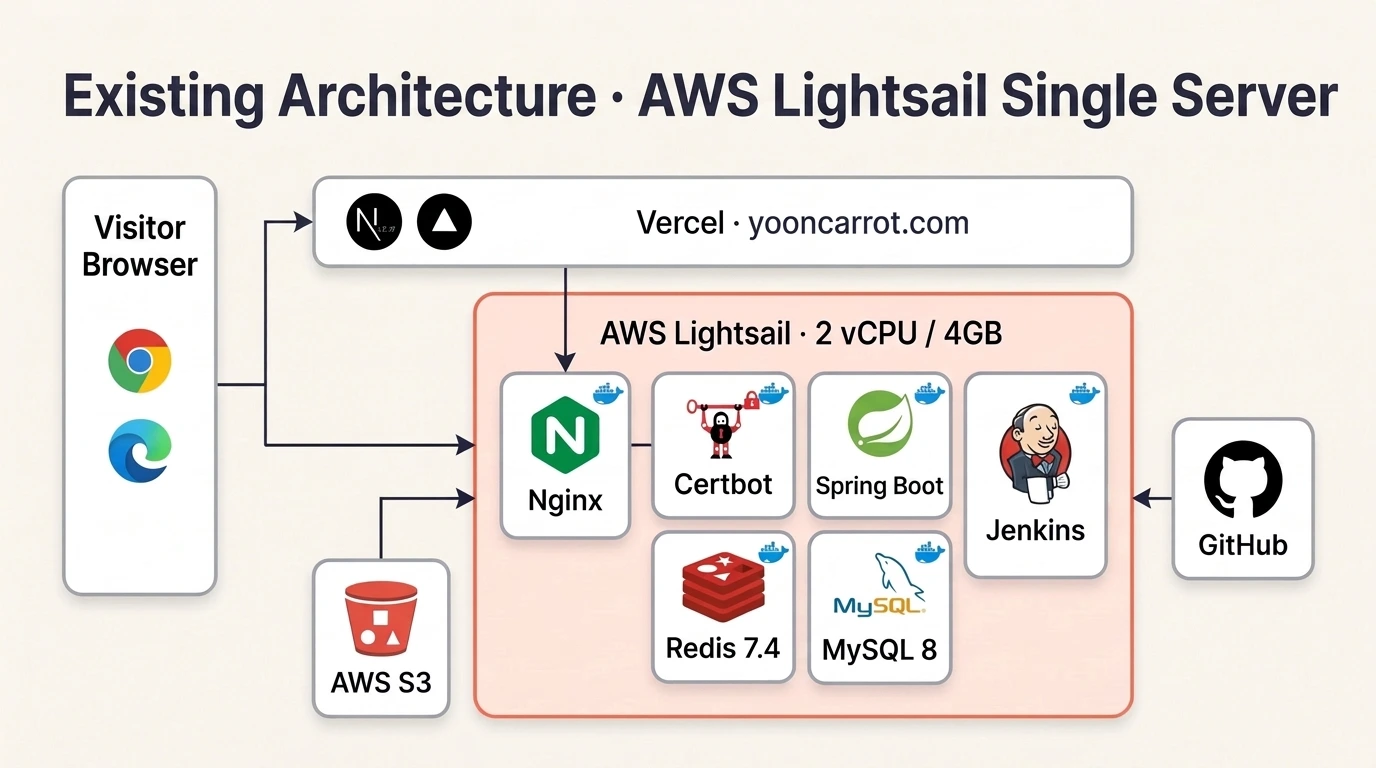
It was cheap and convenient since everything could be taken care of for around 35,000 won a month, but there was always something unsettling about it.
My biggest concern was that the database, the core of the blog , shared the same fate as the app server. It was a structure where, in the event of a major failure like a disk crash, all my posts could disappear unless I kept separate backups.
Furthermore, the Jenkins builds installed directly on the host increased my anxiety. Every time a build ran, it consumed a significant amount of server memory, causing the remaining memory to drop below 500MB. Running a build incorrectly even once could cause specific apps to crash or the server to slow down due to an Out of Memory (OOM) error.
So I thought it was an important task to completely separate the DB and heavy builds from the app server.
Changed Structure: Separation of Roles and Transition to Managed Architecture
I kept the frontend as is and moved the backend, image store, and database to GCP.
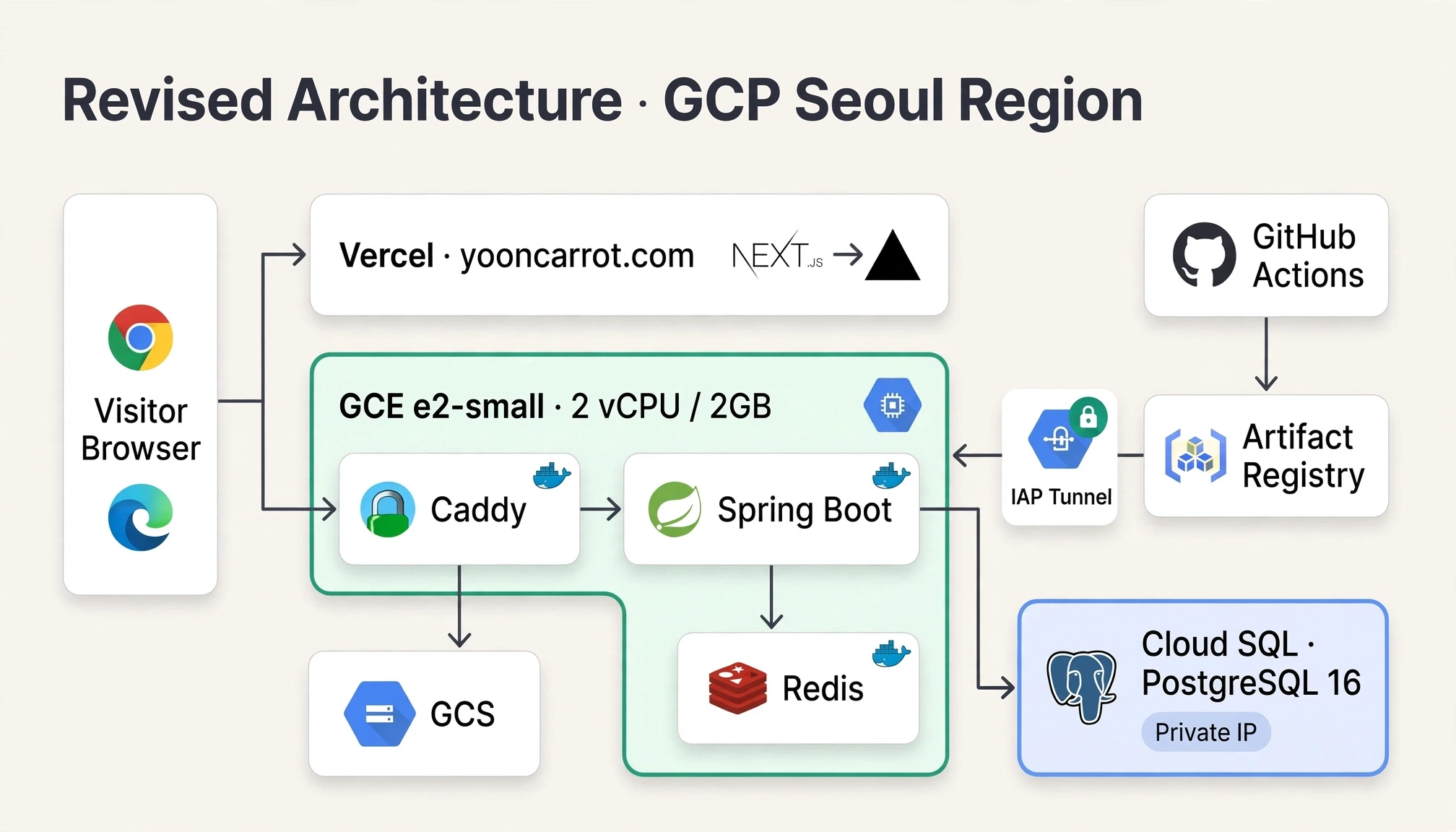
The traffic and data flow has changed as shown below.
Request Ingress and Proxy : When a visitor sends a request, Caddy, located in front of GCE e2-small, receives it first. It forwards static image paths (/static/*) directly to the GCS bucket and passes only the remaining API requests to the Spring Boot container at the backend.
Complete DB Isolation : When reading and writing data, we communicate with Cloud SQL (PostgreSQL 16), connected only via a Private IP, rather than within the server. We have enabled daily automatic backups and 7-day point-in-time (PITR).
Freed-up Memory : The app server memory was cut in half, from 4GB to 2GB. However, now that the heavy MySQL and Jenkins have been removed, I confirmed that the memory used by the three containers (Caddy, Spring Boot, Redis) combined is only about 500MB.
division | Existing (AWS) | After change (GCP Seoul) |
App server | Lightsail 2 vCPU, 4GB | GCE e2-small 2 vCPU, 2GB |
database | Internal MySQL 8 container | Cloud SQL PostgreSQL 16 |
DB Backup | Direct manual management | Automatic Backup + 7-Day PITR |
Image repository | S3 (Nginx proxy) | GCS (Caddy Proxy) |
Proxy and SSL | Nginx + Certbot (Manual configuration for automatic issuance/renewal) | Caddy (Automatic issuance/renewal) |
Build and Deploy | Internal Jenkins build | GitHub Actions external build |
Server connection | Open SSH port 22 | IAP Tunnel Only (Blocked Route 22) |
Take a Hands Off Certificate Management: Caddy Instead of Nginx + Certbot
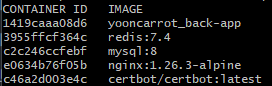
Previously, I ran Nginx and Certbot containers separately and manually configured the certificate issuance and renewal scripts. This time, I eliminated this hassle by using Caddy .
# 간단한 Caddy 설정!!api.yooncarrot.com { encode zstd gzip handle_path /static/* { # 이미지 → GCS 서울 버킷 rewrite * /{버킷이름}{uri} reverse_proxy https://storage.googleapis.com { header_down Cache-Control "public, max-age=2592000" } } handle { # 나머지 → Spring reverse_proxy app:9004 { header_up X-Real-IP {remote_host} } }}And later, when we deployed without interruption, a problem did occur.
Let's Encrypt certificates are issued only if the domain actually points to the new server. Therefore, we could not obtain a Let's Encrypt certificate in advance through Caddy before switching DNS. As a result, the backend was actually down for about 12 seconds while Gabia connected the DNS to the GCP server and issued the certificate.
I thought that next time, I should move the backend certificate in advance. Then, I think I can just use the existing certificate while obtaining a new one.
Detach builds from production servers: From Jenkins to GitHub Actions
The previous deployment method involved encrypting the production environment variable file with GPG and uploading it to the Git repository; when code was pushed, Jenkins running on the Lightsail server would receive a webhook and directly perform decryption and a Docker build internally.
Running heavy Gradle and Docker builds simultaneously on a 4GB server caused memory usage to skyrocket with every deployment, and memory was running borderline. So this time, I moved the entire build and decryption process to GitHub Actions . I felt there was practically no real benefit to using Jenkins. (With so few users, was there really a need for zero-downtime deployments to that extent?)
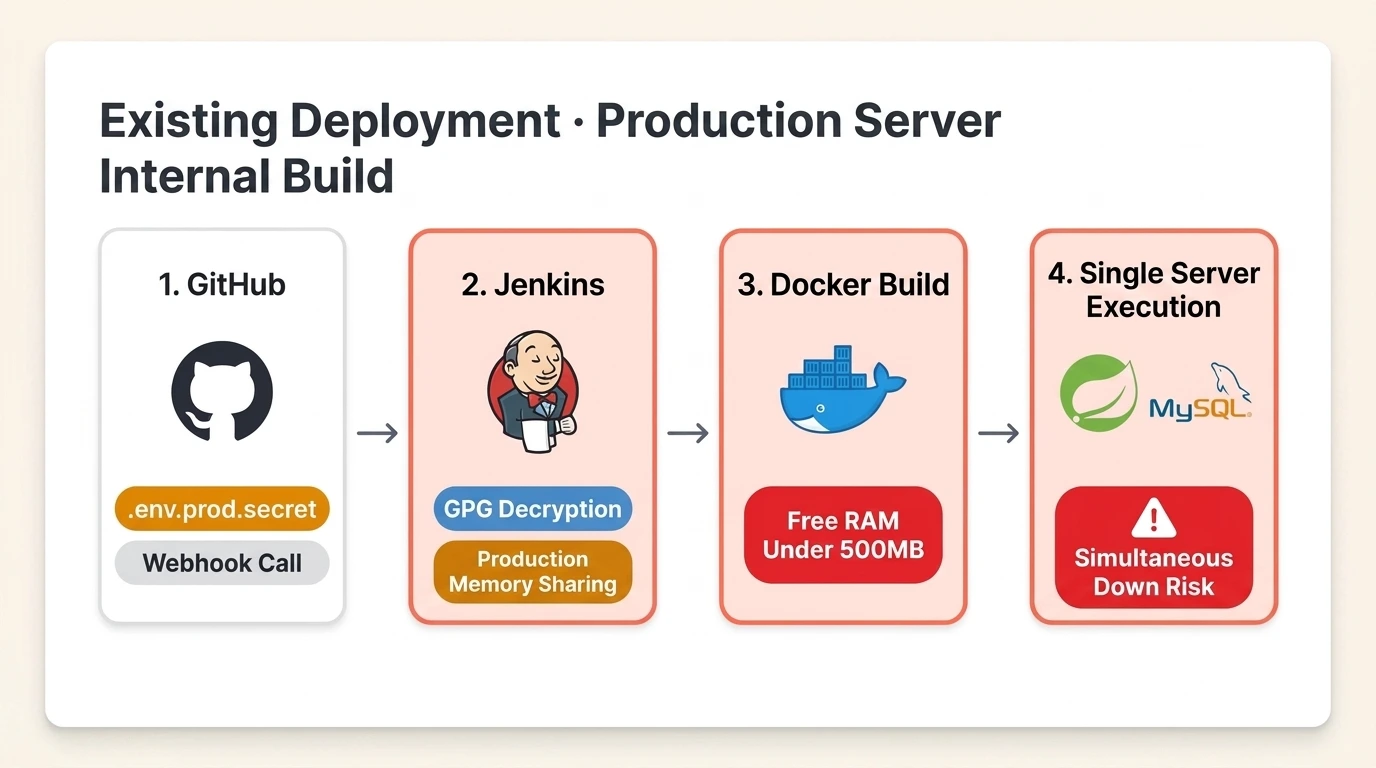
So this time, I tried to solve it externally using as many free resources as possible. That is GitHub Actions.
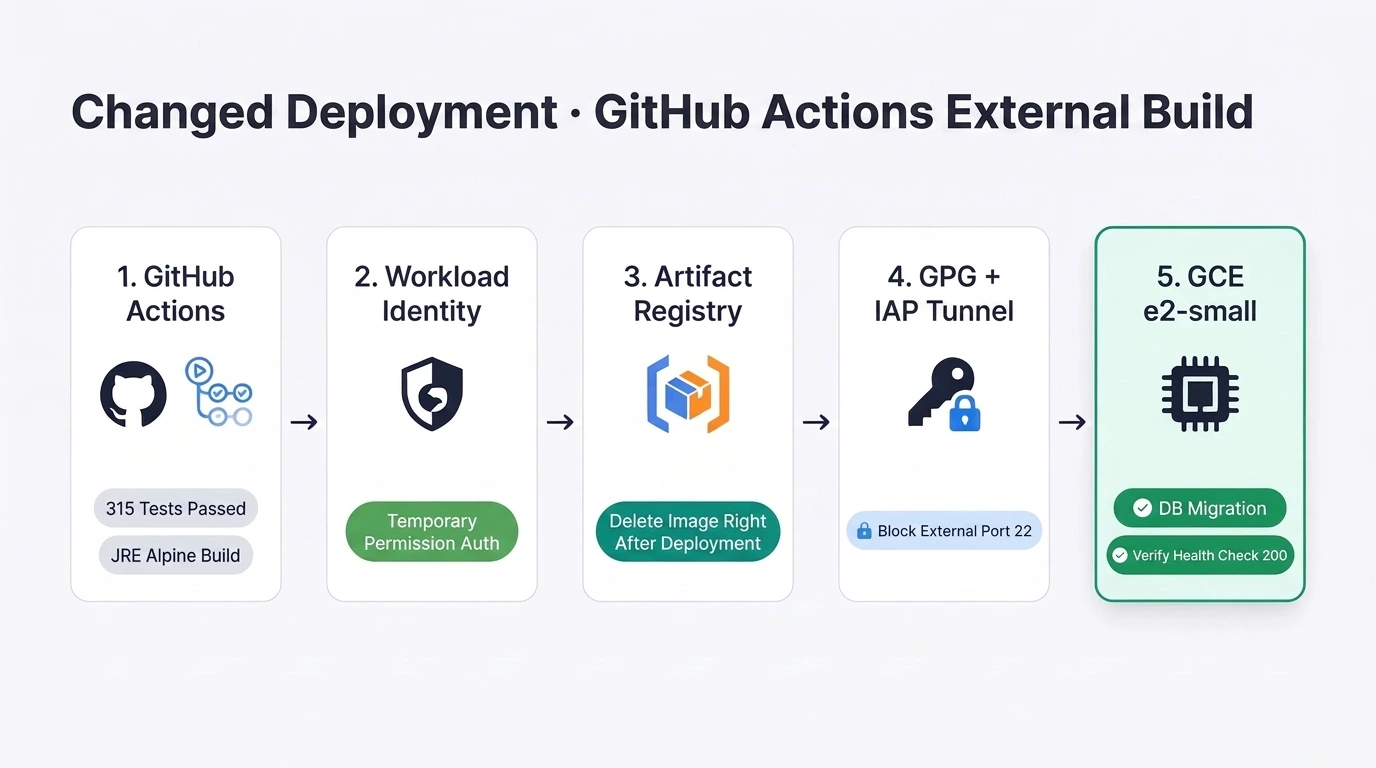
I configured it so that only tests are run on PRs or the develop branch, and deployment occurs only when the code is merged into the main branch. Once the tests pass on the main branch, it creates a Docker image, uploads it to the Artifact Registry, decrypts the .env.prod.secret file, and passes it to the server via the IAP tunnel.
And the server completes DB migration, container replacement, and health checks.
There are three benefits we gained from restructuring the pipeline.
Zero Server Load and 0 Won Storage Fees : The production server simply receives and executes the completed image. As soon as the image is received, it is immediately deleted from the registry regardless of success or failure, and with the added daily automatic deletion policy, the registry cost is $0.
Authentication without a key file : The GCP service account JSON key is not stored on GitHub. Using Workload Identity Federation, only the workflows in this repository are granted temporary permissions at the moment of deployment, while the app server itself is granted only download and log write permissions.
Completely blocking Port 22 : We removed inbound and outbound traffic on Port 22, which is open and insecure, and blocked access to the server only through the Google IAP tunnel.
Why did I switch from MySQL to PostgreSQL?
This was the task I put the most effort into during this migration. We didn't stop at simply moving the database outside the server; we switched the engine from MySQL 8 to PostgreSQL 16. Since Cloud SQL cannot change the engine once created, we had to ensure it was built correctly from the start.
I chose PostgreSQL for two reasons. (To be honest, a big part of it was that I wanted to try out what's trending these days.)
Weaviate, currently running for natural language search, can be merged into pgvector later to replace the infrastructure at any time.
You can directly use pg_trgm, which is advantageous for partial Korean character searches. (In MySQL, ngram is used.)
And I spent a lot of time matching the data types of table columns that were different in MySQL and PostgreSQL.
Conversion items | MySQL 8 | PostgreSQL 16 |
User ID | binary(16) | uuid |
Flag column | tinyint | boolean |
JSON data | JSON | jsonb |
Auto-increase key | AUTO_INCREMENT | GENERATED BY DEFAULT AS IDENTITY |
Update modification time | ON UPDATE CURRENT_TIMESTAMP | BEFORE UPDATE Trigger |
Korean search | FULLTEXT (MATCH ... AGAINST) | pg_trgm GIN + ILIKE |
Array aggregation | JSON_ARRAYAGG | json_agg |
Switching servers without downtime (keeping only the Get Method...)
We also had to prevent the issue where comments or likes left during the move would only remain on the old server and vanish. So, we moved the server to GCP, setting it up to keep reading open while temporarily pausing writing.
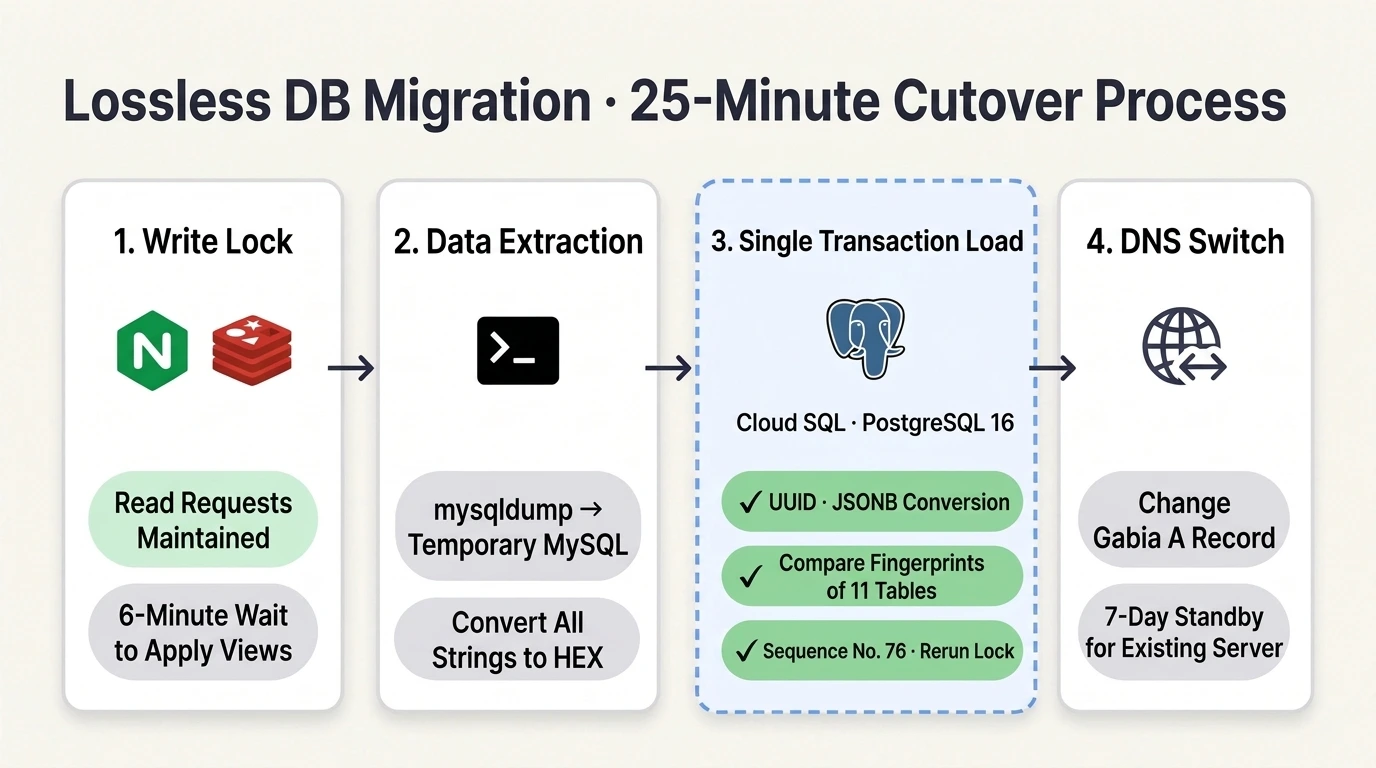
On moving day, I proceeded in the following order.
Write Blocking and 6-Minute Wait : While the DNS was still pointing to the old server, I first stopped the GCP app and blocked requests other than GET on the old server's Nginx with a 503 error. Reading posts works as usual, but the recording of comments, likes, and views is currently paused. Since views are collected in Redis and reflected in the DB every 5 minutes, I waited 6 minutes until all remaining views were entered into MySQL.
HEX Encoding Extraction : After restoring the data generated by mysqldump to a temporary MySQL container on the GCP server (with a memory limit of 512MB), I converted all strings to HEX and passed them to a temporary PostgreSQL schema to prevent tabs, line breaks, backslashes, and emojis in the body from being corrupted during the copying process.
Single Transaction Transformation and Cross-Verification : Within a single transaction, we bundled the loading of UUID, Boolean, and JSONB transformations, the resetting of the next post number column, and the comparison of row counts with the source. If even one step is out of sync, the entire process is rolled back, leaving Cloud SQL untouched.
Before loading, we first compared the column lists to ensure that columns not present in the code would not quietly appear only in the production DB, and after finishing, we compared the row counts, key fingerprints, and image sizes of the 11 tables with the original.Re-execution Lock and DNS Switching : By recording a completion mark at the end of the same transaction, we prevented the migration script from overwriting new data even if it was accidentally re-run after the DNS switch; instead, it would check the mark and stop immediately. Immediately after verification was complete, I launched the GCP app and changed the A record in Gabia to the new IP.
Writing was blocked for about 25 minutes, during which time visitors were able to read posts without interruption. The existing server was kept on standby for 7 days so that we could simply revert the A record if any issues arose. (Keeping the AWS server running as a backup.)
Exciting performance measurement after moving
I measured the response times by establishing a new connection every time from a Korean PC and sending the same request 100 times alternately to a live, read-only Lightsail server and a new GCP server. (I could have done it 10,000 times, but I didn't use the production server immediately.)
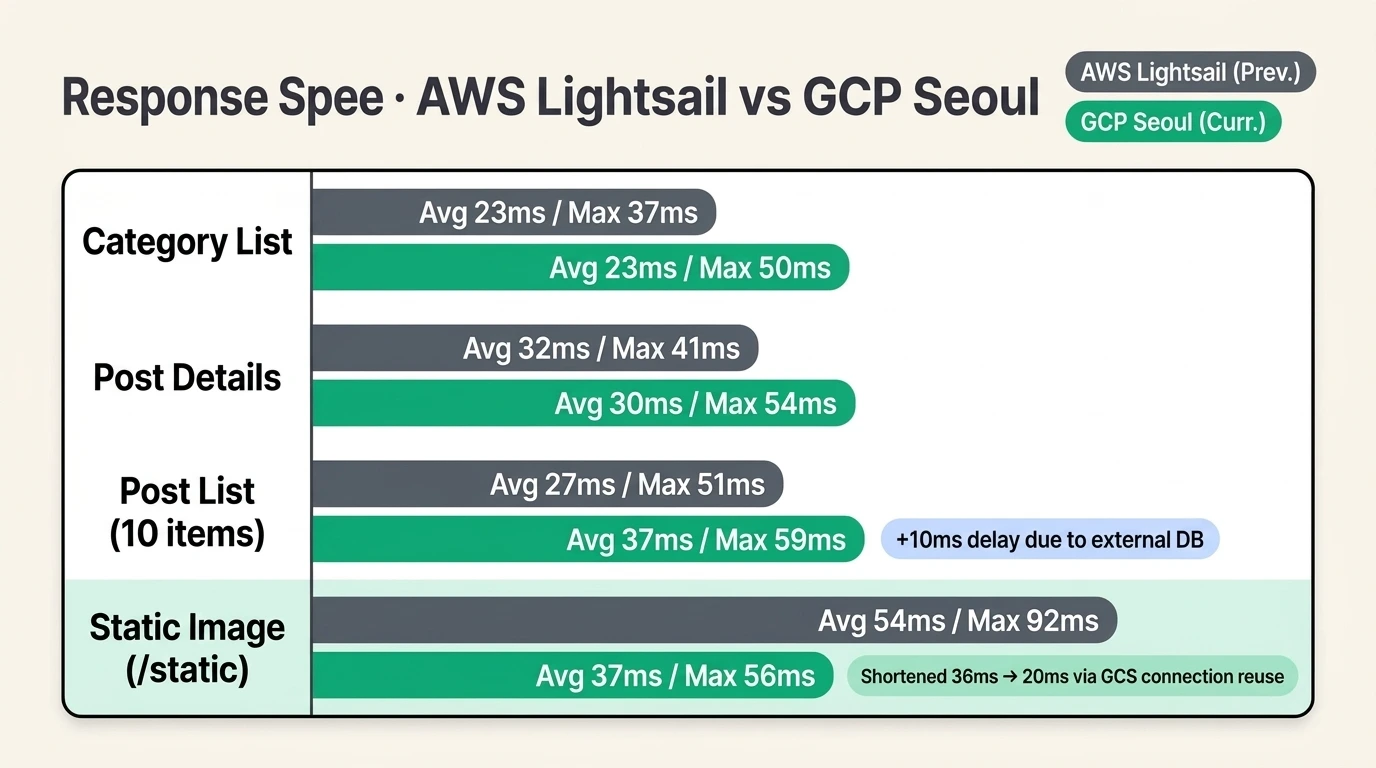
Request types | Lightsail (p50 / p95 / p99) | GCP Seoul (p50 / p95 / p99) |
Category List | 23 / 26 / 37ms | 23 / 25 / 50ms |
List of posts (10) | 27 / 39 / 51ms | 37 / 52 / 59ms |
View detailed post | 32 / 37 / 41ms | 30 / 36 / 54ms |
Korean search | 26 / 35 / 46ms | 31 / 36 / 139ms |
Image (/static) | 54 / 85 / 92ms | 37 / 41 / 56ms |
I did notice a trend to some extent after measuring. (Since p99 out of 100 requests is influenced by the slowest 1 or 2, please look only at the overall trend.)
The most welcome thing is that the image response time has been significantly reduced from 54ms to 37ms on the p50 and from 92ms to 56ms on the p99.
Upon investigating why, I found that although the S3 I was originally using was also in the Seoul region, the previous Nginx configuration passed the S3 address as a variable. However, because it was not registered as an upstream (proxy_pass https://$bucket ), the connection could not be reused, and a new connection was frequently established every time. (But I heard that the free Nginx version supports this starting from 1.27.3...?) Now, Caddy reuses the connection with GCS and routes through Google's internal network within the same region, reducing the internal server processing time from 36ms to 20ms .
On the other hand, I think the 10ms slowdown in P99 for post list retrieval or other APIs is due to moving the database outside. I believe this is because, unlike before when containers communicated within the same server, it now travels to Cloud SQL across the network. Also, search seems to spike significantly because of the issue that occurs when calling Weaviate located in Europe.
Exciting Post-Moving Cost Estimation (Spending 7,500 won more T_T)
The actual monthly bill for Lightsail, including tax, is $27.01 (approximately 36,500 won).
After moving, I expect the monthly cost for the GCP Seoul region to be $29.60 before tax, and about 44,000 won including 10% VAT.
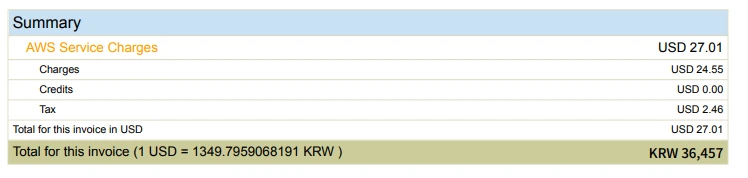
Now, let's compare the existing and current rates. Also, since GCE offers a discount if you sign a one-year contract, I included that as an additional option.
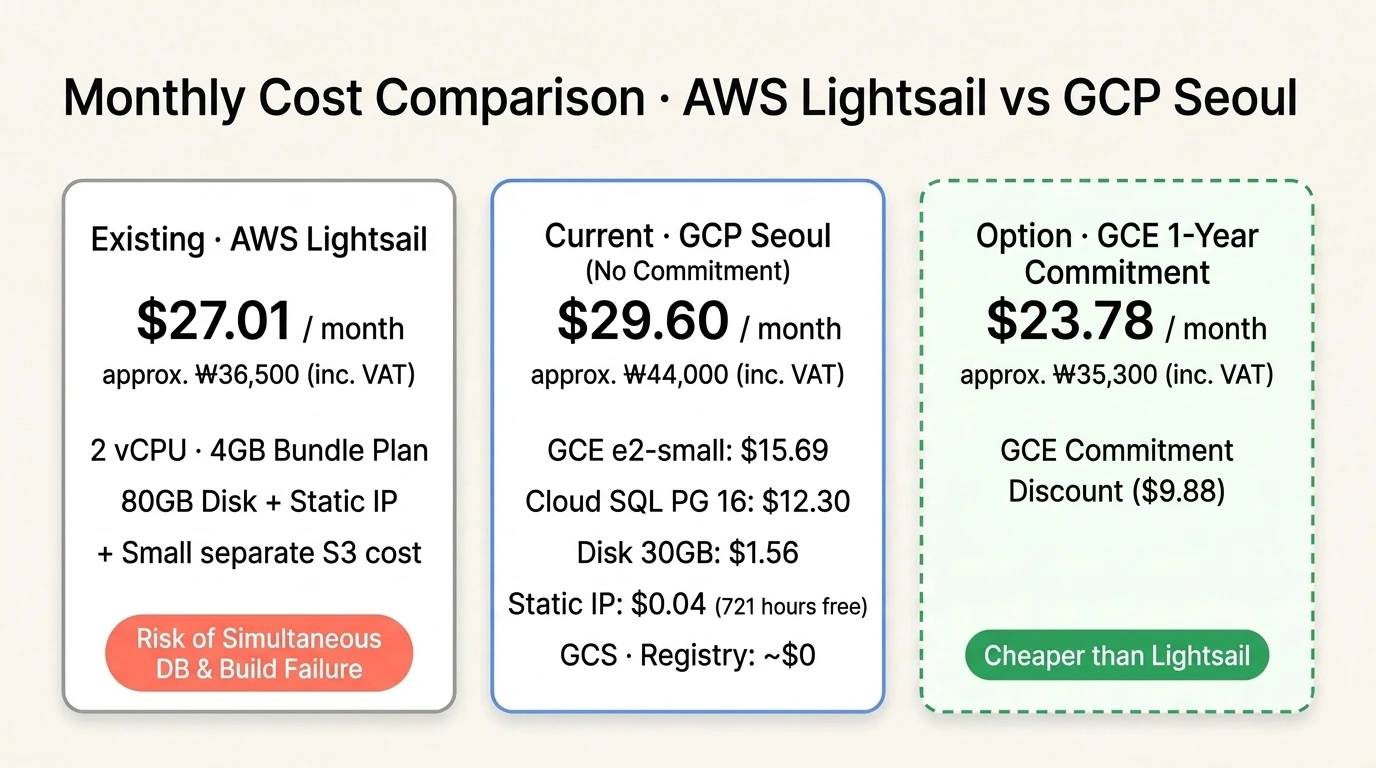
For just about 7,500 won more a month
Automatic backup and point-in-time recovery environment where posts are preserved even if the entire server is wiped out
We achieved scalability and high availability (HA) by separating the database. It is especially good because the database is the heart of the system, and being able to protect it more securely is a great benefit.
You can maintain servers for free with the GCP credits provided by your Google AI Ultra subscription.
I've gained even more benefits like the ones mentioned above. Now that I no longer have to worry about the server crashing and the blog database getting destroyed, I can sleep soundly. Z2z...
Pros, Cons, Things to Change, Wrap-up
Good points
With this move, the app server has become a nearly stateless launcher. Even if the server crashes, recovery is complete simply by launching a new instance and restarting the deployment, and scalability has been achieved where we can just upgrade the server capacity later if traffic increases.
Disappointing aspects
It is difficult to run servers with the same cost-effectiveness as AWS in the GCP ecosystem. Lightsail offers good value because it targets low-cost cloud services from the start, but since GCP does not target low-cost services, it seems to be a bit more expensive for the same performance.
Although I have separated the DB, it does not provide broad HA guarantees. DBs with the HA prefix are about twice as expensive, and I hear they copy the same DB to a different region within the same area. So, it would be great for much higher availability... but I plan to be satisfied with just backing it up. Honestly, the data isn't that critical, is it? Even with just weekly backups, the amount of data lost isn't that significant.
Redis was too expensive to use in the cloud. So, I just ran it on the same server as the Spring server. Also, I wanted to use the reverse proxy provided by GCP, but it seemed like it would cost money, so I just ran Caddy (Nginx + Cert) myself.
Things planned to be changed in the future
Currently, I am encrypting .env.prod files using GPG and uploading them to Git. This allows the runner to decrypt them and use them to run the server. However, I believe that uploading configuration files directly to the repository commit can actually pose a risk. Therefore, I plan to separate environment variables using GCP Secret Manager and remove the encrypted files from Git.
If you have memory left, try applying Blug/Green deployment.
I am considering switching file uploads to Presigned URLs. This would allow for pre-uploading, and I plan to implement a system where files are automatically deleted if the upload is not confirmed. I intend to have the upload confirmed the moment the post is published. (S3 uses Presigned URLs, GCS uses Signed URLs)
If everything runs smoothly without any major issues for the next week, I plan to completely clean up the Lightsail server and S3 bucket that I've struggled with. I'll also update this post once the GCP pricing is released. Having a broad understanding of the AI era makes it feel great to be able to build infrastructure exactly as I envision it... though it's also a bit scary...