
Contents (15)
- Add natural language search functionality to your blog for 0 won per month
- Keyword search that makes it difficult to find the desired article
- I don't want to spend more money on the server for a blog that isn't visited often!
- With the mindset that it could disappear at any time.
- Overall structure
- How to index text
- If the text changes, the index changes accordingly.
- Record which texts have been indexed.
- How to search
- Search flow
- I hardly changed the front.
- Even with a disability, searching works.
- If you can't use Weaviate, use keyword search instead.
- Effort to overcome low-spec server/free limitations
- In conclusion
Add natural language search functionality to your blog for 0 won per month
I thought it would be nice if searching for "difference between MD and HTML" in the blog search bar brought up the post " [AI Coding] Thoughts on MD and HTML formats ." However, when I searched as described above, no posts appeared on the blog.
In this post, I summarized the process of adding natural language search, which finds posts based on the meaning of sentences, to a personal blog that previously only supported keyword search.
There are two goals.
Vector embedding and vector DB search must be possible even with 2 vCPUs/4GB RAM.
You must not spend extra money.
Keyword search that makes it difficult to find the desired article
The original search was a MySQL FULLTEXT keyword search. It works well if you know the exact word, but readers usually search by the problem they are experiencing rather than the word.
"My login keeps getting logged out" → Search for: JWT Refresh Token Rotation
"Saved post but the screen didn't change" → Searching for: Next.js cache invalidation
So I needed a search that finds texts with similar meanings.
I don't want to spend more money on the server for a blog that isn't visited often!
The server setup runs MySQL, Redis, Spring Server, Jenkins, and Nginx all on a single platform. Therefore, adding a Vector DB was a significant burden, as we also need to secure sufficient RAM to handle incoming requests. (Especially during Jenkins builds, less than 500MB remains.)
So, I looked to see if there were any cloud services that provide vector databases and embeddings for free. That is how I found the Weaviate Cloud free plan .
You can store 1GB RAM / 10GB SSD / 100,000 vector objects for free. Additionally, 2,000 free embeddings per day and 1,000 RAG searches per month are available.
Considering the daily visitors and the number of posts, I determined that the free plan is sufficient.
With the mindset that it could disappear at any time.
I thought that since the Weaviate free server is free, it could fail or go down at any time. So, I implemented a fallback to allow it to operate using the existing MySQL keyword search.
The source of the text is always MySQL.
The search must not fail even if the vector repository becomes empty or stops. In this case, use keyword search instead.
Even if the index disappears, you can recreate it with a single Admin API call.
Overall structure
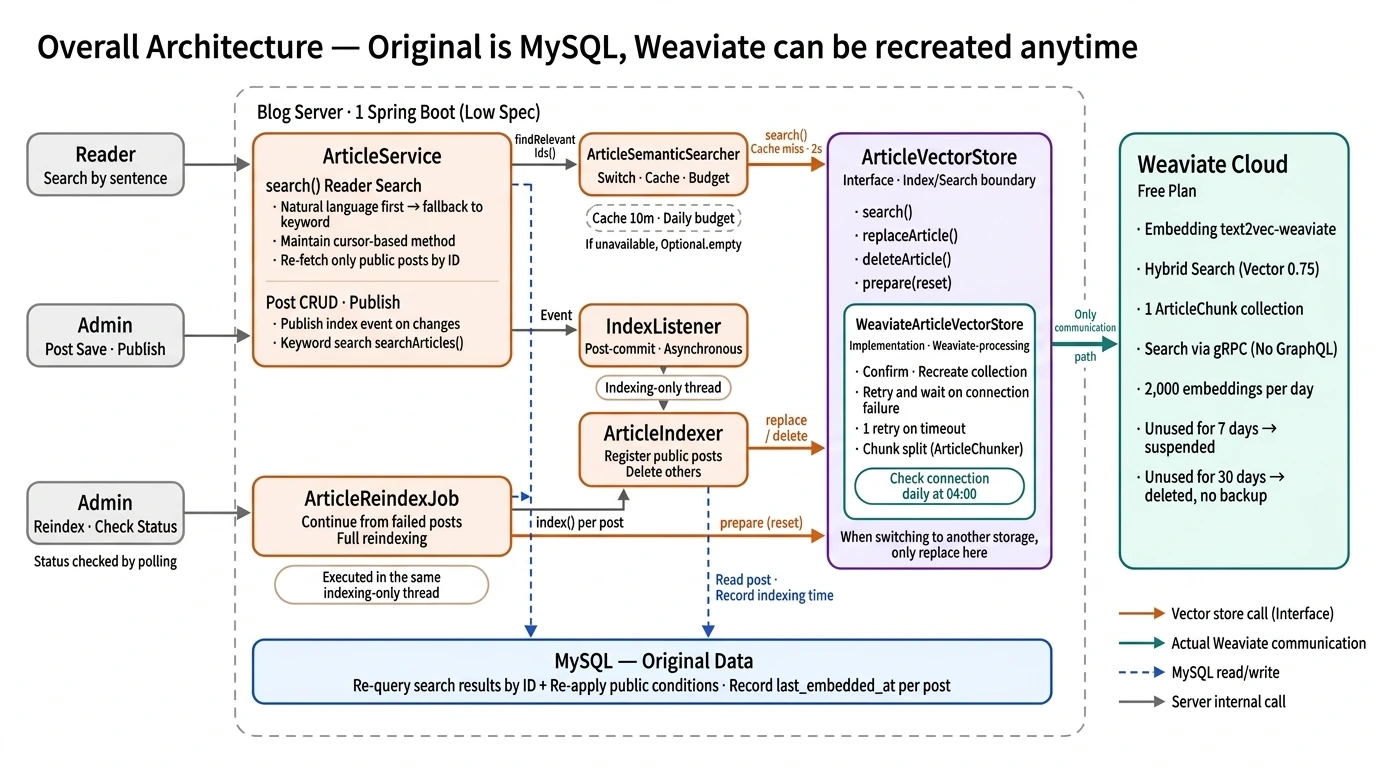
Weaviate stores the post title, body fragments, category, and post number together. The title and body are used as materials for comparing meaning, and the category is used as a filter. However, the only thing retrieved from the search results is "which post is closest in meaning to this sentence." Card information such as titles and thumbnails to display on the screen is not retrieved from Weaviate.
MySQL actually returns the posts to display. It also filters them by checking their visibility based on MySQL information.

By doing this, private or deleted posts will not appear in search results even if the vector repository lags slightly. The card always displays the latest MySQL content.
How to index text
If you embed an entire post, the middle content gets buried the longer the text. That is why I divide the text into chunks before inserting them. Of course, it would be good to establish evaluation criteria to determine the optimal character splitting ratio for the best results and check how much it has improved, but I didn't do that because it would be excessive to conduct such testing on a personal blog.
Use plain text , not HTML. It is text with Markdown symbols removed when the editor saves.
I mechanically cut it into units of 1,000 characters and overlap the front and back pieces by 100 characters. I intend to ensure that even sentences cut at the boundary retain their surrounding context on one of the pieces.
Please include the title as well. It needs to be searchable using only words found in the title.
Assign a UUID to each fragment created in the format article:{post number}:{fragment number}. And when there are edits to the post, delete all fragments registered with the article ID and re-register them.
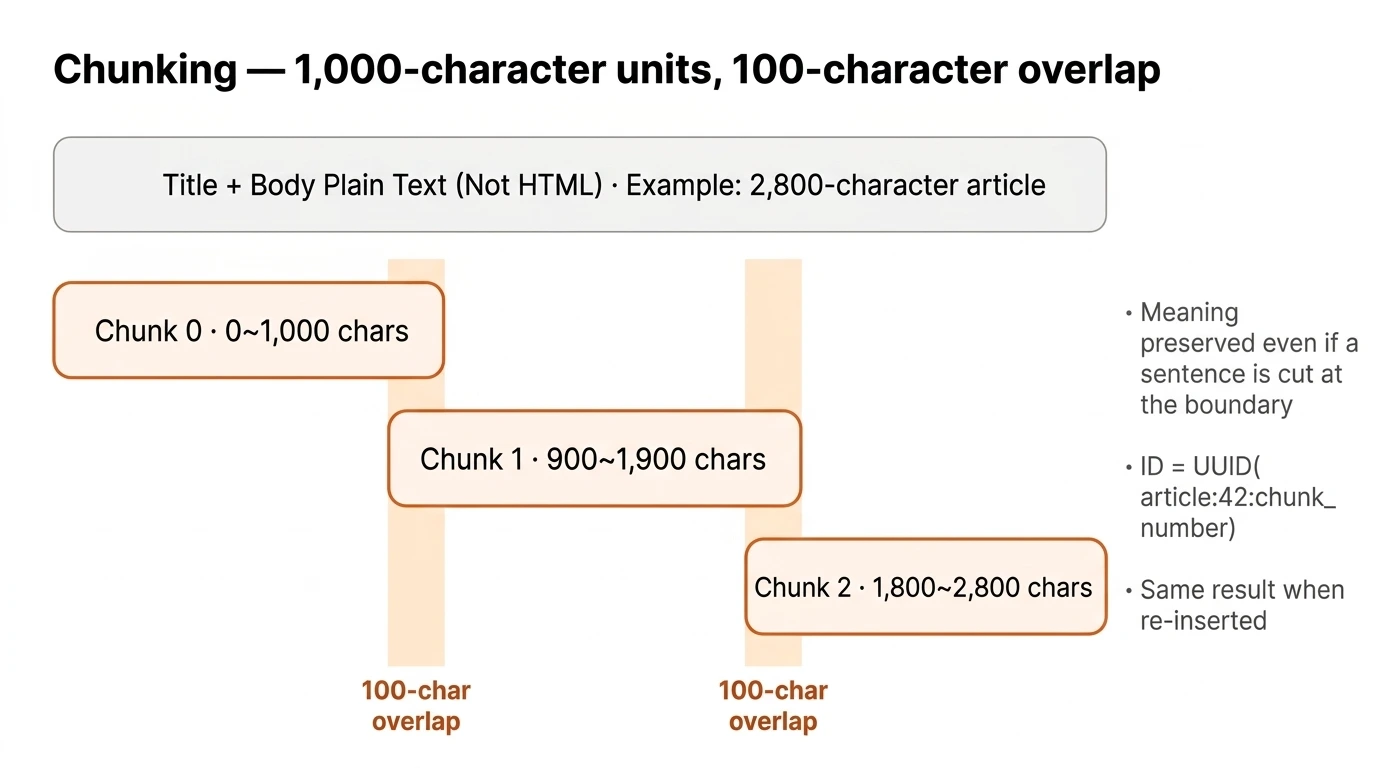
Weaviate stores only this information for each piece.
attribute | use |
|---|---|
articleId, chunkIndex | Finding which fragment of which text it is when deleting |
category | Filter by category |
title, content | Convert to Vector + Trigram Keyword Search |
If the text changes, the index changes accordingly.
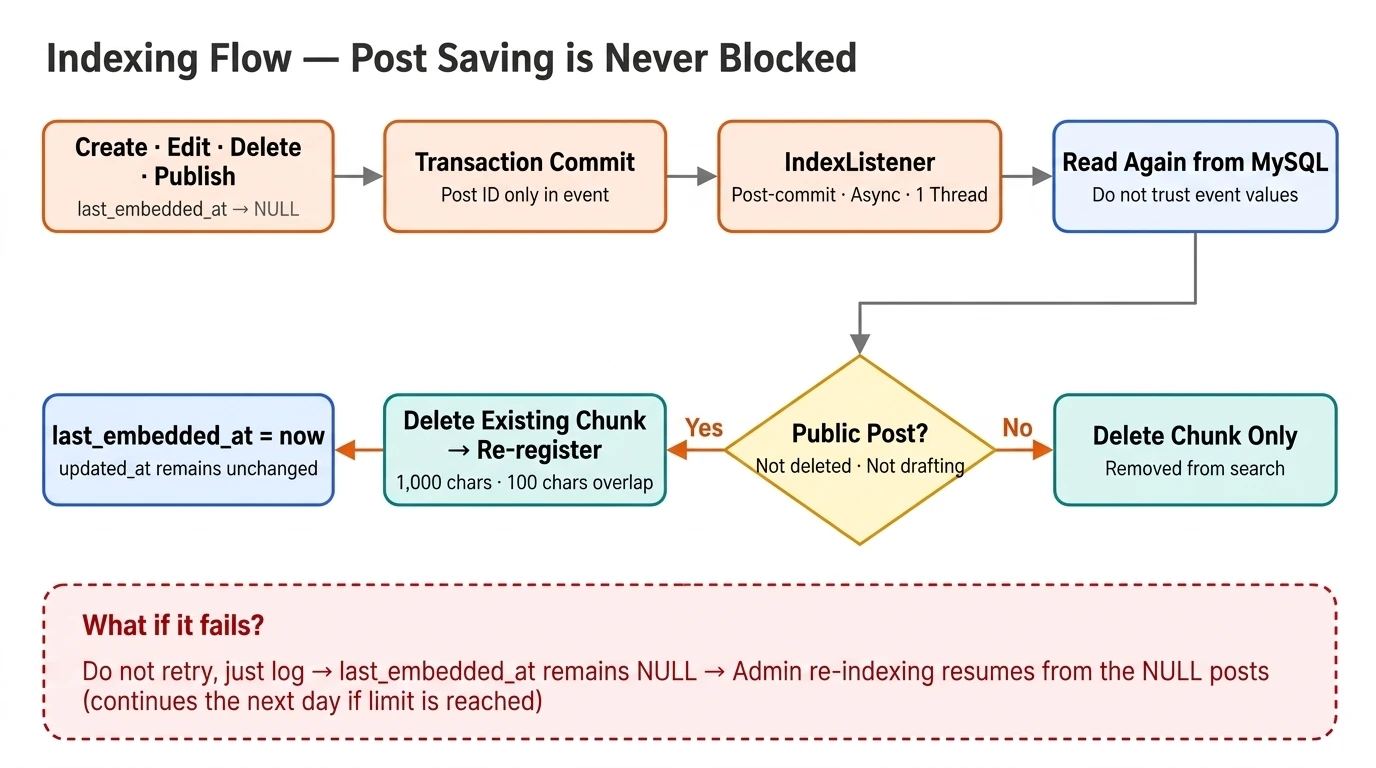
When a post is edited or deleted, the existing vector indexing is removed and recreated. It works as follows.
1. We absolutely do not block post saving. Indexing runs separately after the save (commit) is finished. Posts are saved even if Weaviate is slow or paused. From the start, we established that "if post saving fails due to Weaviate, it is a flawed design."
2. We run the indexing with only one thread. Since it is a small server, we couldn't let the indexing reduce the resources available to handle reader requests.
3. Read the DB again during processing. Only the post number is stored in the event, and the actual status is verified again in MySQL. (Check indexing status in MySQL)
4. It does not retry even if it fails. It only keeps a log and leaves recovery to manual re-indexing.
Record which texts have been indexed.
I put a last_embedded_at column in each post and write it like this.
value | meaning |
|---|---|
time | It was indexed with the current content at that time. |
NULL | It hasn't been indexed yet, or you have to do it again. |
The last_embedded_at value is cleared to NULL the moment an index is needed (update, publish transition). This is then used as a criterion to determine whether or not an index is required.
How to search
Search flow
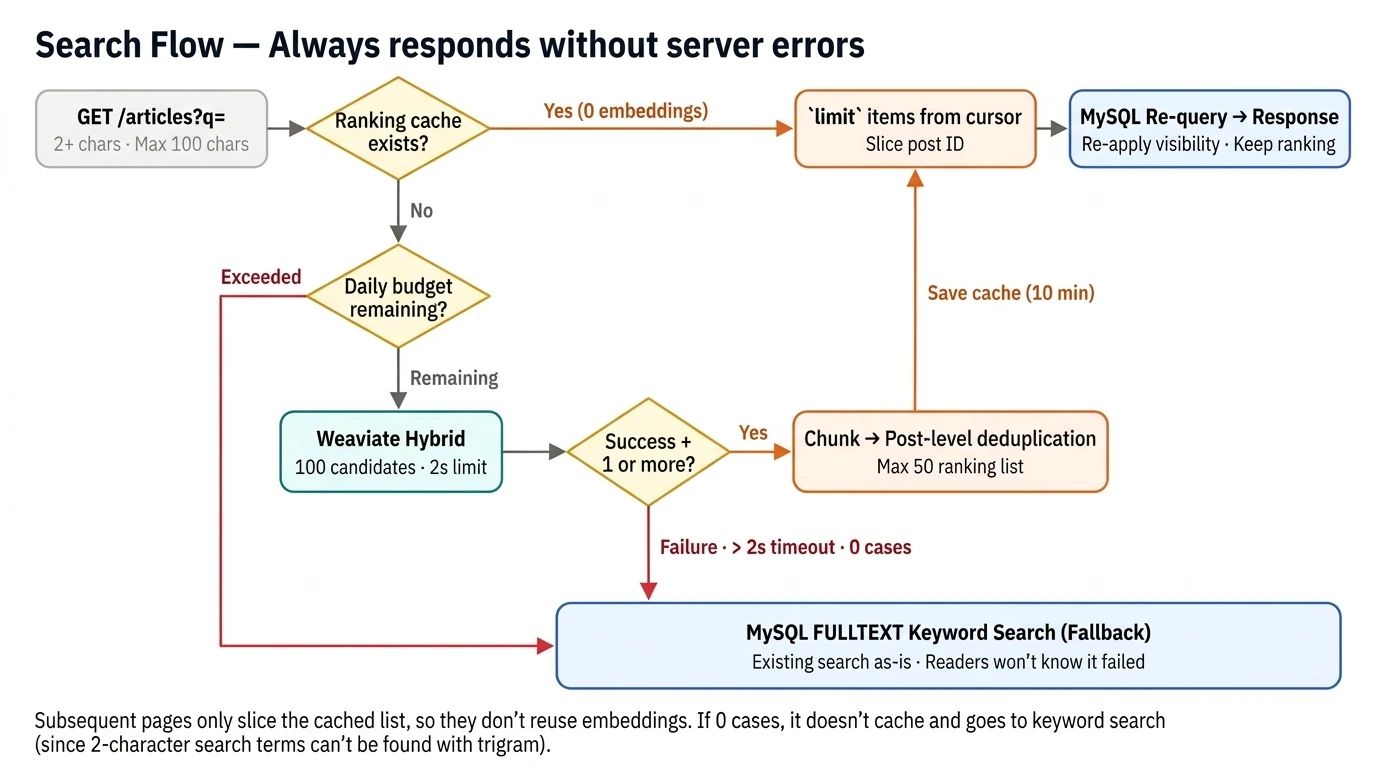
Check the search term. It must be at least 2 characters long, up to a maximum of 100 characters.
Check if a ranked list created with the same search term (and category) is in the cache. If it is, skip the embedding and go directly to step 4.
If not, check if there is enough available for today and search in Weaviate (Vector 75% + Keyword 25%, 100 candidates, 2-second limit). Combine fragment-based results into post-based lists of up to 50 ranked items and cache for 10 minutes.
Cut the necessary number of posts starting from the cursor position and retrieve them from MySQL. Recheck the privacy conditions and maintain the rankings.
It responds in the exact same format as the existing keyword search.
I thought it would be better to cache existing search terms to enable pagination or infinite scrolling. Otherwise, they would keep embedding. That is how this flow emerged.
I hardly changed the front.
We matched the response format exactly to the existing keyword search. So the search results screen remains the same. There are three changes made on the frontend.
I created an index management page for administrators. You can check the indexing status of each post and perform re-indexing.
I changed the search bar text to "Natural Language Search (Max. 100 characters)" and added a "Vector + Keyword Hybrid" guide to the search results.
I limited the search term to 100 characters.
Even with a disability, searching works.
Free cloud services can slow down, stop, or disappear. That is why we designed the search API to ensure it does not generate server errors (5xx) under any circumstances .
If you can't use Weaviate, use keyword search instead.
request | Weaviate state | result |
|---|---|---|
First page | Failure, exceeded 2 seconds, exceeded today's usage | Show me the first page of keyword search. |
First page | Normal, but 0 results | Show me the first page of keyword search. |
Next page, cached | It doesn't matter | Continue showing from the cache |
Next page, no cache | normal | Search again and show the same location first. |
Next page, no cache | failure | End the list here. |
Effort to overcome low-spec server/free limitations
The search waits for only 2 seconds. If it exceeds that time, it immediately switches to keyword search and does not attempt again.
If the connection is lost, it pauses. It does not reconnect for a period starting from 30 seconds and up to 6 hours. This prevents all requests from waiting 2 seconds when the cluster goes to sleep. It reconnects immediately when a re-index is performed.
We only attempt the first call one more time. When the server is just started, the first gRPC call is likely to exceed 2 seconds due to setup time. Therefore, we only attempt write operations one more time if the result is the same.
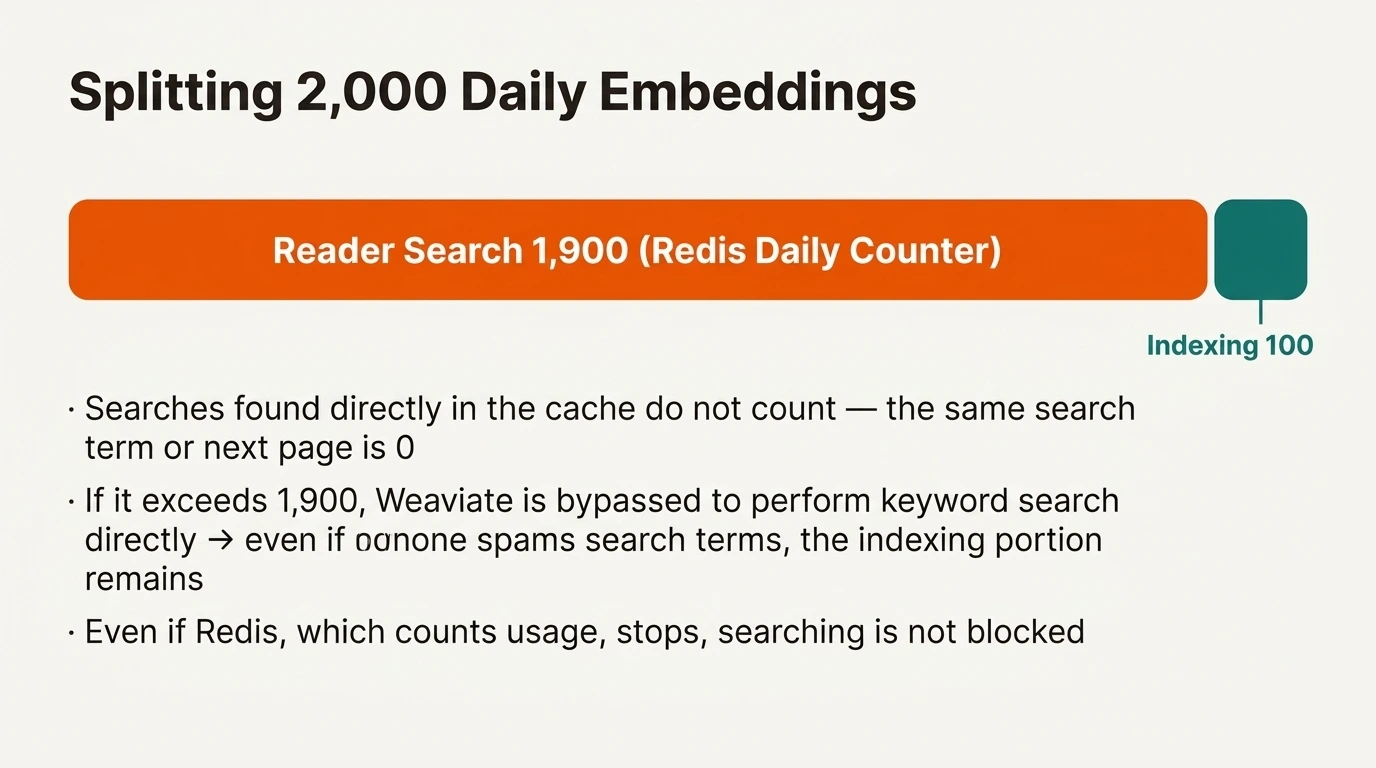
We share the daily usage limit. Anyone can call the search API. If someone keeps changing the search terms, the daily embedding limit is exhausted, and indexing stops. Therefore, we limit searches to 1,900 per day, reserving 100 for indexing. Searches found directly from the cache are not counted. If the Redis component counting usage stops, searches are not blocked and continue as usual.
I wake up the cluster every day. To avoid the "stop after 7 days of inactivity" rule, I send a light call every morning at dawn. However, I haven't yet confirmed whether this call actually prevents the shutdown.
You can turn it on and off with a switch.
In conclusion
While studying, I learned what vector embeddings are, how to find them, and what to adjust and verify to improve search performance. Based on what I understood while using AI, adding vector search capabilities wasn't that difficult to implement. However, I'm not yet sure about my satisfaction with it in actual use. Of course, it does search for more results and shows things that seem genuinely relevant, though.