
Contents (12)
- Micro Frontend Architecture (MFA)
- 1. What is a Micro Frontend?
- 2. Monolith => Modular Monolith => Micro Frontend
- 3. How should we split it?
- 4. Shell App (Container App, Share App, Host App)
- 5. How MFA apps are merged
- 6. Client-Side MFA Implementation Technology
- 7. Limitations (Disadvantages) of Micro Frontends
- 8. When is a micro frontend needed?
- 9. Alternative in most organizations: Modular monolith (monorepo)
- 10. AI and MFA
- conclusion
Micro Frontend Architecture (MFA)
I learned about Micro Frontend Architecture while developing an app by separating packages and using a Monorepo. Just as there is MSA (Microservices Architecture) in the backend, there is MFA (Micro Frontend Architecture) in the frontend. Similar to MSA, MFA involves separating code to address the difficulties of code management, library management, and departmental management as an organization grows.
1. What is a Micro Frontend?
If there is MSA (Microservices Architecture) on the backend, there is MFA (Micro Frontend Architecture) on the frontend.
Simply put, MFA is "breaking one large frontend app into multiple smaller apps that can be developed and deployed independently."
Each small app is owned by a separate team and can have its own codebase and deployment pipeline. In theory, teams can deploy at their own pace without waiting for each other. Of course, while this is appealing, it comes with its own set of challenges.
2. Monolith => Modular Monolith => Micro Frontend
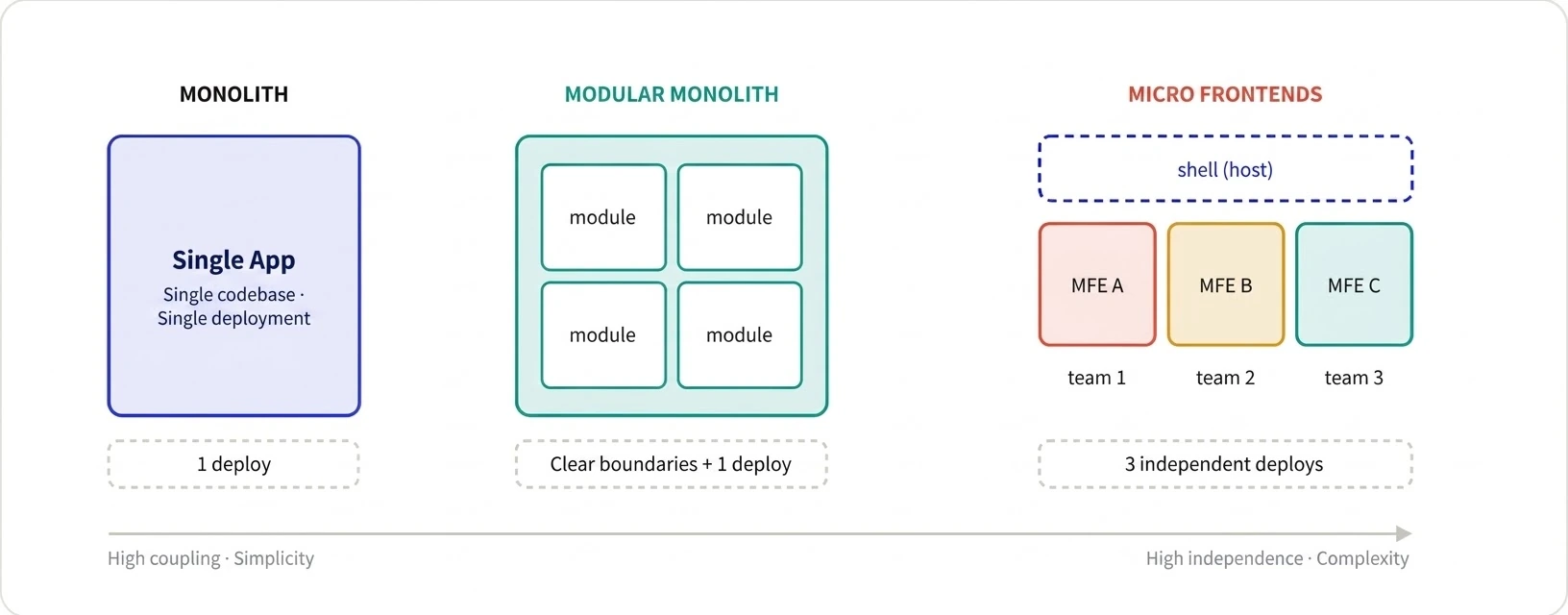
Monolith, Modular Monolith, and Micro Frontend are architectures listed in the order of developing a single app independently into multiple apps.
Monolith
Single Codebase & Deployment
Modular Monolith
Single code base & single deployment with modules separated by clear boundaries
Micro Frontend
Multiple codebases & multiple deployment pipelines
3. How should we split it?
There are various criteria for dividing MFAs, but there are usually three.
Page unit - Separated entirely by route, like payment pages or search pages
Domain-based (usually team-based) - Separate by business domain, such as Cart, Products, and Profiles (most recommended)
Component Unit - Using widgets from multiple teams on a single page
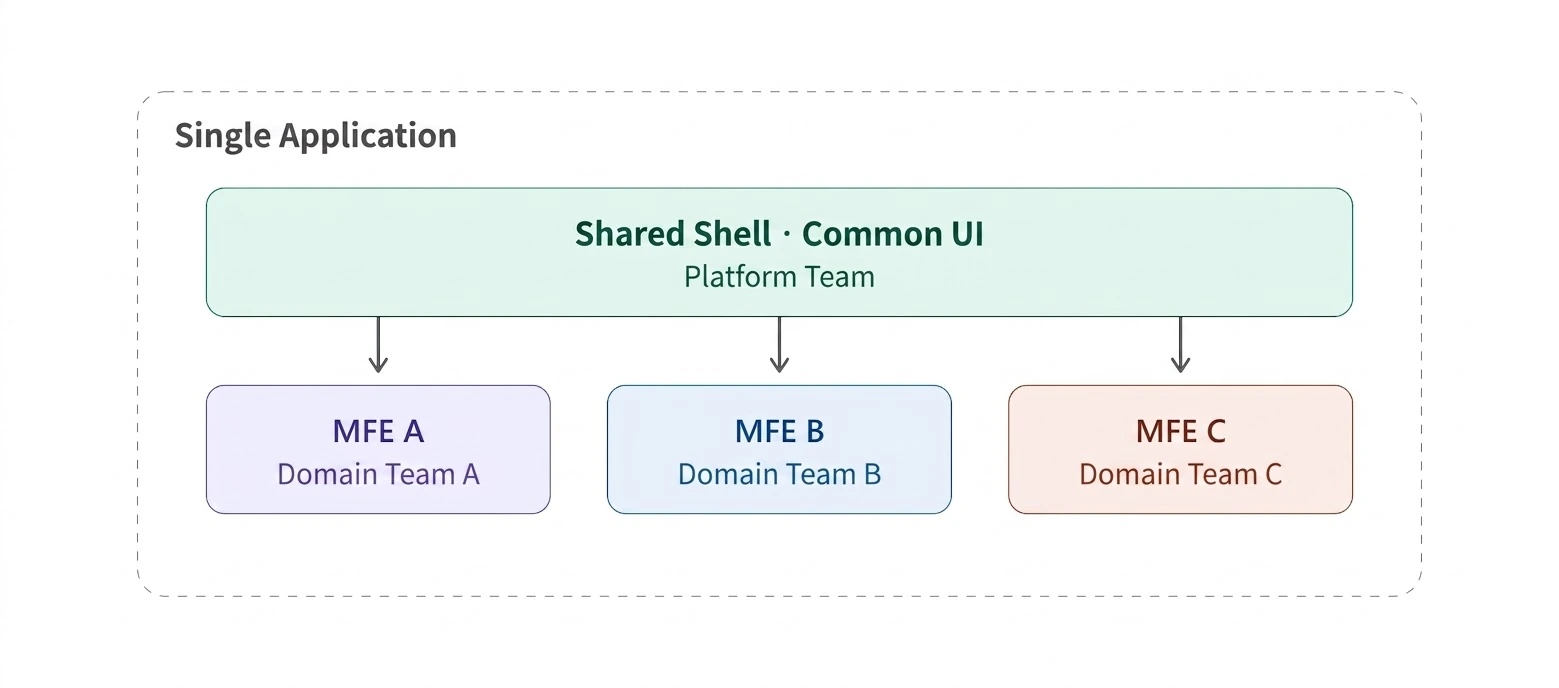
When splitting, the organization is more important than the technology. Code boundaries ultimately follow team boundaries (Conway's Law). Separating only the code without the teams being actually separated only increases costs.
So, when MFA is applied, each app is divided into sizes large enough for a single team to own.
4. Shell App (Container App, Share App, Host App)
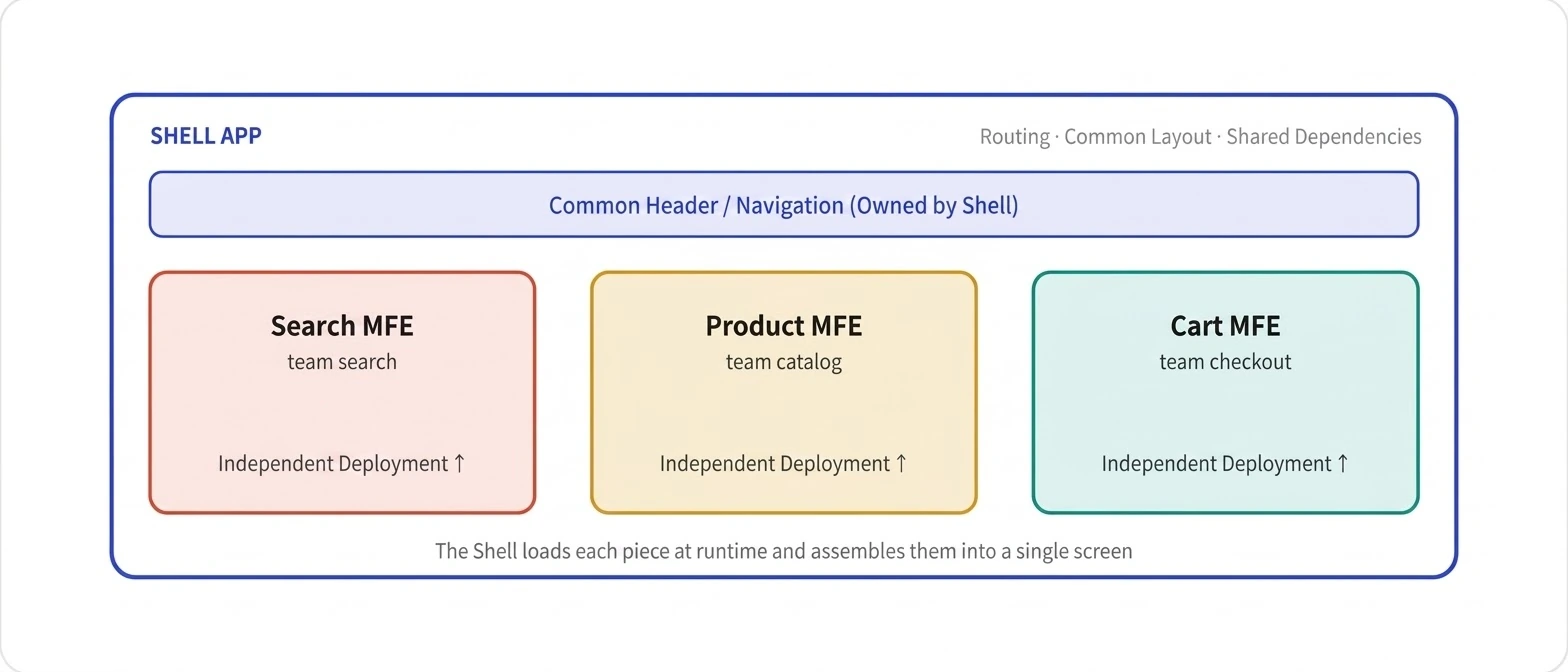
To display independent apps on a single screen, you need a container to assemble them. This is called a Shell, Host, or Container app.
The Shell App does not contain business logic and is responsible for routing, common layout, managing shared dependencies, and loading and mounting each app.
5. How MFA apps are merged
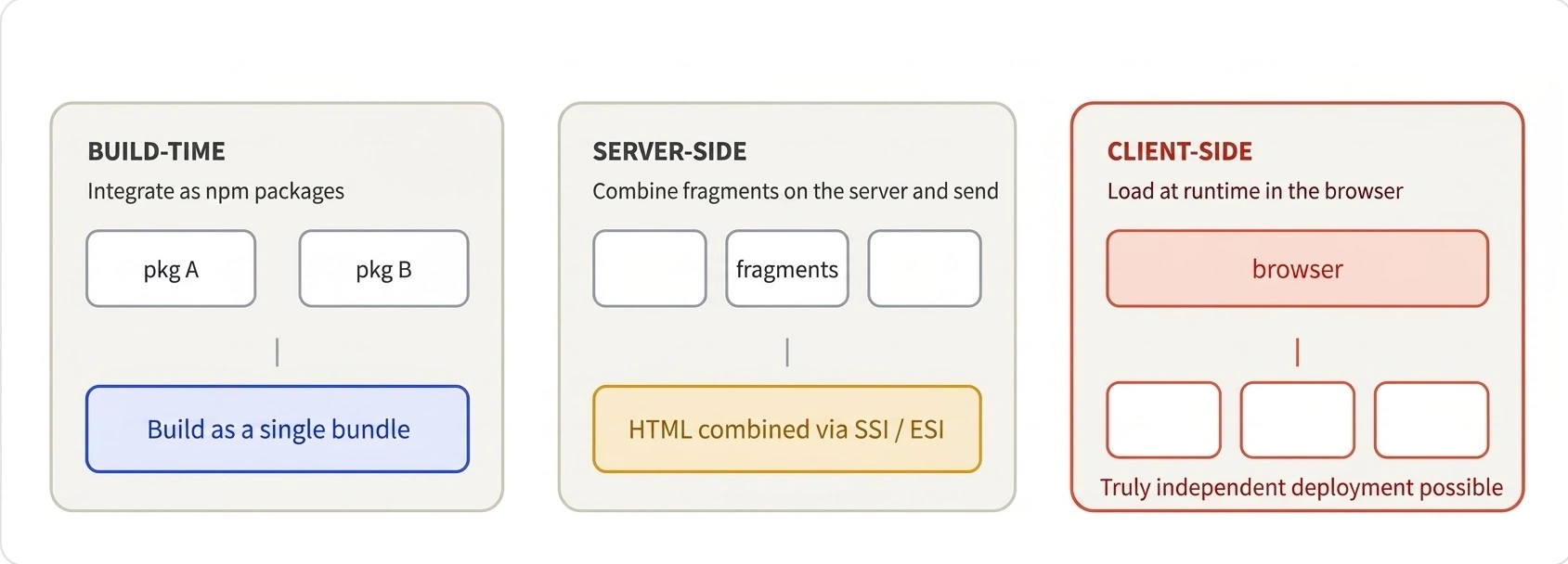
Depending on when the apps are merged, the resulting MFA has different characteristics (advantages and disadvantages). Typically, frontend apps are merged at three main points: [build time, server-side, and client-side].
In fact, integrating the app at build time is actually closer to a Modular Monolith. Being close to a Modular Monolith also means there is no reason to pay the high cost of MFA.
Combine at Build Time
merit
Easy to set up
Various frameworks and ease of operation
No runtime loading complexity
disadvantage
All teams are affected by a single release (deployment) => When one team deploys a new version, the entire app needs to be rebuilt and redeployed.
Merging on the server side
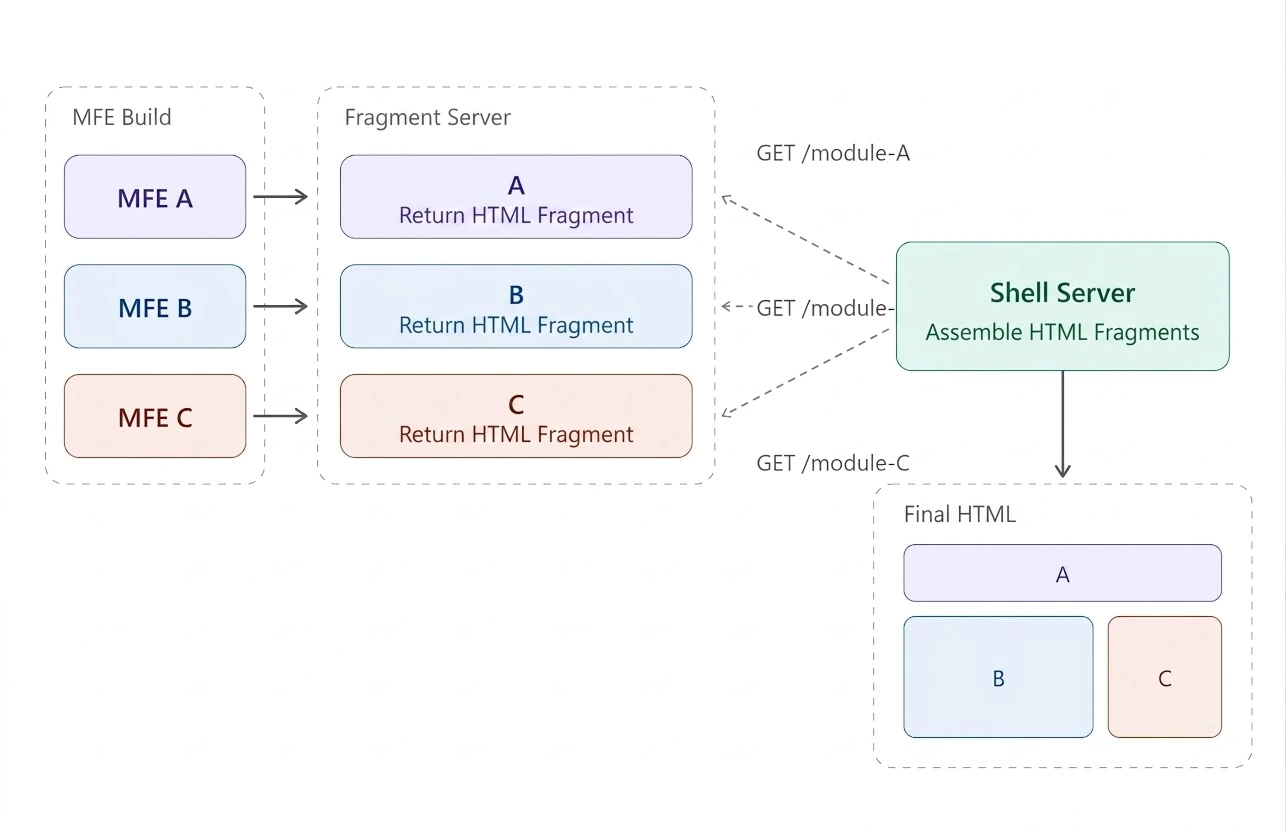
merit
Fast FCP time via SSR
Independent deployment management by team
disadvantage
High infrastructure costs and complexity
High communication costs when inter-app state management or communication is required
Merging on the Client-Side
There are various options, and the advantages and disadvantages vary depending on the option.
6. Client-Side MFA Implementation Technology
There are four main technologies for integrating apps on the client side.
technology | explanation | Isolation level | User Guide |
|---|---|---|---|
Module Federation | Sharing runtime modules between Webpack 5 and Rspack
| middle |
|
Single SPA | Mount/unmount multiple apps from different frameworks on a single page
| middle |
|
iframe | Complete isolation guaranteed by the browser (simple implementation, but if communication increases, well)
| height |
|
Web Components | Encapsulation based on browser standards (Custom Elements + Shadow DOM)
| height |
|
7. Limitations (Disadvantages) of Micro Frontends
Micro frontends seem perfect in theory, but it is said that there are many difficulties in actual implementation. Typical examples of the costs are listed below.
Explosion in operational complexity — managing builds, deployments, monitoring, and routing for N apps respectively.
Bundle duplication — Each piece carries dependencies like React separately and delivers a heavier page to the user.
Version/Dependency Hell — Shared library versions are fragmented and break at runtime.
The difficulty of consistent UX — even with a design system, subtle inconsistencies between pieces leak out.
Difficulty of debugging and observation — it is much trickier to trace which piece the problem originated from.
And it is said that most teams are not large enough to bear these costs. It simply takes on the pain and cost of distributed systems for organizations that do not necessarily need an MFA.
8. When is a micro frontend needed?
It may be necessary in very large organizations with multiple independent teams. Each team may have different release cycles and libraries, and the organization becomes more flexible. Therefore, it is also an architecture designed to solve "organizational problems."
However, if you use it for a mid-to-low-tier team, a single cohesive product, or a performance-sensitive service, it will actually create new problems.
9. Alternative in most organizations: Modular monolith (monorepo)
What people wanted from MFA was clear boundaries, modularity, and team autonomy. In fact, this can be achieved even with a modular monolith without the costs of a distributed system.
So, it is a good strategy to postpone getting an MFA until you actually need it. If you draw the boundaries clearly, separating it into an MFA becomes much easier.
10. AI and MFA
The biggest justification for an MFA is to physically break down large codebases into teams for management because they are difficult for humans to handle. However, as AI advances, new justifications are constantly emerging.
AI handles large codebases better. Human cognitive limitations become less of a bottleneck when navigating module boundaries, tracking changes across multiple files, and maintaining conventions.
Dispersion is a cost to AI as well. Systems scattered by multiple repositories, multiple deployments, and version inconsistencies make it more difficult for AI agents to grasp the full context.
Maintaining boundaries has become cheaper. AI-assisted reviews and refactoring have made it easier to address the "problem of boundaries collapsing over time," which was a weakness of modular monoliths.
So, actually, I think the modular monolithic approach might be preferred over MFA. (Because perimeter maintenance costs are lower.)
conclusion
MFA is the right tool for large organizations divided into independent teams. Therefore, if you look at the trade-offs objectively, it is wise for most teams to start with a modular monolith. This is because modular monoliths have clear boundaries and unified deployment, and as AI has significantly lowered the cognitive cost of large codebases, the threshold for "when MFA is truly needed" has become higher.