
Contents (15)
- Reasons for not using the FSD architecture and alternatives
- FSD Architecture
- FSD Architecture Dependency Rules
- FSD Architecture Folder Structure Example
- Evaluation of the FSD architecture
- 1. Cohesion
- 2. Bonding
- 3. Ease of Search
- 4. Mental Model Match
- 5. Gradual Introduction
- FSD Comprehensive Evaluation
- Proposal of an Alternative Architecture
- Web Project Layered Architecture Example
- Applying Layered Architecture + Vertical Slice to Web Projects
- conclusion
Reasons for not using the FSD architecture and alternatives
Are you familiar with the FSD (Feature-Sliced Design) architecture? It is an extensible architecture created for the frontend. The key is to structure the project around features. While previous architectures were divided based on technology—such as Components, APIs, Styles, and Services—FSD divides them based on business logic and user functions.
FSD Architecture
The FSD architecture consists of layers divided into six function-centered layers, each layer has slices, and each slice has segments.

Layer: Classified based on the role an application plays based on responsibility. It consists of 6 layers as shown below. (It is adjustable, and different criteria can be applied.)
app: Application initialization, Provider, Router
pages: URL-based screen
widgets: Large UI blocks that make up a page (sets of multiple features), usually composed of reusable units within the page.
features: Actions performed by the user (like, login, etc.)
entities: core domain objects (User, Product)
shared: Reusable code that does not belong to a specific domain, no Slice or Segment exists.
Slice: Based on business domain
user
post
...
Segment: Technical Division
ui
API
model
...
FSD Architecture Dependency Rules
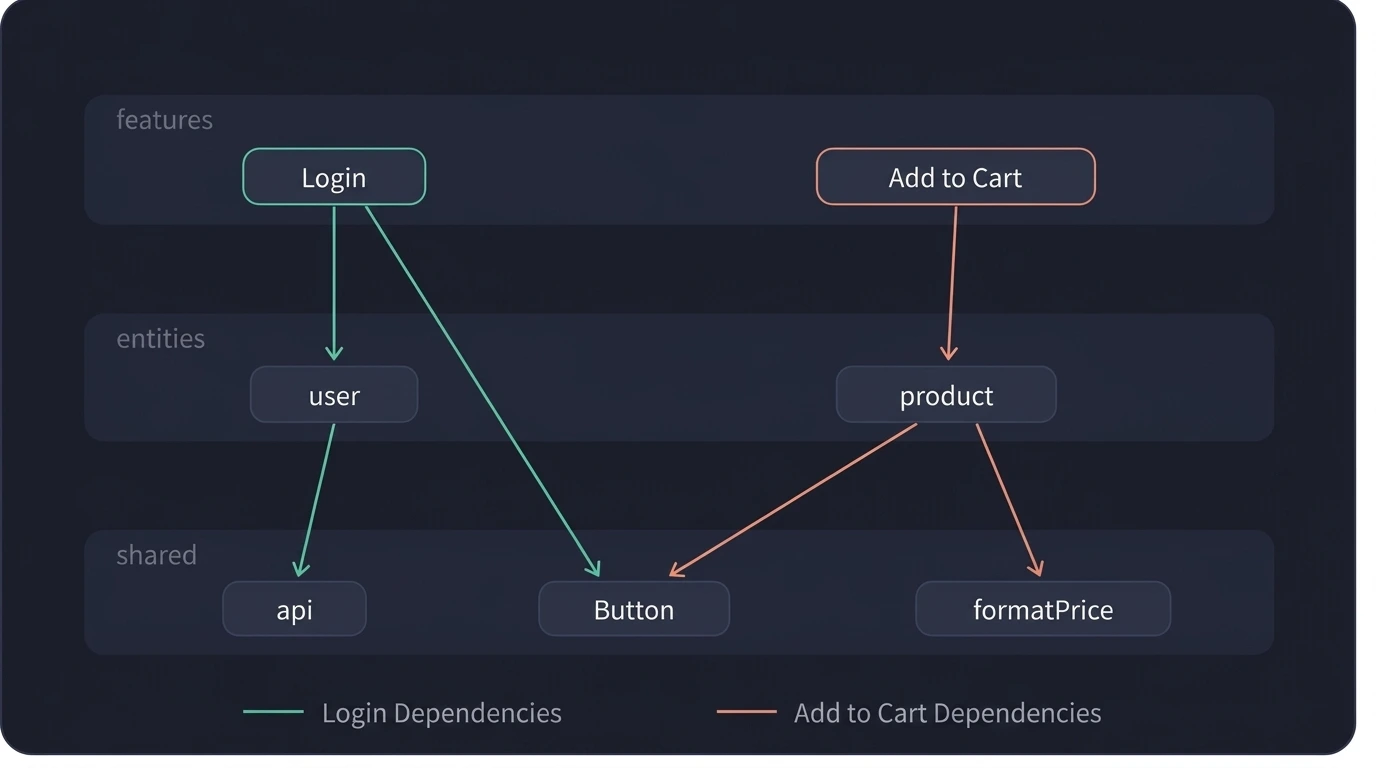
The FSD architecture has a rule that lower layers cannot use upper layers. Additionally, with the exception of shared layers, cross-imports between layers of the same type are not allowed. In cases where cross-imports are permitted, exception rules are used by adding "@x" to the folder name so that the consuming layer recognizes that a cross-import is taking place.
FSD Architecture Folder Structure Example
Now, to help you understand, I will show you an example of the FSD architecture folder structure.
src/├── app/ # App initialization, provider, routing│ └── providers/│├── pages/ # Route-based page combination│ ├── login/│ └── cart/│├── widgets/ # UI blocks that operate independently│ └── header/│├── features/ # User behavior (scenario) unit│ ├── auth/ # log in│ │ ├── ui/│ │ │ └── LoginForm.tsx│ │ ├── model/│ │ │ └── useLogin.ts│ │ └── index.ts # public API (exposed externally only here)│ └── add-to-cart/ # Put in a shopping cart│ ├── ui/│ │ └── AddToCartButton.tsx│ ├── model/│ │ └── useAddToCart.ts│ └── index.ts│├── entities/ # Business Domain Model│ ├── user/│ │ ├── ui/│ │ │ └── UserAvatar.tsx│ │ ├── model/│ │ │ ├── types.ts│ │ │ └── userStore.ts│ │ ├── api/│ │ │ └── userApi.ts│ │ └── index.ts│ └── product/│ ├── ui/│ │ └── ProductCard.tsx│ ├── model/│ │ └── types.ts│ ├── api/│ │ └── productApi.ts│ └── index.ts│└── shared/ # Public code with an unknown domain ├── ui/ │ └── Button.tsx ├── api/ │ └── apiClient.ts ├── lib/ │ └── formatPrice.ts └── config/ └── env.tsEvaluation of the FSD architecture
I will evaluate the FSD architecture from five perspectives.
Cohesion
coupling
discoverability
Mental model match
Gradual introduction
1. Cohesion
Cohesion refers to how closely related code is grouped together. If it is scattered, the cohesion is low.
Code that must be changed together for one reason is viewed as related code and is considered to have high cohesion.
I think the FSD architecture is not good from a cohesion perspective. This is because, in reality, when you change a single function, there are cases where you have to check the lower layers as well.
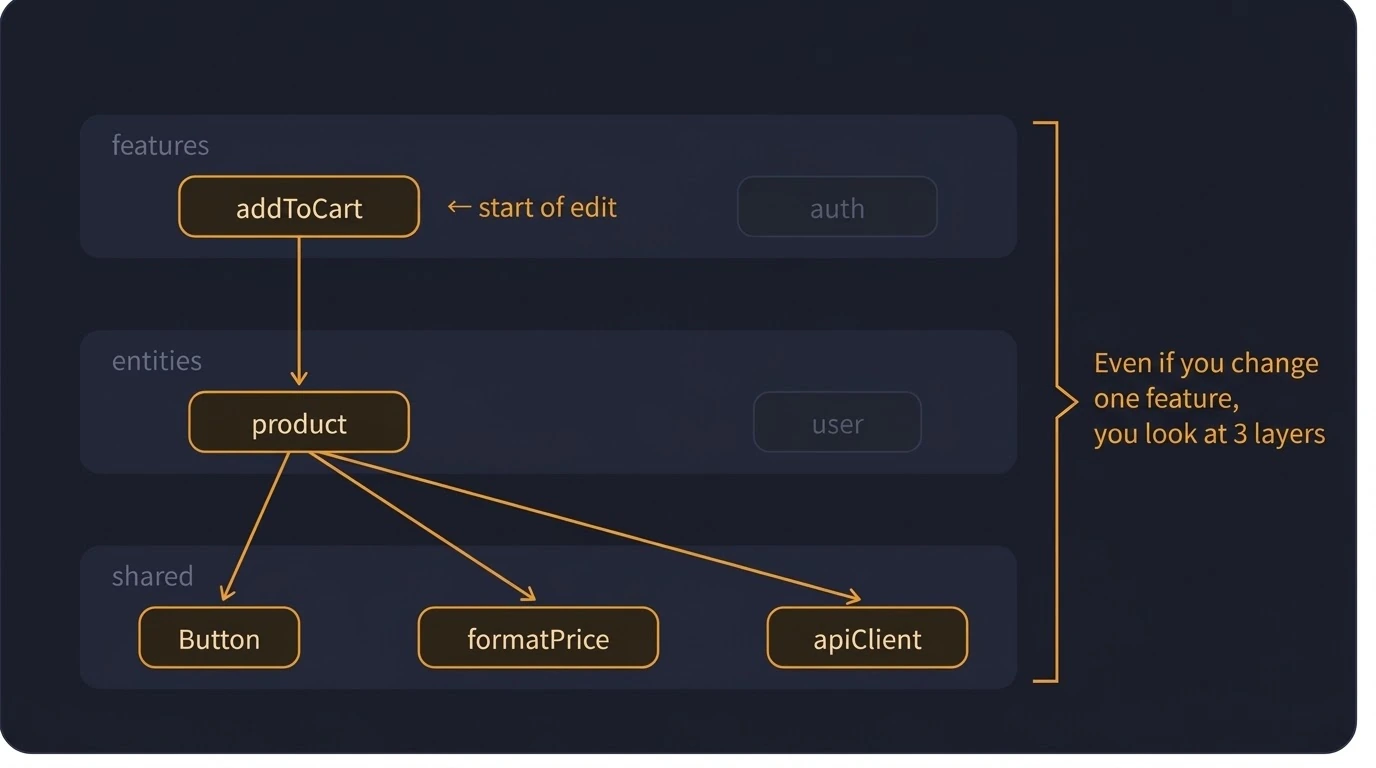
As the above indicates, the cohesion can be seen as low, leading to the following problems.
Cognitive Load: Having more files to open means the developer needs to have more context.
Hidden Dependencies: Modifying one layer can affect other layers, whether they are lower or upper layers.
Slow code review: Reviewers need to check multiple folders to understand a single change.
Difficult onboarding: Newly hired developers cannot understand how a feature works just by looking at a single folder.
2. Bonding
Coupling is a measure of how independent modules are from one another. It indicates how much changing one module affects other modules.
If changing one module affects other modules and causes them to stop functioning, it means there are hidden dependencies and high coupling.
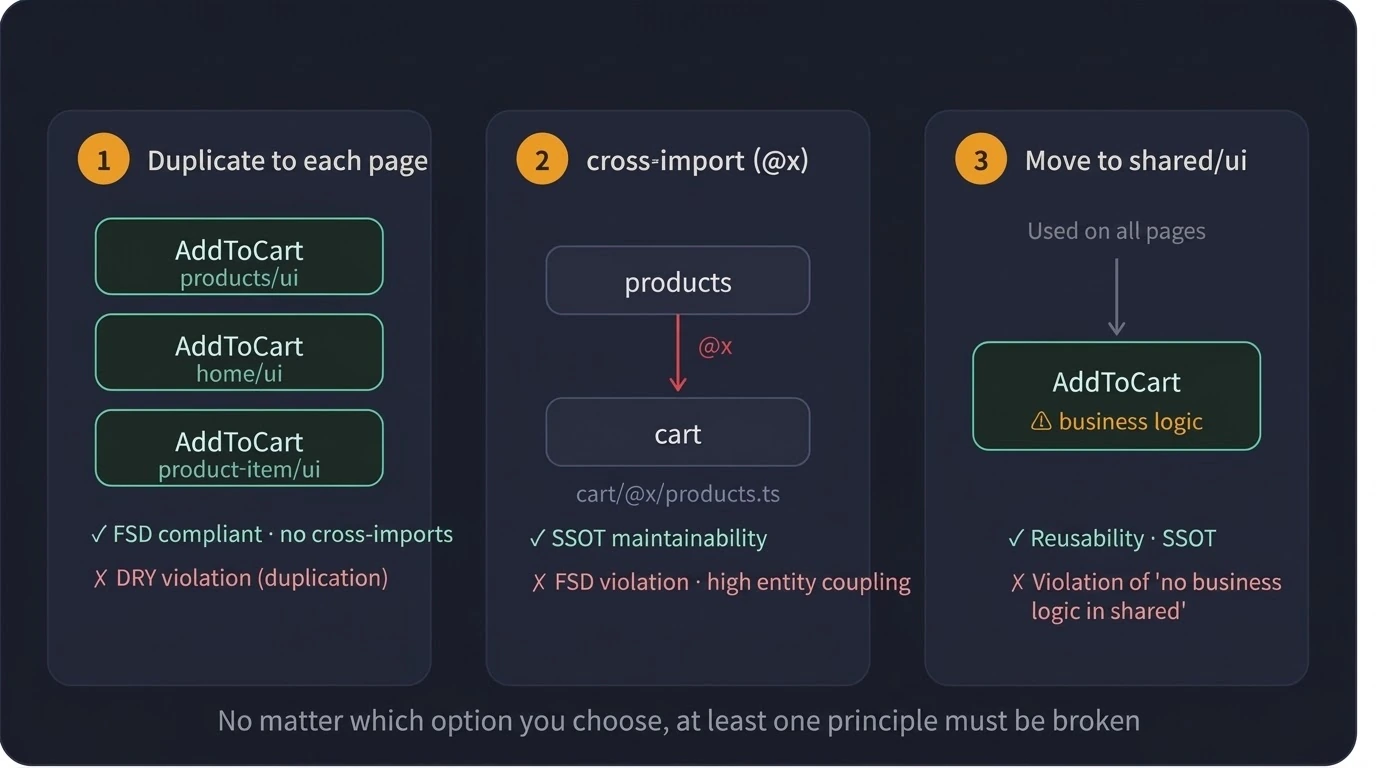
In the FSD architecture, there are cases where the principles must be broken due to architectural limitations, as features that need to encroach on each other's areas must do so. (Refer to the example in the figure above to see that connectivity between slices is inevitable.)
You might ask why we can't just combine the Add to Cart component in the Widget instead of the methods above, but that would essentially break the criteria for dividing the layers one by one and actually make things more complicated, wouldn't it?
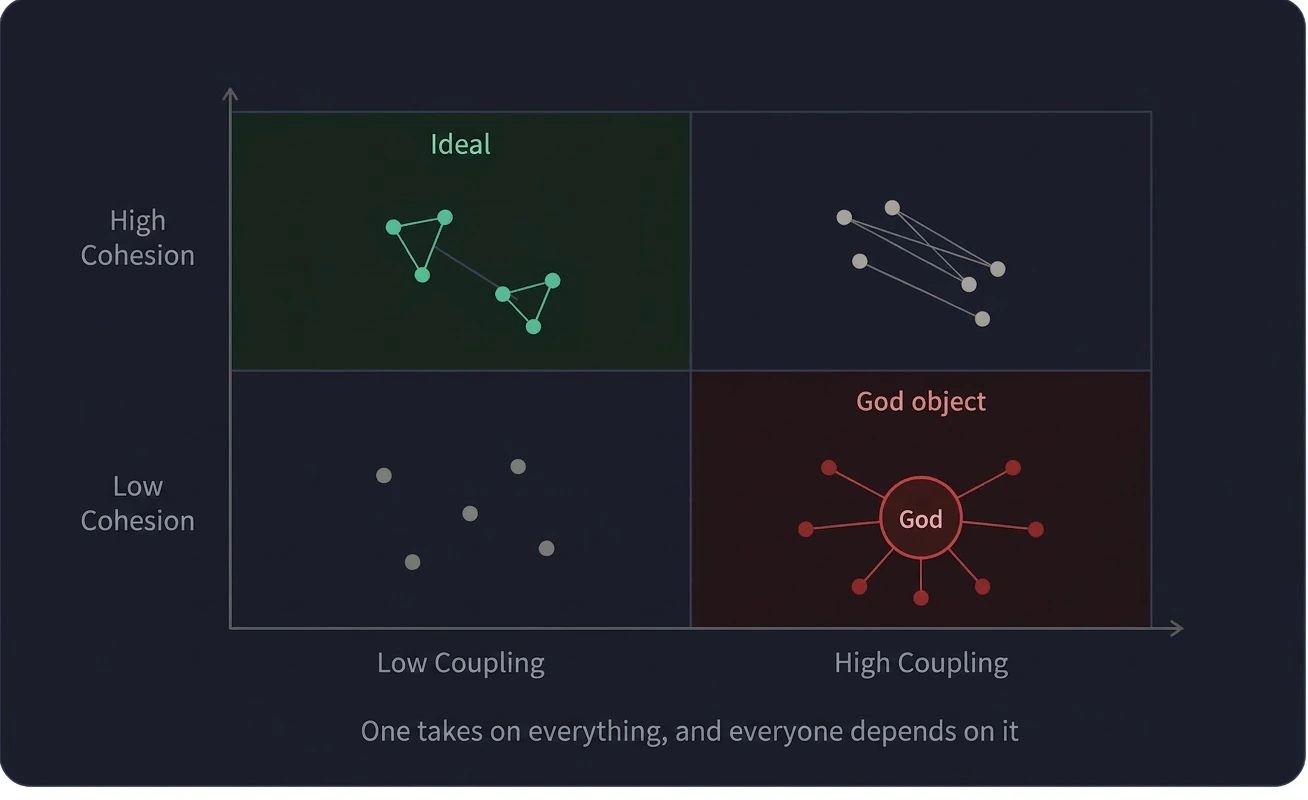
Looking at the figure above, it shows dependencies and cohesion based on cohesion and coupling divided into a matrix. In the case of the FSD architecture, the structure itself may appear to have low coupling, but in actual use, it becomes somewhat ambiguous due to its limitations. Therefore, I consider it an architecture with a medium level of coupling. In conclusion, I believe it occupies a mid-coupling position with low cohesion.
3. Ease of Search
If navigability is high, you can quickly find code for a specific function or role simply by looking at the folder structure. The FSD architecture has a very serious problem with navigability. There are two main reasons for this.
Problems caused by different layer placements depending on the developer—reviewers may even disagree with the layer selection itself and be unable to focus on the code.
with low cohesion
For example, let's say you are creating a "search bar" component. Developers may have different views on whether to consider this "search bar" as a widget, a feature, or an entity. In that case, if Developer A has created the "search bar," Developer B cannot be certain at which layer the "search bar" will be found.
4. Mental Model Match
Mental models indicate whether the team's product concept and folder structure align.
Code structure reflects how the team thinks about the product. If the code aligns with the team members' vision of the product, they do not need to think about which part of the architecture it represents when building or reading about a feature.
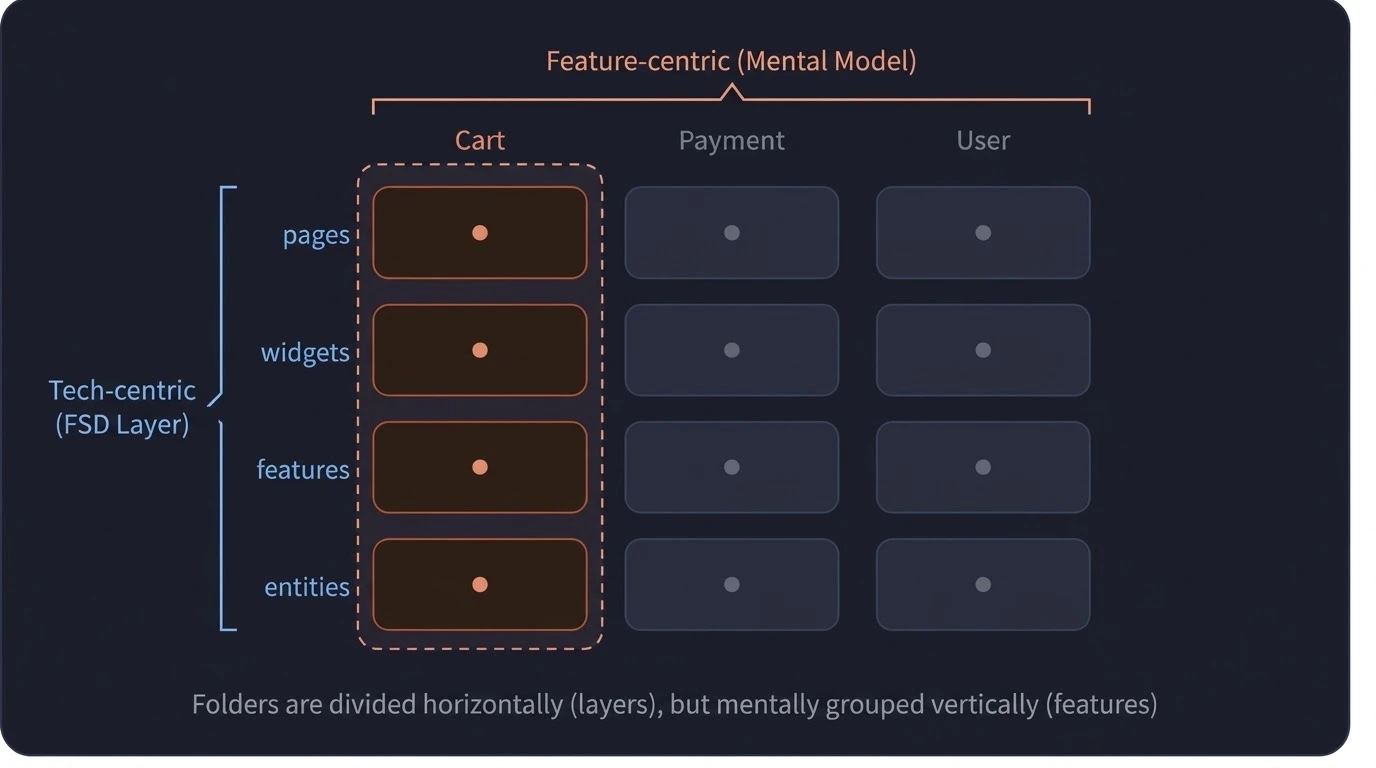
The FSD architecture divides layers based on technology. However, when actually using technology-centric layers, you cannot be certain because opinions vary from person to person. Therefore, you always have to think it over. On the other hand, if you divide them based on function first, you can more easily match the folder structure with your thoughts when considering a feature.
If we are to align mental models with product concepts based on the layers of the FSD architecture, I think a lot of consensus and training will be required . I believe that is the only way to barely achieve alignment.
In fact, there are very many cases where the FSD architecture is modified and conceptualized to align with mental models.
5. Gradual Introduction
The architecture cannot be finalized from the early stages of development. As new requirements emerge, there are instances where the architecture must be modified.
Architecture changes as the product evolves. Therefore, it typically starts with a simple architecture and gradually changes to suit the product.
However, the FSD architecture requires applying 6 layers, slices, and segments from the start. Of course, if you look at the official FSD documentation, there is a guide for incremental adoption, but I think it is actually very difficult to apply because the structure itself starts differently from the existing code.
FSD Comprehensive Evaluation
merit
The cohesion at the slice level is good.
There is no circular dependency.
disadvantage
Cohesion is poor at the functional level.
The result of selecting a layer may vary.
The folder structure is forced to be technology-centric.
Gradual implementation is practically difficult.
Proposal of an Alternative Architecture
I suggest utilizing Layered Architecture and Vertical Slice as alternatives to the FSD architecture.
Layered Architecture is typically recommended for small to medium-sized projects. Like FSD, it organizes code based on technical responsibilities. In web projects, it is usually divided according to roles such as Shared, Presentation, Business Logic, Data Access, and Router. For the backend, it would be divided into Controller, Service, and Repository.
Web Project Layered Architecture Example
Layered Architecture is typically recommended for small to medium-sized projects. Like FSD, it organizes code based on technical responsibilities. In web projects, it is usually divided according to roles such as Shared, Presentation, Business Logic, Data Access, and Router. For the backend, it would be divided into Controller, Service, and Repository.
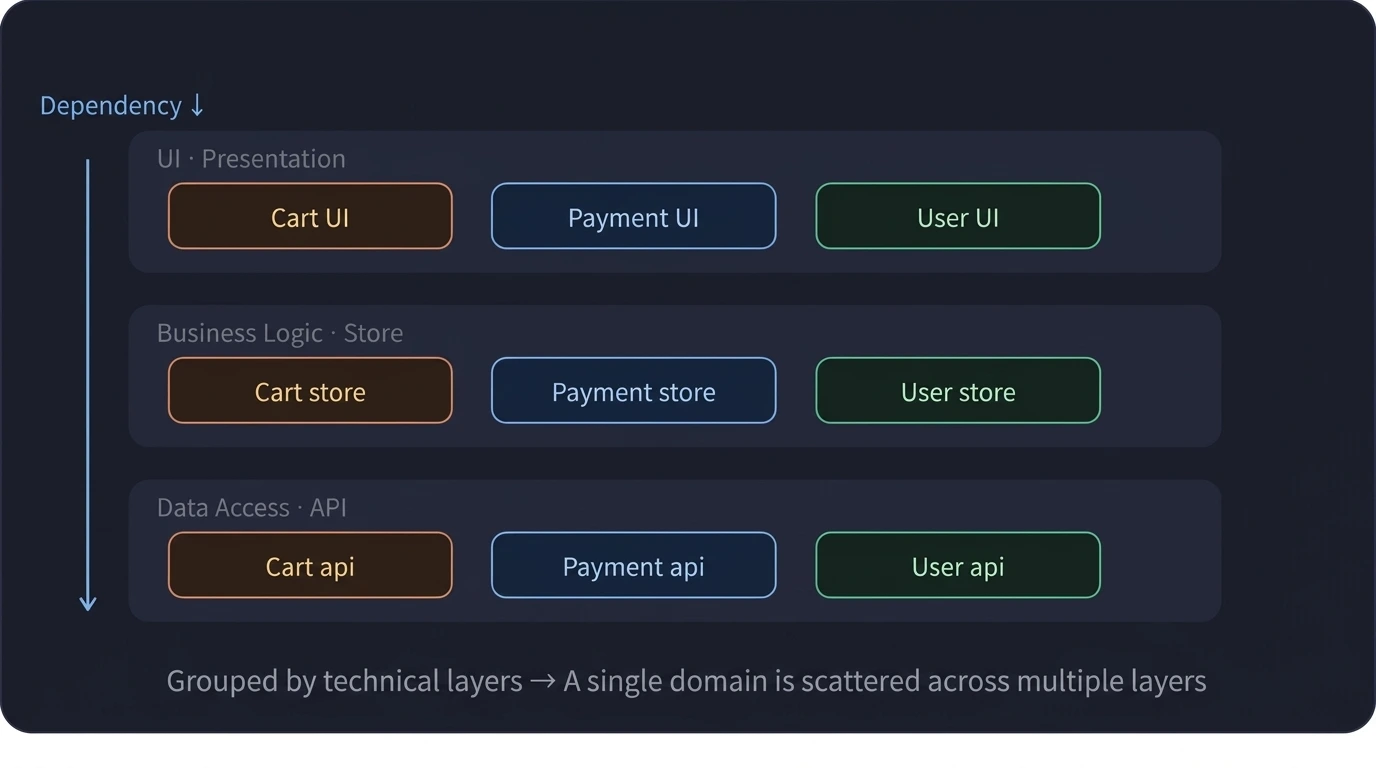
Then, how about we comprehensively evaluate hierarchical architecture from five perspectives?
Cohesion - Low cohesion because it is not divided by function
Coupling - Varies depending on the team or project
Discoverability - Easy to navigate due to simple structure
Mental Model Match - Technically, by dividing the structure, it does not match the mental model.
Gradual adoption - Easy to get started
Applying Layered Architecture + Vertical Slice to Web Projects
Vertical Slice divides the architecture based on features rather than technology. Generally, you can think of it as starting to split into Vertical Slices when a single feature in a layered architecture becomes too large.
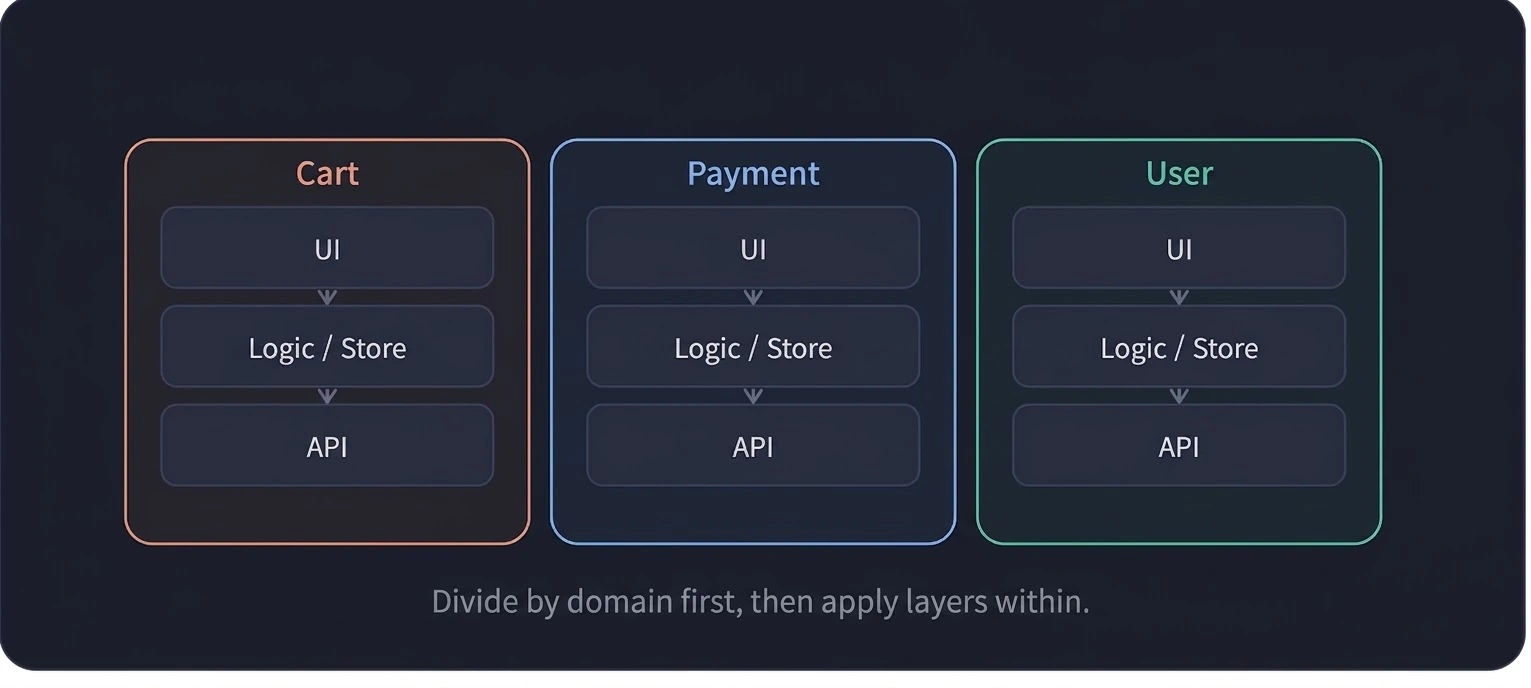
Cohesion - High because code for a single function is in a single folder
Coupling - Varies by team/project
Discoverability - The code for a single function is all in a single folder
Mental Model Alignment - Business functions and folders match easily
Gradual rollout - Easily get started with a single feature folder
conclusion
While the FSD architecture offers advantages such as resolving circular dependency issues and achieving good cohesion at the slice level due to clean rules, it suffers from problems like hierarchy selection, low functional cohesion, and difficult incremental adoption. Therefore, in practice, it is very common to modify and redefine the FSD architecture rather than using it as is.
I also use the FSD architecture at my company, but honestly, I don't like it. Instead, it seems to only increase communication costs and lead to more deliberation about which layer to place things. However, if we don't communicate, things inevitably remain in an ambiguous state. Furthermore, it has become much more difficult to find which folder to navigate to access a specific function.
So, in this case, I think it would be much more flexible to use Feature Slices in a Layered Architecture to divide by domain.
Anyway, in addition to this, I plan to introduce MFA (Micro Frontend Architecture) in my next post. As a team gradually grows in size, there may be situations where you need to divide everything, including deployment and code management, right? So, I will discuss methodologies for dividing these responsibilities at a higher level.