
Contents (11)
- Web multithreading
- Web single thread
- Web worker
- Worker and main thread context
- Data transfer method between worker and main thread
- Method for sharing memory between worker and main thread (Shared Array Buffer)
- Worker utilization
- Comlink Library
- Service Worker (Side Story)
- WebAssembly Multithreading (Bonus 2)
- organize
Web multithreading
It is common to mistakenly believe that web applications or JavaScript engines are single-threaded because there is only one main thread running the JavaScript code. However, in reality, they operate internally as multi-threaded systems. This is why you can perform communication using `fetch`, set a timer with `setTimeout`, and handle other tasks simultaneously. (e.g., `setTimeout` pushes a callback function to the Task Queue after 300ms => tasks on the Call Stack do not stop during these 300ms, and the main thread continues to process other operations.)
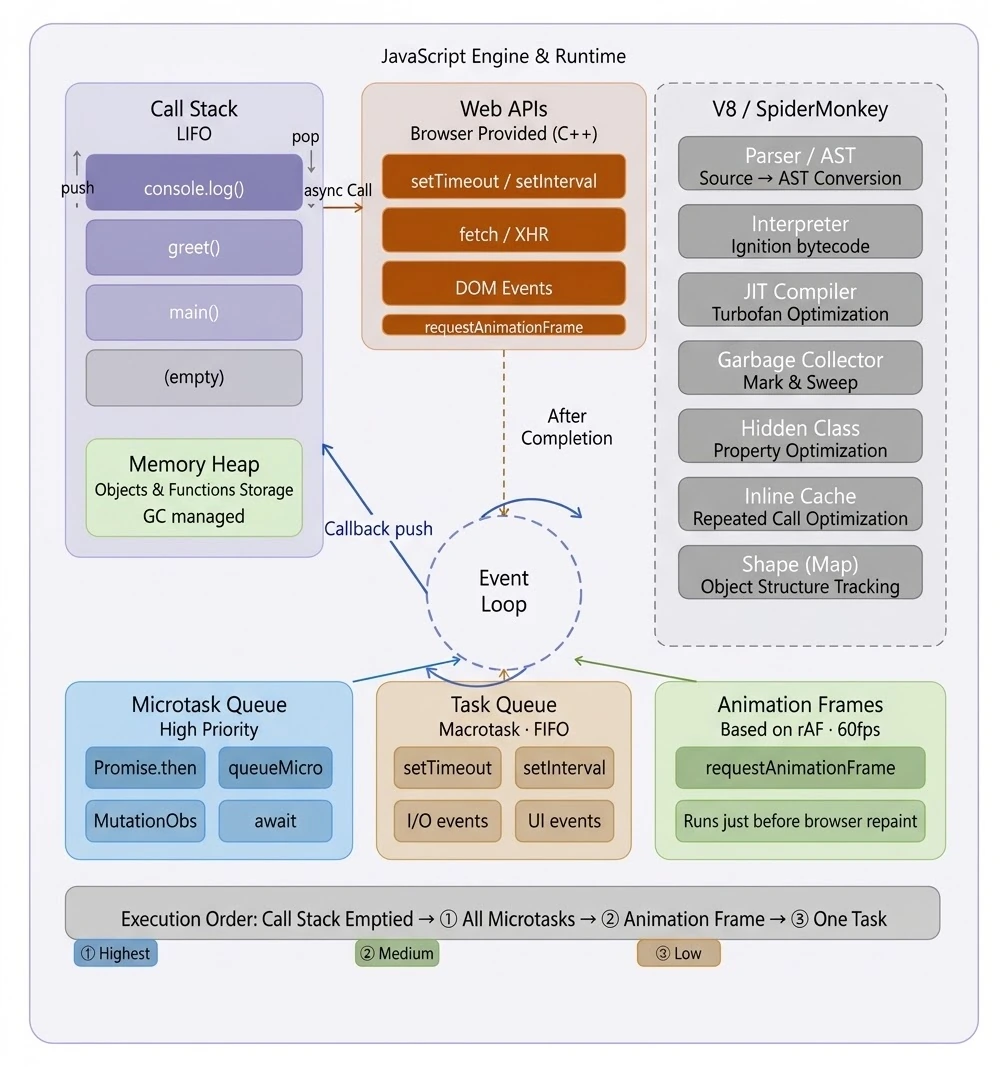
JavaScript intentionally designed the main thread to operate as a single thread (single execution context) to dynamically and seamlessly display HTML documents. This is because managing the DOM becomes difficult when multiple threads modify it simultaneously in a multithreaded environment. For example, if special cases arise where one thread attempts to attach an event to a node while another is deleting it, it becomes difficult to detect memory leaks, and management becomes complex.
The problem is that as web applications become more complex, relying solely on pure JavaScript due to the above choice often leads to performance issues. For example, when processing large amounts of data is required, implementing it using only JavaScript blocks the main thread, causing users to experience a brief pause.
So, various methods were developed to solve this. Representative examples include features such as Web Workers, Web Assembly, and shared memory.
Web single thread
Before we begin discussing multithreading, let's look at examples of how single-threading works in JavaScript, a web-based language, what situations arise from it, and how to resolve them. ( Detailed explanations will be provided exclusively to study group members!!!!! )
// Situation where heavy computations are executed on the main thread (rendering issues + interaction freeze issues)button.addEventListener('click', () => { status.textContent = 'Processing...'; // It is not rendered at this point. const result = heavyComputation(); // Main thread occupancy => User interaction freezes status.textContent = result; // Finally, it is displayed on the screen});// Method 1. Use requestAnimationFrame (executed before entering the render cycle)button.addEventListener('click', () => { status.textContent = 'Processing...'; requestAnimationFrame(() => { // Execute this function in the next rendering cycle. (If you're unlucky, you won't see the "Processing..." message.) const result = heavyComputation(); status.textContent = result; });});// Method 2. Use setTimeoutbutton.addEventListener('click', () => { status.textContent = 'Processing...'; setTimeout(() => { // Add the function below back to the MacroTask Queue. (If you're unlucky, you might not see the "Processing..." message.) const result = heavyComputation(); status.textContent = result; }, 0);});// Method 3. Double nesting of requestAnimationFramebutton.addEventListener('click', () => { status.textContent = 'Processing...'; setTimeout(() => { // First: Skip Paint Opportunity setTimeout(() => { // Second: Run heavy here const result = heavyComputation(); status.textContent = result; }, 0); }, 0);});The code above demonstrated how the web engine's JavaScript main thread operates at runtime while explaining how to ensure the "Processing..." message is displayed during the web rendering lifecycle.
However, we still haven't solved the problem where user interaction freezes while heavy functions are executing. What is the simplest way to solve this? We just need to avoid running it on the main thread. That is why Web Workers are necessary.
Web worker
You can think of Web Workers as APIs that execute JavaScript on a separate thread on the web. Therefore, functions run on an independent thread without interfering with the main thread. The main thread can then receive only the results of these heavy operations and display them on the screen.
Now, let's write the code to run the previous example as a Web Worker. (Since the onMessage callback is stacked into a MacroTask, it does not necessarily render "Processing...".)
// main.jsconst worker = new Worker('worker.js');button.addEventListener('click', () => { status.textContent = 'Processing...'; worker.postMessage('start'); // Delegate to Walker and finish.});worker.onmessage = (e) => { status.textContent = e.data; // Update when results are received};// worker.jsself.onmessage = () => { // Execute function when worker receives message. const result = heavyComputation(); // Even if it takes 3 seconds here, it doesn't matter about the main. self.postMessage(result); // Send to main thread.};Worker and main thread context
A Worker is an execution environment completely isolated from the main thread. It has neither a window nor a document. Therefore, since a worker cannot reference document or window objects, it cannot use things like local storage or DOM APIs. Consequently, DOM manipulation is always performed only on the main thread.
Due to these limitations, the code is written so that only heavy computations are executed on the worker, and only the results are received by the main thread and delivered to the user.
Data transfer method between worker and main thread
The method for transferring data from the main thread to a worker and from a worker to the main thread is postMessage. This data is copied by default.
So, if you send a 100MB ArrayBuffer, 100MB is newly created in Worker memory. Since this consumes a significant amount of the user's memory resources, a method of transferring ownership is used to avoid copying.
const buffer = new ArrayBuffer(100 * 1024 * 1024); // 100MB// Method 1. Copy — Both the main thread and the worker use memoryworker.postMessage({ buffer });// Method 2. Transfer memory ownership — The buffer disappears from the main thread.worker.postMessage({ buffer }, [buffer]);console.log(buffer.byteLength); // 0The array passed as the second argument is a list of Transferables. Only data types of ArrayBuffer, MessagePort, ImageBitmap, and OffscreenCanvas are allowed.
Method for sharing memory between worker and main thread (Shared Array Buffer)
Web Worker's postMessage copies data or transfers ownership. However, if you want the main thread and the web worker to share the same memory, you can use SharedArrayBuffer.
Also, a race condition occurs if two threads read and write the same index simultaneously. Atomics APIs are sometimes used to prevent this.
// main.jsconst sab = new SharedArrayBuffer(4 * 4); // 16 bytesconst shared = new Int32Array(sab);const worker = new Worker('worker.js');// Pass by reference, not copyworker.postMessage({ sab });worker.onmessage = (e) => { if (e.data.type === 'DONE') { console.log('Worker complete, shared[0]:', shared[0]); }};// Wake up the worker after setting the value in the mainshared[0] = 0;Atomics.store(shared, 1, 42); // Data to read by the workerAtomics.notify(shared, 0, 1); // Wake up the waiting worker in shared[0]// Worker.jsself.onmessage = (e) => { const shared = new Int32Array(e.data.sab); // Wait while shared[0] is 0 — Block until main notifies Atomics.wait(shared, 0, 0); // Read data after waking up const value = Atomics.load(shared, 1); console.log('Received value:', value); // 42 // Atomic increase — safe without race conditions Atomics.add(shared, 0, 1); // shared[0]++ // Completion notification on main self.postMessage({ type: 'DONE' });};One thing to note in the code above is that you cannot use Atomics.wait on the main thread. You must use Atomics.waitAsync() (because the entire UI might freeze).
Since data is shared, design complexity increases significantly, so I recommend using it only if absolutely necessary. Please be careful, as writing clean multi-threaded code is difficult, and it is challenging to write it without edge cases.
Also, SharedArrayBuffer was disabled due to security issues, and it was actually patched after vulnerabilities were discovered (around 2024 or 2025...). Therefore, to use SharedArrayBuffer, you must configure HTTP headers. Otherwise, the browser will block its use.
Cross-Origin-Opener-Policy: same-originCross-Origin-Embedder-Policy: require-corpThey say that enabling this header might cause third-party devices or iframes to behave strangely, so please check it if you use payment gateways.
Worker utilization
You might think that using a Worker will definitely make things faster, but the reality is different.
Due to the serialization cost of postMessage, it can actually slow down a structure that exchanges small data hundreds of times.
Also, since creating a Worker initially incurs the cost of creating a new thread and each Worker object is single-threaded, methods such as a Worker Pool are sometimes used to create a thread pool in advance to enable parallel data processing.
const POOL_SIZE = navigator.hardwareConcurrency; // The number of logical threads on the user's computerconst pool = Array.from({ length: POOL_SIZE }, () => new Worker('./worker.js'));Comlink Library
PostMessage-based communication makes the code messy because you have to implement callback or ID-based response mapping yourself.
So, I would like to introduce a library called Comlink. It wraps a worker in a proxy, allowing you to use it like a function call. It also makes it easier to implement a memory-efficient method where workers are shared even when multiple tabs are open, using the `worker.port.start()` approach.
// worker.jsexport const add = (a: number, b: number) => a + b;// main.ts// Create Worker (No sharing between tabs)const instance = new ComlinkWorker(new URL("./worker.js", import.meta.url), { /* normal Worker options*/});const result = await instance.add(2, 3);result === 5;// Create SharedWorker (Sharing between tabs) => Memory Efficiencyconst instance = new ComlinkSharedWorker<typeof import("./worker")>( new URL("./worker", import.meta.url), { /* normal Worker options*/ });const result = await instance.add(2, 3);result === 5;Service Worker (Side Story)
Service Workers have a similar name to Web Workers, but their purpose is different.
While the primary purpose of Web Workers is "separating CPU computation," the main purpose of Service Workers is to turn the web into a native app. Therefore, Service Workers act as intermediaries between the browser and the server to intercept requests, respond from the cache, receive push notifications, and enable offline operation. They are workers that run independently in the background, regardless of the page lifecycle.
Worker / SharedWorker | Service Worker | |
|---|---|---|
life | While the tab is open | Survives even when tab is closed |
DOM access | Impossible | Impossible |
Network interception | Impossible | Possible (fetch event) |
Push notifications | Impossible | possible |
Installation concept | doesn't exist | Available (install → activate) |
Therefore, the key element that makes the web feel like an app in PWAs is the Service Worker. Based on this, we build offline web apps. (Cache is also controlled so that the app can be used based on cached data even offline.)
WebAssembly Multithreading (Bonus 2)
When compiling C or C++ code into WebAssembly, pthreads (POSIX threads) may be included. However, since the web cannot use OS threads, this is emulated using Workers + SharedArrayBuffer + Atomics . This is usually handled by C to Wasm conversion tools like Emscripten.
pthread_create => new Worker()
pthread_mutex_lock => Atomics.wait
Memory Sharing => SharedArrayBuffer
As shown above, thanks to WASM conversion tools, you can port multithreaded C++ code to the browser almost intact.
// C++ code — runs in the browser as isvoid process_in_parallel(float* data, int len) { std::vector<std::thread> threads; int chunk = len / std::thread::hardware_concurrency(); for (int i = 0; i < len; i += chunk) { threads.emplace_back([=] { for (int j = i; j < std::min(i + chunk, len); j++) { data[j] = heavy_math(data[j]); } }); } for (auto& t : threads) t.join();}organize
In the web, the only way for developers to explicitly use multithreading as desired is by using Web Workers . However, data still has to pass through a single thread to reach the user screen. Furthermore, the implementation becomes very complex and management is difficult.
Nevertheless, the reason multithreading technology exists is that there are cases in web development where this feature is absolutely necessary. This occurs when heavy computational tasks cause a bottleneck in the main thread. To prevent the degradation of user experience caused by this bottleneck, multithreading is the only solution.
I also implemented and am using a thread pool for performance reasons while developing a 3D editor. Let's build an app together that satisfies users by properly utilizing multi-threading features.