
Contents (12)
Open Code and Oh-My-Open Code Application Log
As AI coding becomes a necessity, we have entered an era where we must use AI more effectively. With so many AI models and agents being released, developers may find it overwhelming. However, even in this situation, pioneering developers are striving to utilize various AIs more efficiently.
Today, I’d like to introduce you to OpenCode , an open-source AI agent. Before that, however, let’s briefly classify AI concepts. Looking at the examples below, I think you’ll get a good sense of what it is. (Added 2026.01.25 => Oh-my-claudecode has also been released. The world is changing so fast.)
AI Model = Capabilities include text generation, reasoning, summarization, and code generation. (It cannot perform actions such as reading files, executing, or generating pull requests.)
There are text-based models such as Open AI's GPT, Anthropic's Claude, Google's Gemini, and Z.ai's GLM.
There are also AI image generation models like Nano banana.
An AI Agent possesses both a model and behavior/management capabilities. It establishes plans, utilizes tools, and generates results. It also manages context and memory, and provides settings that allow the model to be modified.
Codex: A coding-specialized agent that primarily uses the GPT model
Claude Code: A coding-specialized agent that primarily uses the Claude model
Chat GPT: A general-purpose conversational AI agent using the GPT model
opencode: With open source agents, you can highly customize contexts, MCPs, and more, and mix and match various AI models or agents. You can even easily apply open source plugins.
oh-my-opencode plugin: This is a plugin for OpenCode. It comes with a built-in core agent called Sisyphus. It is referred to as an Agent Orchestrator and helps manage and execute predefined agents. Basic agents include a search agent, a planning agent, a plan validation agent, and a codebase/file navigation agent, and you can use your desired AI model for each agent.
AI Assisted IDE = A code editor with built-in features that allow you to easily utilize AI, such as Cursor, Windsurf, and Antigrabity.
There are things like Cursor, Antigravity, Cursor, Windsurf, Cline, and Github Copilot.
Reasons for using OpenCode
I use the Claude Code Agent as my main coding tool on the Claude Pro plan. However, when coding with very sophisticated contexts, I sometimes run out of my quota in just 30 minutes. So, like a nomad, I would either go around using up my Antigravity quota or my Cursor quota. But these methods had their drawbacks.
Limitations of existing agents
Generally, provided AI agents are single-agent models. So, it is like a single agent handling everything, such as writing code and reviewing it. Also, each agent has its own configuration methods.
I define contexts in the ".claude/" folder to use Claude Code's Skills, Commands, and Agents features, but when using different Agents like Nomad, I had to manually provide the contexts I defined to get the desired results. This happens because each AI Agent has different characteristics.
In addition to these, known issues include the problem of having to use expensive models even in areas that do not require much computation because the same model is used for multiple tasks, the difficulty of using desired AI models due to limitations on the models provided by the agent, and the problem of not being able to know what context or MCP the agent is using internally.
The reason for using
So, to solve this, I heard from a developer who is like a mentor to me that there is an open-source AI agent called OpenCode, so I decided to try using it.
Features of Open Code
merit
Model Freedom - You can freely select the model you want.
Cost Efficiency - With just an API key, you can use AI models more cheaply by paying only for them via per-token billing.
Open source extensibility - A plugin ecosystem is built, allowing you to easily add features and see how they work.
Privacy - Self-hosting is possible without storing code and context externally.
disadvantage
Initial setup is required.
I heard that there are cases where the agent company blocks its use.
OpenCode, oh-my-opencode Installation and Setup
Now, let's learn how to install and configure OpenCode and oh-my-opencode.
Install
Open Code installation
There are various ways to download it. However, I will introduce the simplest method.
curl -fsSL https://opencode.ai/install | bashInstall oh-my-opencode
You also need to install the oh-my-opencode plugin separately. Here, we recommend using AI Agents for the installation. This is because it allows settings to be added automatically without errors.
# Please enter the following content into AI Agents.Install and configure oh-my-opencode by following the instructions here:https://raw.githubusercontent.com/code-yeongyu/oh-my-opencode/refs/heads/master/docs/guide/installation.mdSet up
1. Provider connection or Auth connection
If you need additional LLM connections (Anthropic, Google, etc.), connect using the following command.
$ opencode # Open Code execution$ /connect # Run the opencode command to connect with the provider API key$ opencode auth login # Connect to the same plan as Claude Pro2. opencode.json settings
There are a lot of configurable options in Open Code. There are various settings, including MCP, Agents, Models, and Instructions. That is why I think it is better to consult the documentation directly rather than relying on blog posts. First, let me show you my configuration. [ Open Code Configuration Document ]
// ~/.config/opencode/opencode.json # Global settings// {{project.root}}/opencode.json # Project-specific settings{ "$schema": "https://opencode.ai/config.json", "plugin": [ "oh-my-opencode", "opencode-antigravity-auth@1.3.0" ], "provider": { "google": { "name": "Google", "models": { "antigravity-gemini-3-pro-high": { "name": "Gemini 3 Pro High (Antigravity)", "thinking": true, "attachment": true, "limit": { "context": 1048576, "output": 65535 }, "modalities": { "input": [ "text", "image", "pdf" ], "output": [ "text" ] } }, "antigravity-gemini-3-pro-low": { "name": "Gemini 3 Pro Low (Antigravity)", "thinking": true, "attachment": true, "limit": { "context": 1048576, "output": 65535 }, "modalities": { "input": [ "text", "image", "pdf" ], "output": [ "text" ] } }, "antigravity-gemini-3-flash": { "name": "Gemini 3 Flash (Antigravity)", "attachment": true, "limit": { "context": 1048576, "output": 65536 }, "modalities": { "input": [ "text", "image", "pdf" ], "output": [ "text" ] } }, "antigravity-claude-sonnet-4-5": { "name": "Claude Sonnet 4.5 (no thinking) (Antigravity)", "limit": { "context": 200000, "output": 64000 }, "modalities": { "input": [ "text", "image", "pdf" ], "output": [ "text" ] } }, "antigravity-claude-sonnet-4-5-thinking": { "name": "Claude Sonnet 4.5 Thinking (Antigravity)", "limit": { "context": 200000, "output": 64000 }, "modalities": { "input": [ "text", "image", "pdf" ], "output": [ "text" ] }, "variants": { "low": { "thinkingConfig": { "thinkingBudget": 8192 } }, "high": { "thinkingConfig": { "thinkingBudget": 32768 } } } }, "antigravity-claude-opus-4-5-thinking": { "name": "Claude Opus 4.5 Thinking (Antigravity)", "limit": { "context": 200000, "output": 64000 }, "modalities": { "input": [ "text", "image", "pdf" ], "output": [ "text" ] }, "variants": { "low": { "thinkingConfig": { "thinkingBudget": 8192 } }, "high": { "thinkingConfig": { "thinkingBudget": 32768 } } } }, "gemini-3-pro-preview": { "name": "Gemini 3 Pro Preview", "attachment": true, "thinking": true, "limit": { "context": 200000, "output": 64000 }, "modalities": { "input": [ "text", "image", "pdf" ], "output": [ "text" ] }, "options": { "thinking": { "type": "enabled", } } }, "gemini-3-flash-preview": { "name": "Gemini 3 Flash Preview", "attachment": true, "thinking": true, "limit": { "context": 200000, "output": 64000 }, "modalities": { "input": [ "text", "image", "pdf" ], "output": [ "text" ] }, "options": { "thinking": { "type": "enabled", } } } } }, "anthropic": { "name": "Anthropic", "models": { "claude-sonnet-4-5": { "name": "Claude Sonnet 4.5", "thinking": true, "attachment": true, "limit": { "context": 200000, "output": 64000 }, "modalities": { "input": [ "text", "image", "pdf" ], "output": [ "text" ] }, "options": { "thinking": { "type": "enabled", "budgetTokens": 16000 } } }, "claude-opus-4-5": { "name": "Claude Opus 4.5", "thinking": true, "attachment": true, "limit": { "context": 200000, "output": 64000 }, "modalities": { "input": [ "text", "image", "pdf" ], "output": [ "text" ] }, "options": { "thinking": { "type": "enabled", "budgetTokens": 32000 } } }, "claude-haiku-4-5": { "name": "Claude Haiku 4.5", "attachment": true, "limit": { "context": 200000, "output": 16384 }, "modalities": { "input": [ "text", "image", "pdf" ], "output": [ "text" ] } } } } }}oh-my-opencode.json settings
This is the configuration for oh-my-opencode. You can specify the models for each functional agent.
Description of each function agent
Key Agent
Sisyphus
Role : Execution and orchestration of complex tasks
Features : Executes work plans, distributes tasks to sub-agents, and independently verifies the completion of each task.
Model : claude-opus-4-5 (Using the highest-performance model. The official documentation also recommends using the best one.)
When to use : When performing complex multi-step tasks (actually, it does it automatically!!!!)
librarian
Role : Codebase documentation and knowledge management
Features : Code structure analysis, document search, context collection
When to use : Understanding the codebase and documentation-related work
explore (explorer)
Role : Fast codebase navigation and search
Features : File search, pattern matching, code structure analysis
When to use : Quick search tasks such as finding files or searching code
oracle (prophet)
Role : Decision support and technical advice
Features : Architecture decisions, best practice suggestions
Usage point : When technical decision-making is required
multimodal-looker (multimodal analyst)
Role : Analysis of multimodal content such as images and PDFs
Features : Screenshot analysis, design file understanding, PDF document processing
Usage time : UI screenshot analysis, design review, PDF document analysis
Planner
Prometheus (Plan Consultant)
Role : Supports planning as a sub-agent of Sisyphus
Features : A planner automatically called when Sisyphus creates complex plans
Usage point : Automatically called internally by Sisyphus
Metis (Plan Consultant)
Role : Plan verification and advice with Prometheus
Features : Review of plan feasibility, suggestions for improvement
Usage point : Automatically called internally by Sisyphus
Momus (Plan Reviewer)
Role : Plan Validation
Features : Verify whether the plan is complete and feasible
Usage point : Verification phase after Prometheus completes the plan
Other agents
frontend-ui-ux-engineer (Frontend UI/UX Engineer)
Role : Writing frontend code and improving UI/UX
Features : Specialized in frontend technologies such as React, Vue, and CSS
Usage period : UI component development, styling, frontend implementation
document-writer
Role : Document creation and README generation
Features : Markdown documents, technical document creation
When to use : README, guide, writing comments
// ~/.config/opencode/oh-my-opencode.json # oh-my-opencode settings{ "$schema": "https://raw.githubusercontent.com/code-yeongyu/oh-my-opencode/master/assets/oh-my-opencode.schema.json", "google_auth": true, "agents": { "Sisyphus": { "model": "anthropic/claude-opus-4-5" }, "librarian": { "model": "google/antigravity-claude-sonnet-4-5-thinking" }, "explore": { "model": "google/antigravity-gemini-3-flash" }, "oracle": { "model": "anthropic/claude-sonnet-4-5" }, "frontend-ui-ux-engineer": { "model": "anthropic/claude-sonnet-4-5" }, "document-writer": { "model": "google/antigravity-gemini-3-flash", "description": "Document creation" }, "multimodal-looker": { "model": "google/antigravity-gemini-3-flash" }, "Prometheus (Planner)": { "model": "google/gemini-3-pro-preview" }, "" }, "git_master": { "commit_footer": true, "include_co_authored_by": false }}User Reviews
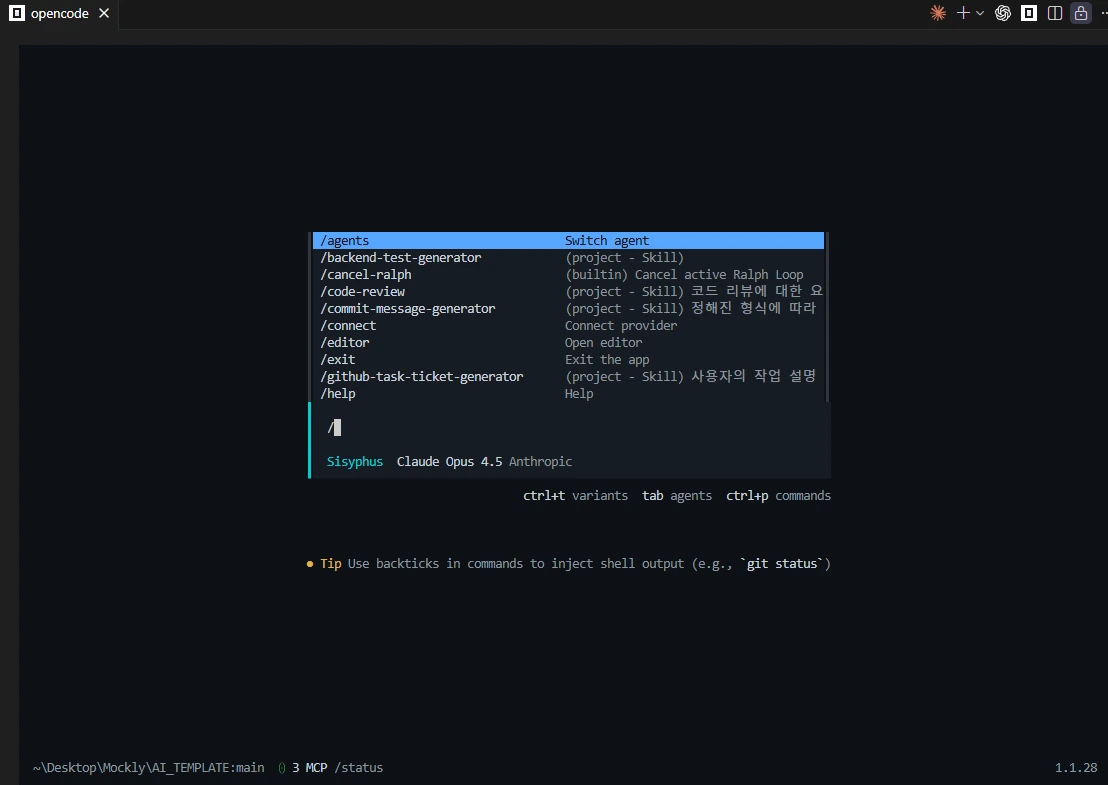
It was great that it recognized skills even when using the existing Claude Code setup files as they were. Also, since I could utilize various free models within the same context, I really liked that I could use the tokens from the paid plans for important purposes.
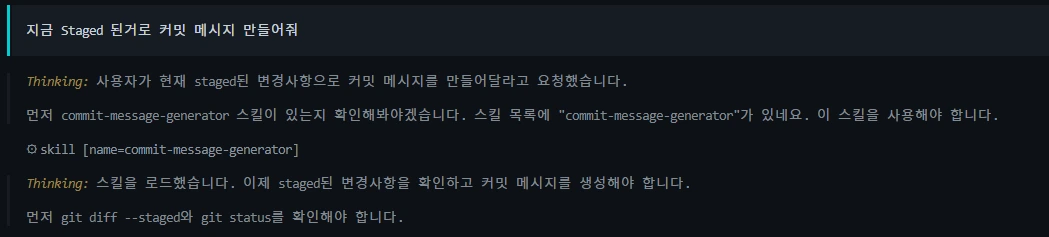
As shown above, it automatically finds the commit-message-generator skill configured for the Claude-Code agent and generates the commit message.
There are still many things left to set up, and there are also many settings I want to try out. Moving forward, I think I need to give a lot of thought to how to use AI to produce better, more efficient results. I have automatic reviews enabled in Git using Claude-Code, but I should also look into whether I can switch from Claude-Code to OpenCode.
Let's all become designing developers who can design and implement quickly with higher quality and productivity.