
Contents (25)
- Architecture
- MVC Architecture
- Traditional MVC
- Web MVC (feat. SPA)
- Full-Stack MVC
- Hierachical MVC
- MVC and Thin/Thick (Fat) Clients
- MVC Summary
- MVP Architecture
- MVP Architecture - Passive View
- MVP Architecture - Supervising Controller
- MVP Architecture Summary
- MVVM Architecture
- An example of how Vue applies MVVM (it doesn't match MVVM 100%, but Vue was inspired by MVVM.)
- Code Example: MVP vs. MVVM
- MVVM Architecture Summary
- MVVM-C Architecture
- VIPER Architecture
- Hexagonal Architecture
- Clean Architecture
- Screaming Architecture
- Vertical Slices Architecture (feat. FSD)
- FSD Architecture
- Wrapping Up
- Sources
Architecture
Software has spawned a huge variety of architectures, like MVC, MVP, and MVVM. Why do so many architectures keep appearing?
Because as code grows more complex, we need ways to divide up responsibilities and secure maintainability, scalability, and testability.
Even the MVC pattern you've probably heard so much about was created to separate things out, because in early GUI software, lots of logic, like view logic and business logic, was all mixed together.
MVC Architecture
MVC is an architecture created about 36 years ago, made up of three Layers: Model - View - Controller.
Model : The part that manages the data and business logic.
View : The part that displays data on the screen through the UI. It includes UI logic as well.
Controller : Acts as a bridge between the Model and the View. It handles user input, updates the model, and passes the result on to the view.
Traditional MVC
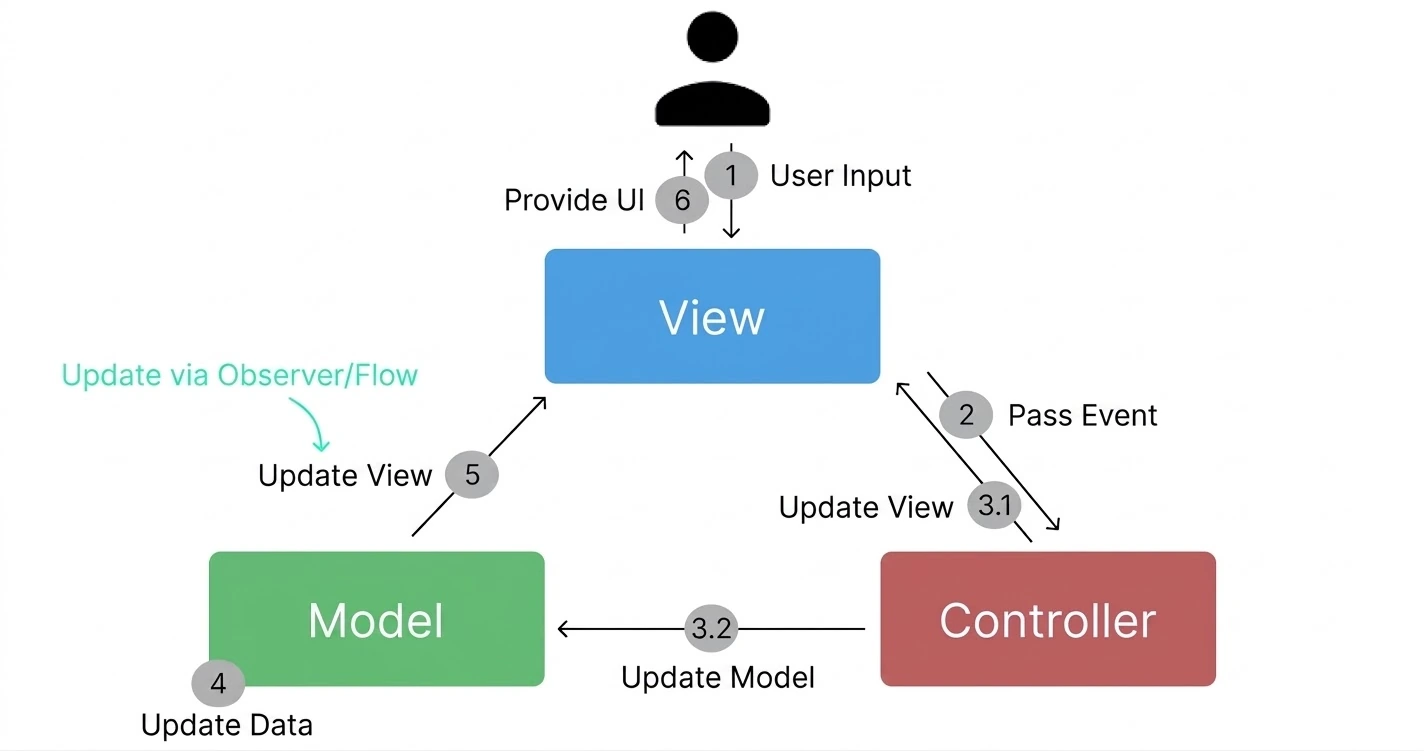
When the user clicks something like a button, an Event is delivered, and depending on it, the Controller can request either a Model update or a View update. And once the Model is updated, it can have the View present a UI that reflects the latest Model.
Here, updating the View in response to Model changes is mainly done in two ways. You can use the Observer pattern so changes are reflected automatically, or you can simply pass along code that updates the View and trigger the View update through the flow.
Web MVC (feat. SPA)
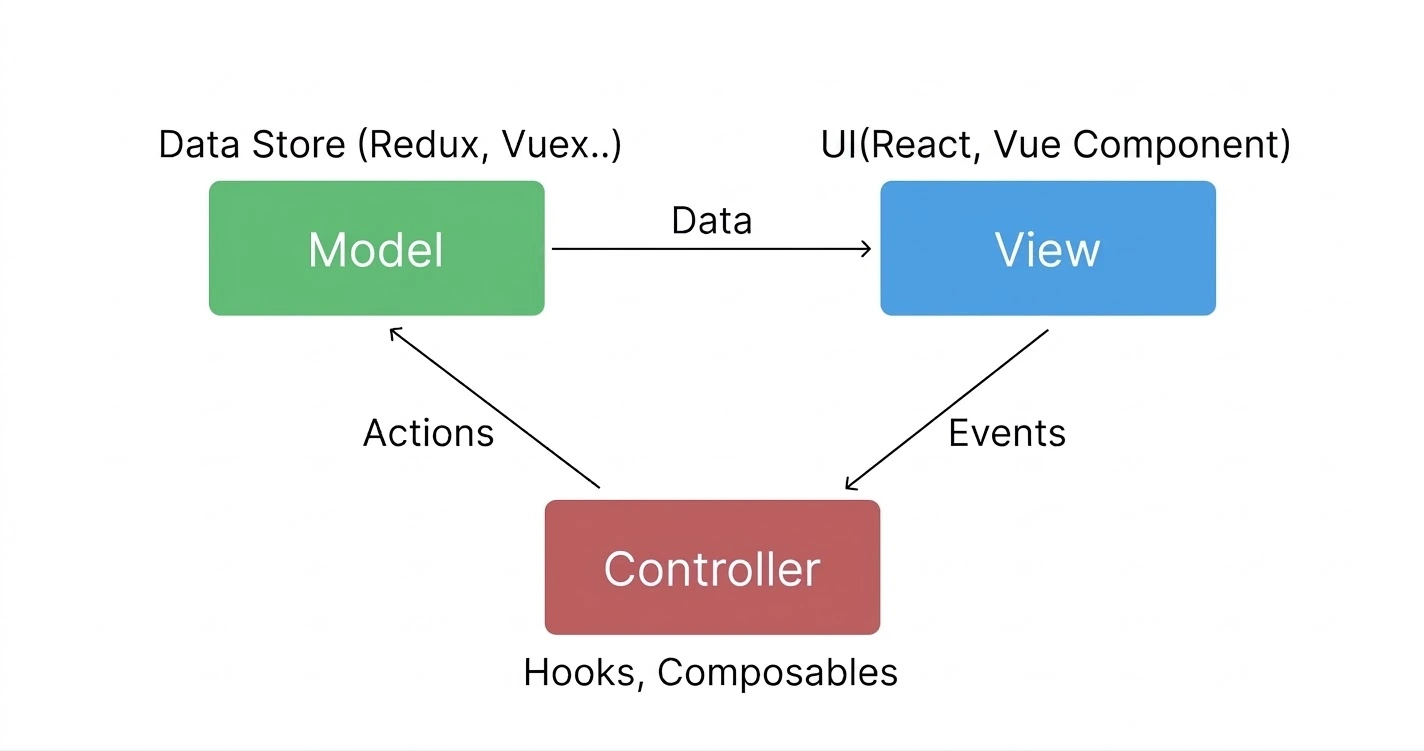
This is what the MVC model looks like when applied to the Web. Redux data shows up in the View, and an Event from the View runs a Controller Hook, which triggers an Action that changes the Model.
Of course, some people see the structure above as a forced fit. That's because modern frontend apps behave as if Model changes are reflected straight into the View. Internally, though, functions that trigger Actions are actually doing the work.
Full-Stack MVC
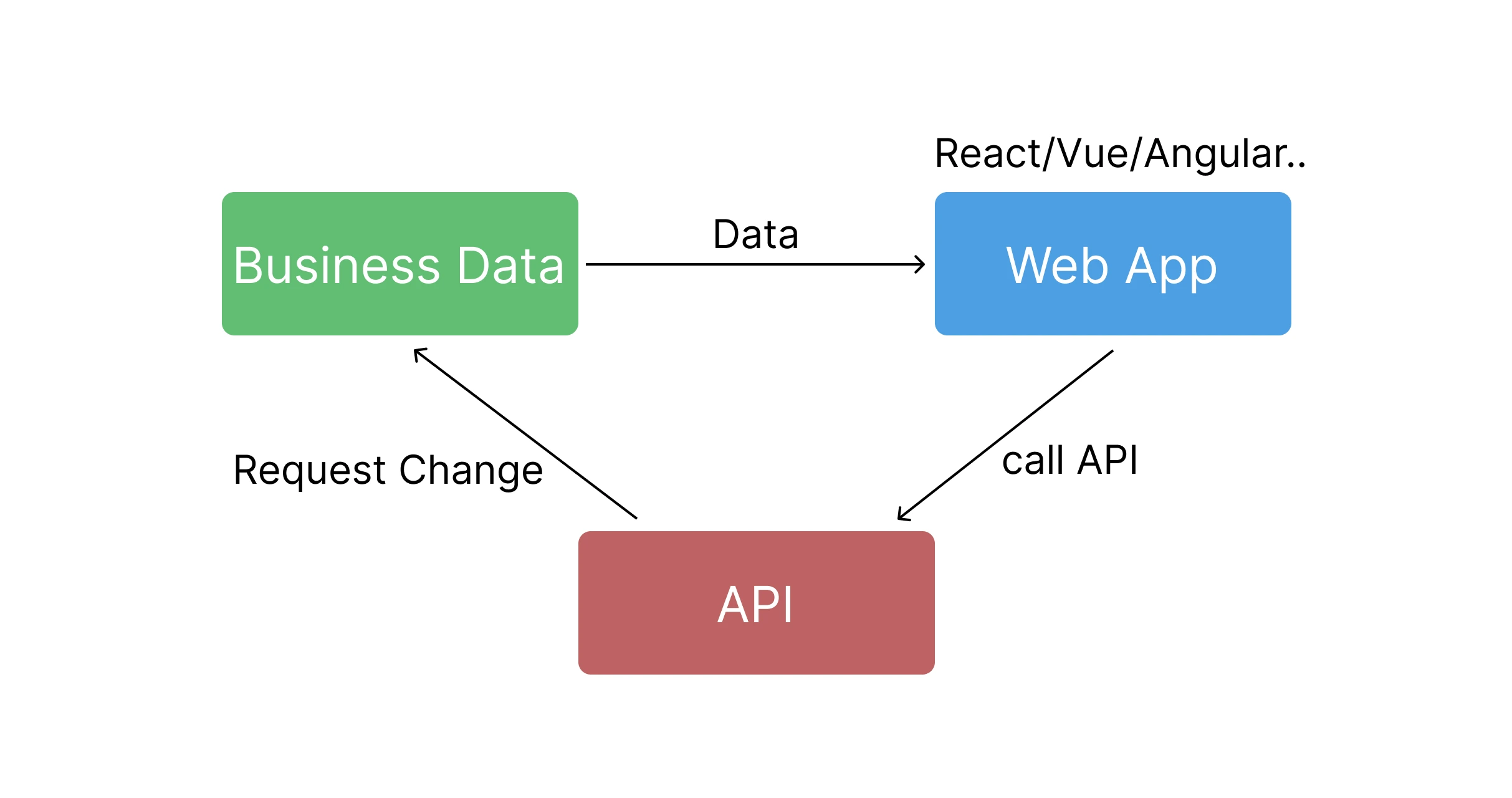
This is what the MVC model looks like from a full-stack perspective. The Web App handles only the UI logic, and the business logic is used through APIs.
Hierachical MVC
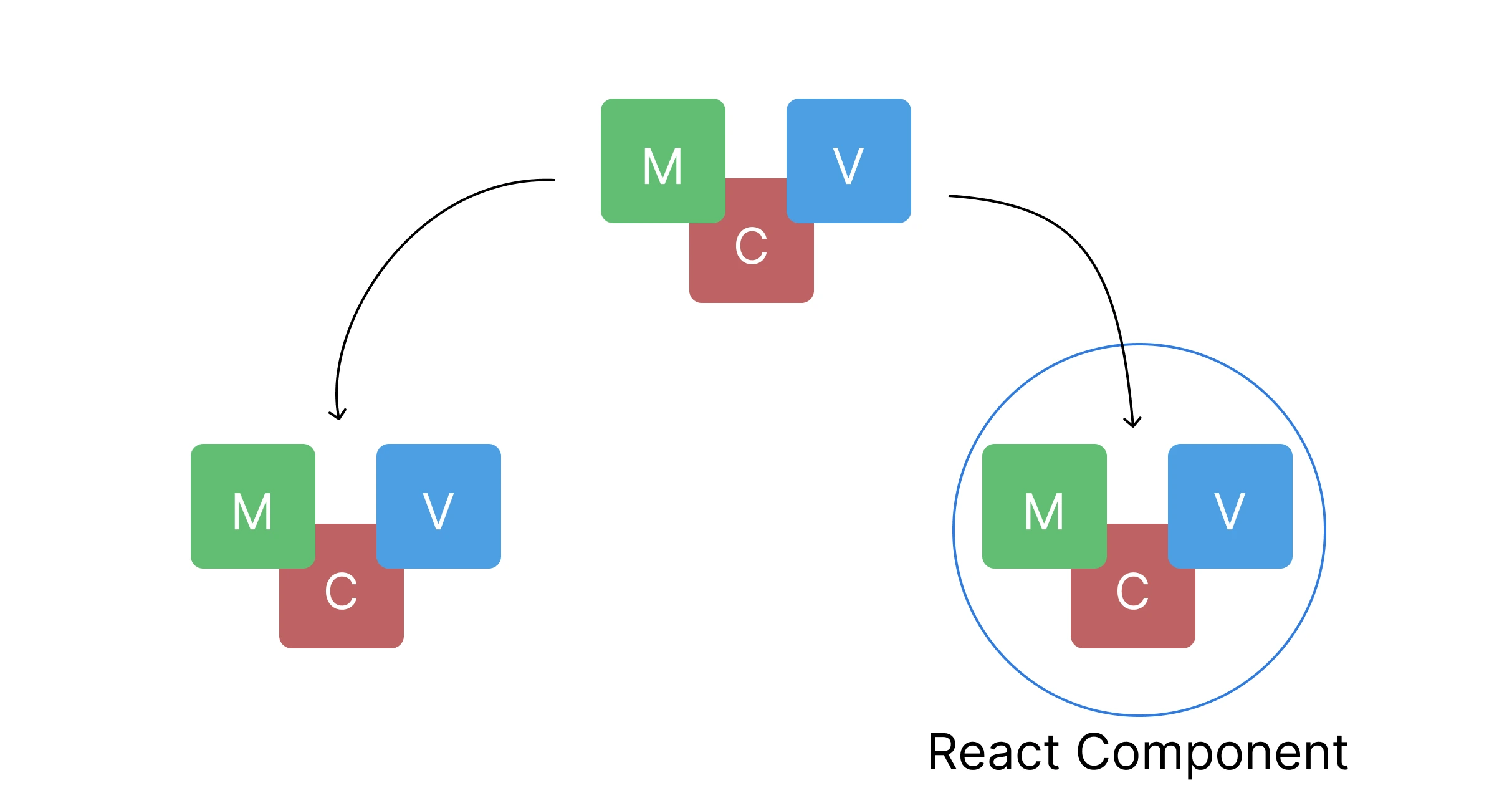
Hierarchical MVC means an architecture made up of multiple MVCs. For example, a React Page is composed of multiple Components. Take Naver as an example: it's made up of many widgets, such as one showing news articles, one showing the weather, and one showing ads, and you can see that each widget is built with the MVC pattern. In other words, you can tell that each component is managed as a separate domain with its own MVC architecture. That's Hierarchical MVC. Splitting things into modules seems like it would improve both maintainability and reusability.
MVC and Thin/Thick (Fat) Clients
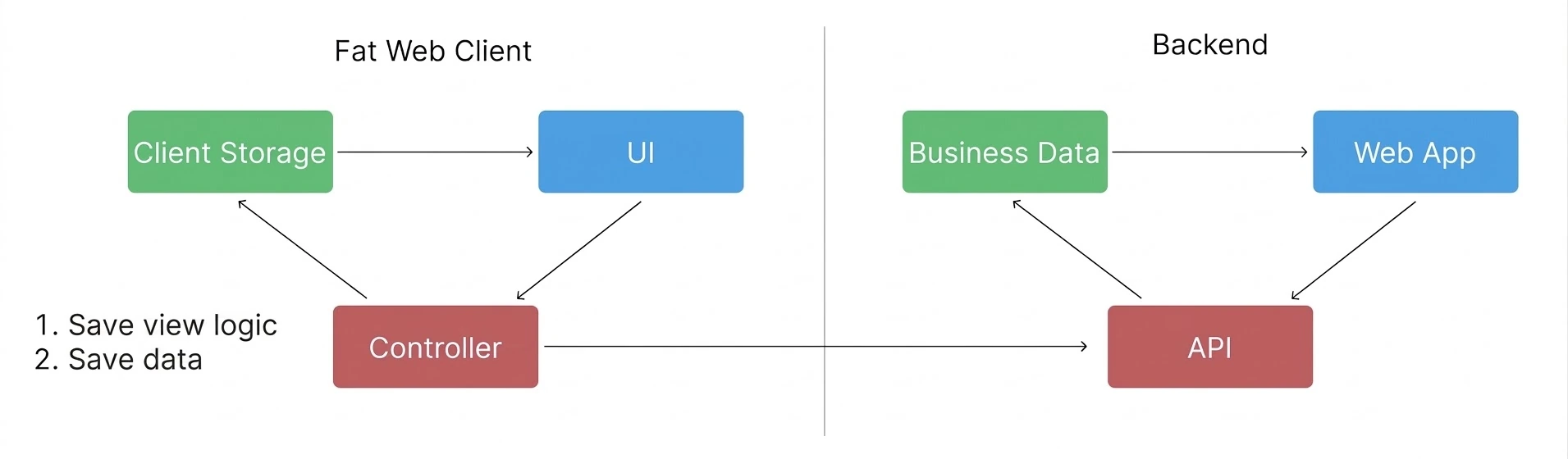
In MVC, web clients are divided into Thin Clients and Thick Clients depending on how much responsibility they take on.
Thin Client : The frontend handles only UI logic and interactions, and the backend handles all other logic. This is the approach used in traditional MPAs. When you press a button, a request goes to the server and the page reloads, right??
Thick Client : The frontend takes on more responsibility, which lightens the load on the server. Simply put, the client depends less on the server and has more features it can run independently. For example, pressing a button doesn't reload the page through the server every time; instead, the client can render just part of the page on its own. It handles state management and logic, and even stores backend data.
To sum up, the Thin Client of an MPA runs much lighter on the client side, so it can work fast even on low-end devices. And the backend takes on the role of the Model. On the other hand, the Fat Client of a modern SPA handles many more features on the client, so it's useful on high-end devices and puts less load on the server. And since it does its own state management, it uses its own MVC architecture.
MVC Summary
Since MVC is an old architecture that emerged in the early days of GUI programming, it's a good fit for building web apps that aren't complex. That's because if you use it to build a complex web app, the Controller can end up with too many responsibilities, and the coupling between the View and the Model makes testing harder and increases code complexity.
MVP Architecture
The MVP architecture is divided into Model-View-Presenter layers. MVP solves MVC's problem of coupling between the View and the Model. The biggest difference from MVC is that the View layer receives no direct updates from the Model layer. Starting with this architecture, the View has no coupling with the Model, which made the View easier to test.
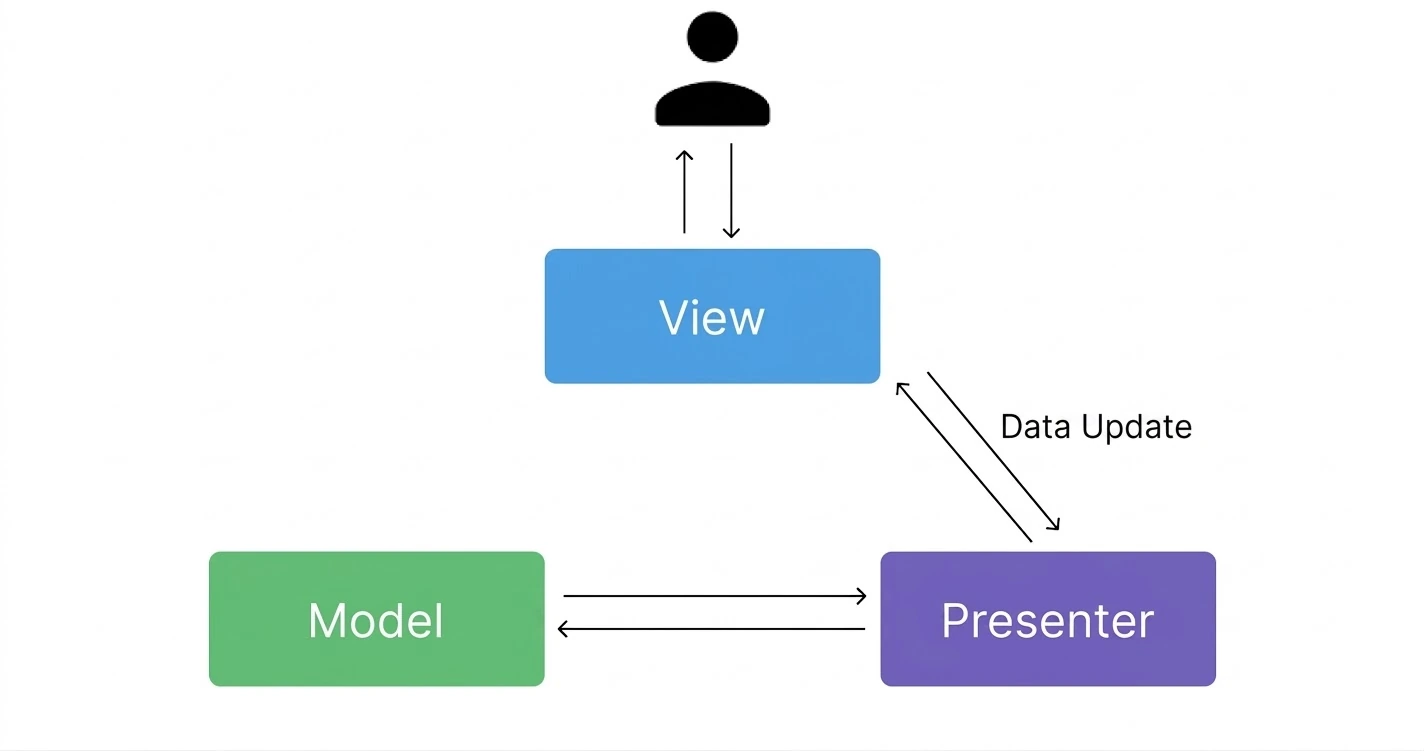
The MVP pattern comes in two flavors: Passive View and Supervising Controller.
MVP Architecture - Passive View
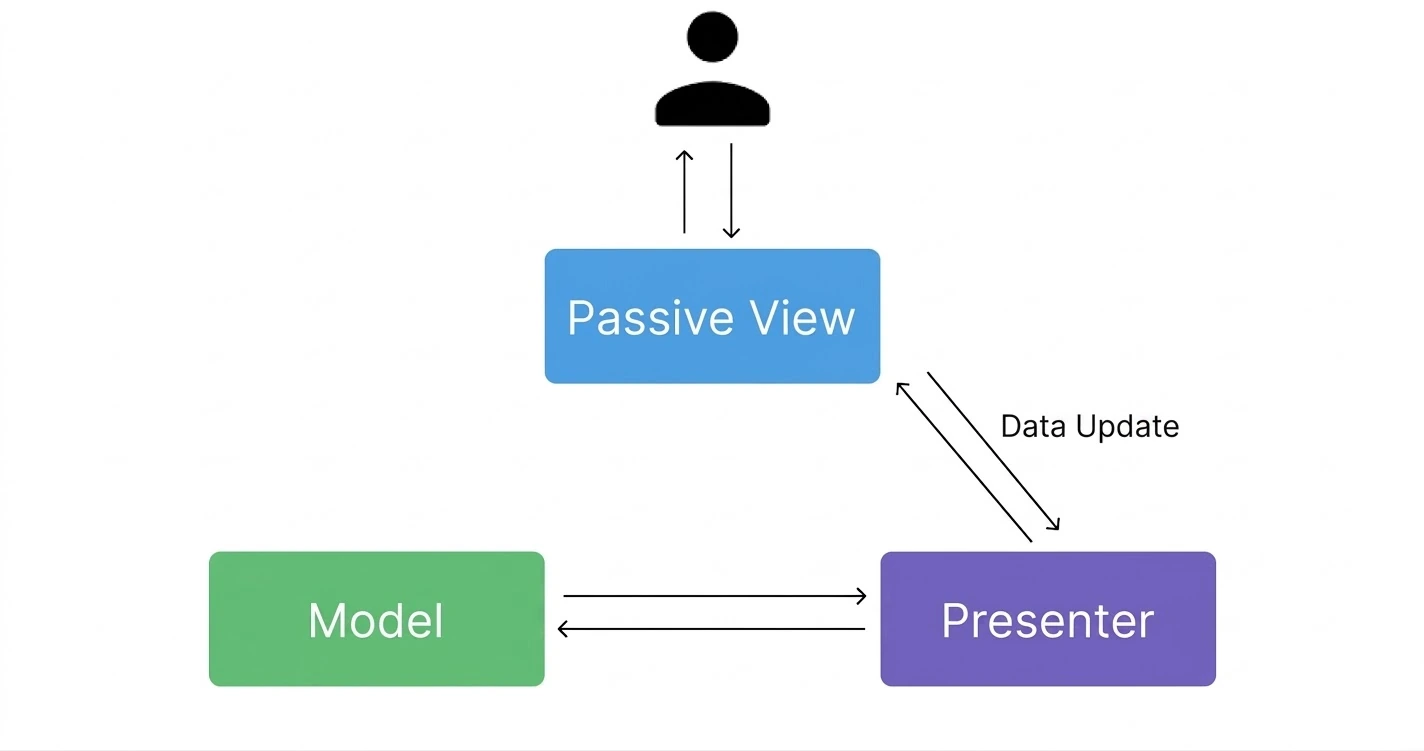
In Passive View, all logic except rendering the View runs in the Presenter. So the boundaries between layers are clear, and it's easy to test. However, even simple UI needs more code, and implementing interactions adds overhead.
MVP Architecture - Supervising Controller
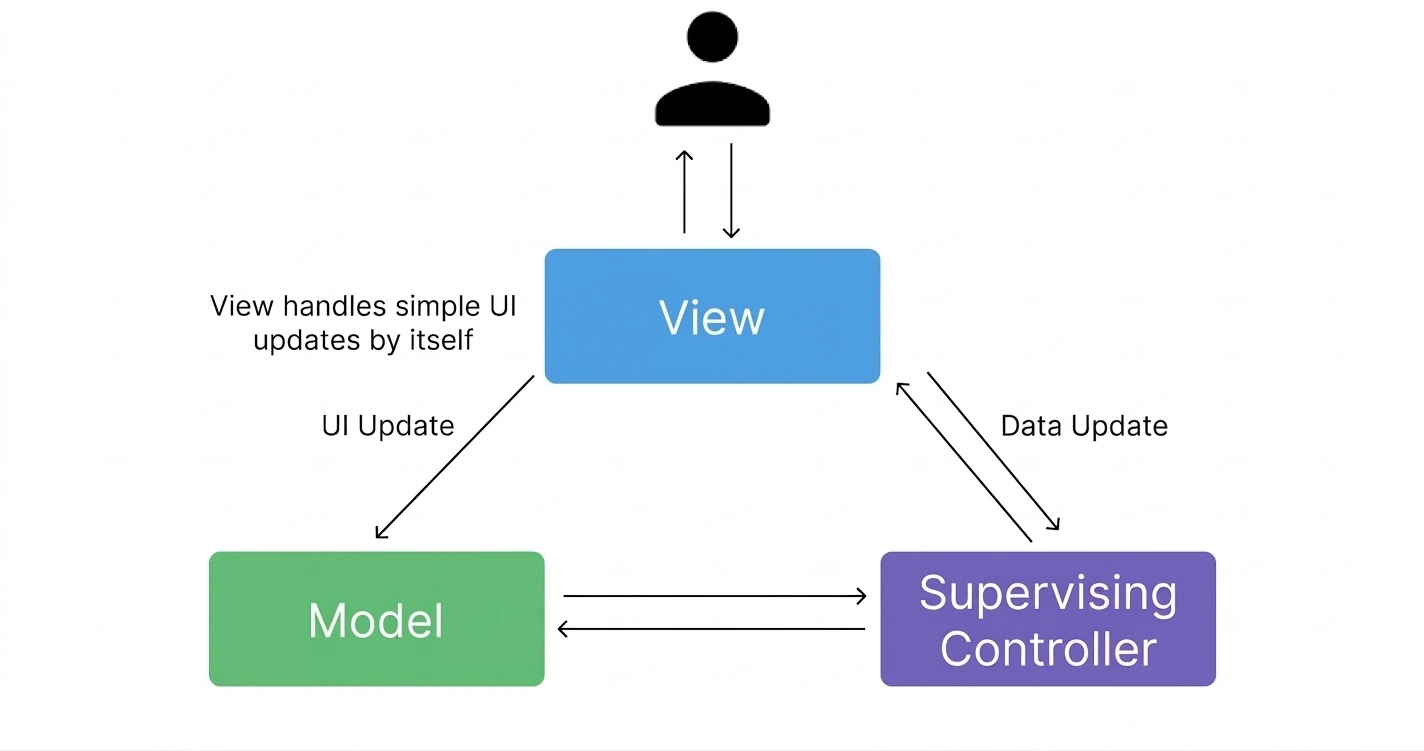
This works similarly to the MVC pattern. But in this MVP architecture, simple UI changes are handled by the View on its own, while complex logic is handled through the Supervising Controller. The important difference is that, unlike Passive View, the View can also hold some of the logic. Compared to Passive View, it has the following advantages
Pros
Since the View can handle some work directly, there's less delegation code and development can be faster.
Cons
Since the View holds more logic, it's harder to unit test and maintain.
MVP Architecture Summary
With MVP, the boundaries between layers become clear. So it's easy to test, too. However, as the Presenter Layer ends up holding too much logic, testing becomes hard. And when you need proper sync/async work like network communication, there's no place to separate that logic out, which makes things tricky.
MVVM Architecture
The MVVM architecture splits things into Model-View-ViewModel. It was created to separate concerns by dividing View Logic from Business Logic, making code more maintainable and easier to test. Business logic would be things like changing a user's name, creating a transaction, or removing an item from a shopping cart, while View logic would be things like opening and closing a modal, rendering a button in a Disabled state, or changing a download status. Simply put, if it actually changes core data, it's business logic; if it exists only to change the UI and doesn't actually change core data, you can think of it as view logic.
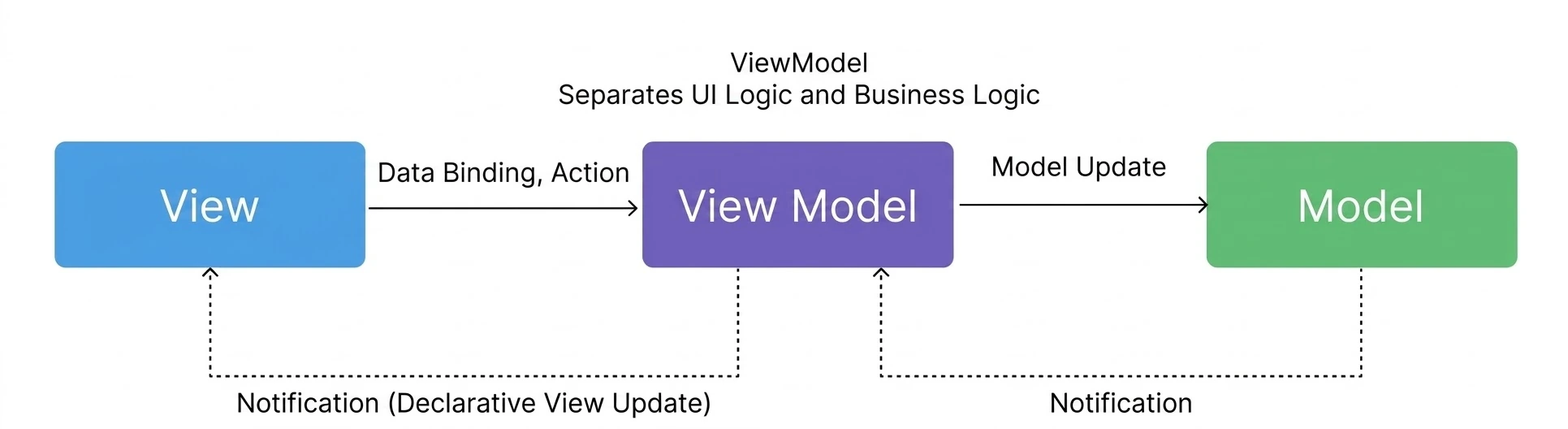
An example of how Vue applies MVVM (it doesn't match MVVM 100%, but Vue was inspired by MVVM.)
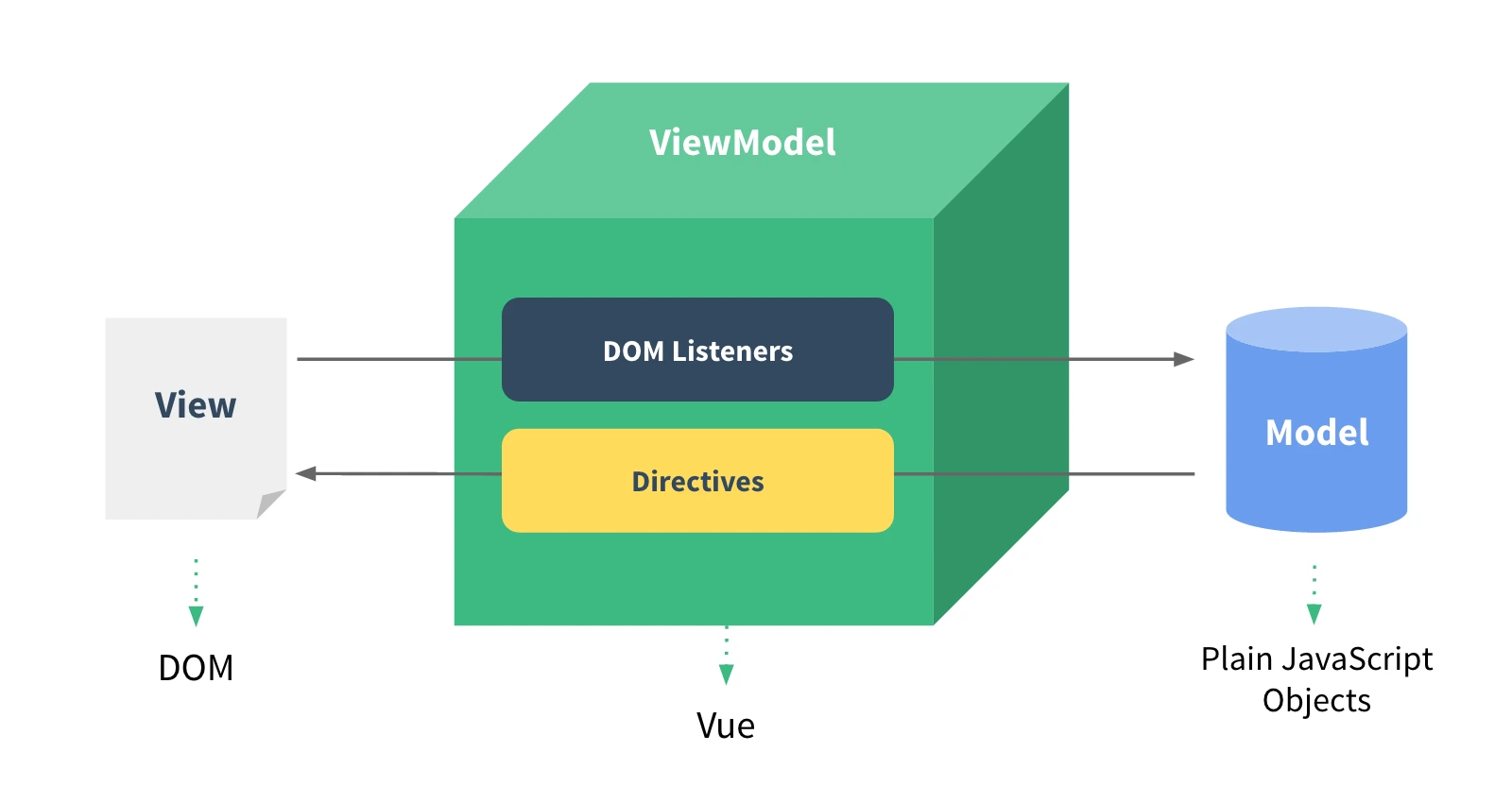
Vue synchronizes DOM input data with JavaScript data through two-way data binding. This synchronization approach is said to have been inspired by MVVM, and it reportedly doesn't match MVVM 100%.
Code Example: MVP vs. MVVM
Honestly, from the diagram above alone, it may be hard to spot how it differs from MVP. You can probably only tell that something like data binding was added. But that can be seen as the key point. Because in MVP, the Presenter has to know the View and the View and Presenter map 1:1, whereas in MVVM, the View and View Model map N:1. Shall we look at the difference in code?
// MVP, the Presenter has to know the View interfaceclass UserPresenter { constructor(view, model) { this.view = view; // References the View directly this.model = model; } async loadUsers() { this.view.showLoading(); // Direct call const users = await this.model.getUsers(); this.view.hideLoading(); // Direct call this.view.showUsers(users); // Direct call }}// MVVM, the ViewModel knows nothing about the Viewclass UserViewModel { constructor(model) { this.model = model; // Observable data this.isLoading = false; this.users = []; this.listeners = []; } // Automatically notifies on state change notify() { this.listeners.forEach(listener => listener()); } subscribe(listener) { this.listeners.push(listener); } async loadUsers() { this.isLoading = true; this.notify(); // View updates automatically this.users = await this.model.getUsers(); this.isLoading = false; this.notify(); // View updates automatically }}MVVM Architecture Summary
With the MVVM architecture, the UI (View), Business Logic (Model), and Presentation Logic (ViewModel) can be clearly separated, and testing got easier too. However, it can be hard to understand and develop with, and like MVP, it can be hard to organize the handling of code such as sync/async logic like API requests.
MVVM-C Architecture
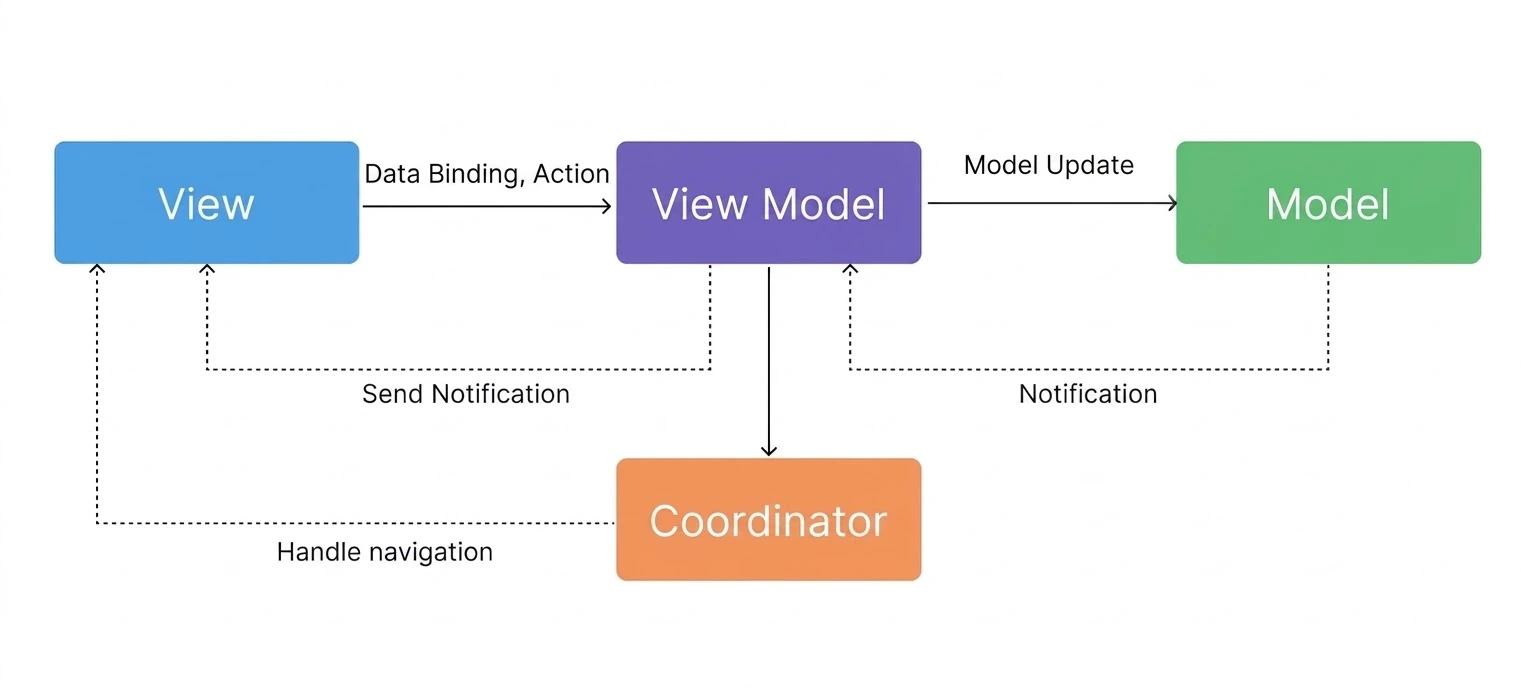
The MVVM-C architecture is MVVM with a Coordinator added. The Coordinator was added because it's hard to manage Screen Transitions or Navigation changes caused by URL changes with MVVM alone. The view is just UI, the Model is data, and the View Model does the binding without knowing which View it's dealing with, so it becomes unclear where to manage Navigation Logic.
VIPER Architecture
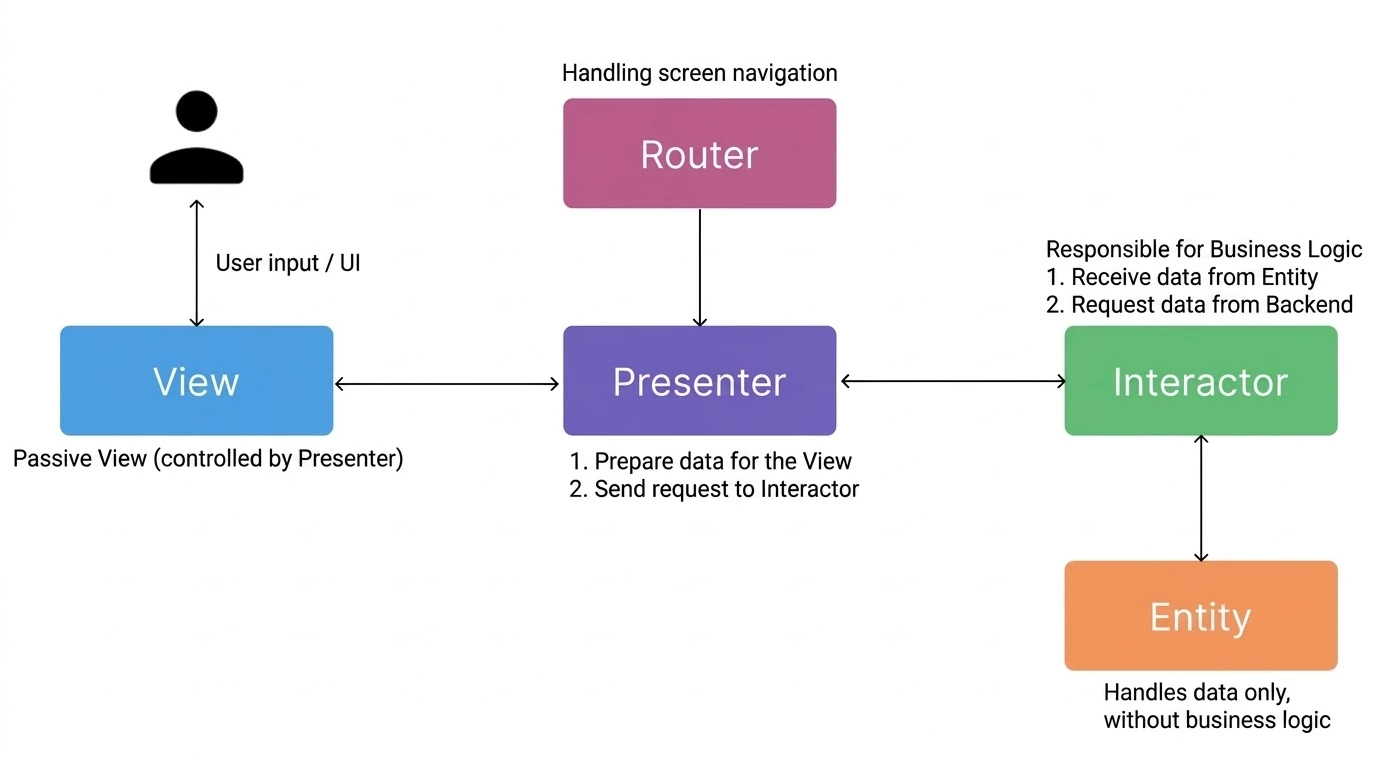
The VIPER architecture refers to the View-Interactor-Presenter-Entity-Router layers. It adds a Router to the MVP architecture and splits the Model into an Interactor and an Entity. Sometimes a backend Service is used instead of the Entity. This architecture solves the earlier problem of API data Fetching being hard to manage in an organized way. It also made it possible to separate Navigation handling out through the Router.
This architecture lets you separate concerns more thoroughly and implement large projects well for real-world use. However, with so much separation, the amount of code grows a lot. You end up with more boilerplate that you otherwise wouldn't need.
Hexagonal Architecture
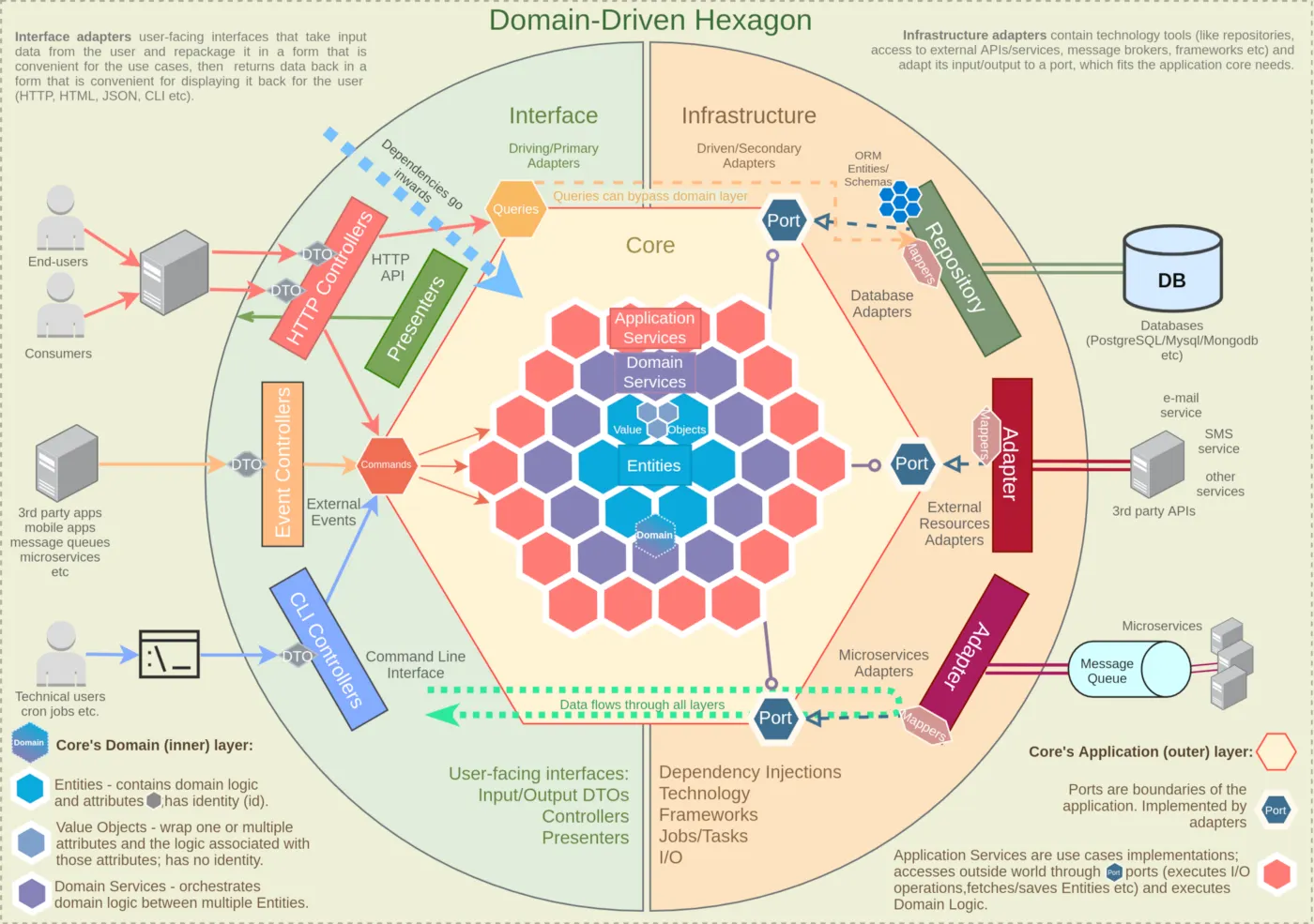
Hexagonal Architecture (or Ports & Adapters) is an architectural style that separates an application's core domain logic from the external environment. You can think of it as building around the core domain logic so the app can cope with a changing external environment. Given how much it values domain logic, it's also similar in philosophy to Clean Architecture.
Here, you can think of the Driving Side as the side that asks the application to do something, and the Driven Side as the side that receives commands from the application. For example, a request coming in through HTTP Controllers is Driving, and the DB, whose data changes through data manipulation requests, is the Driven area.
Clean Architecture
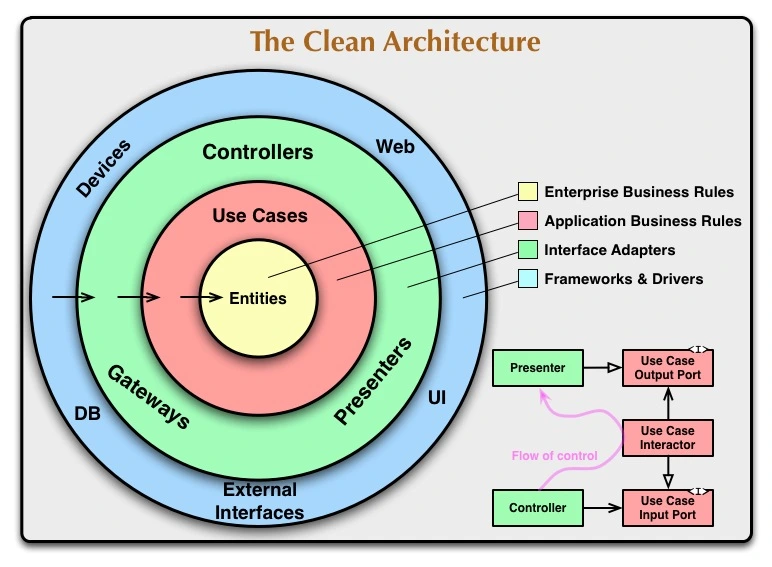
I think many of you have seen this architecture before. The diagram above isn't saying that this is what Clean Architecture is; it's just an example diagram. There may be more Layers or fewer. However, Layers should be divided based on appropriate criteria, you have to decide for yourself how to split things like core Layers and frequently changing Layers, and it's best to always separate the core value, the entity, from the outer layers. Basically, in the diagram above, you can think of the outer circles as depending on the inner circles. Put the other way around, the inner circles don't need to care what the outer circles are.(Dependency inversion) But what is appropriate separation, anyway..? And what should we consider business logic or domain logic..? I think I'll have to study it again with the book and write a post about Clean Architecture...!
Screaming Architecture
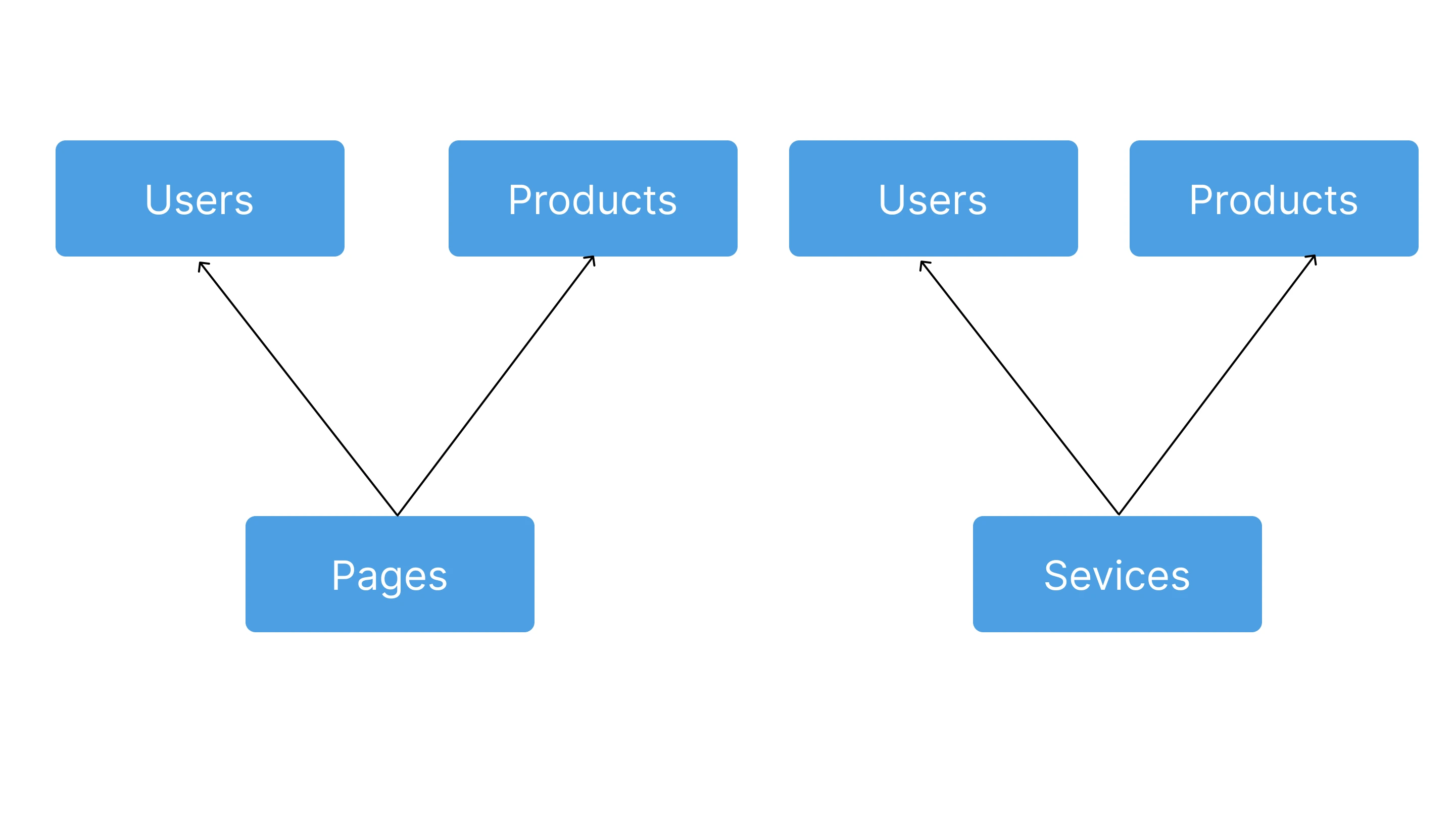
Screaming Architecture is an architecture introduced by Robert Martin. The core idea is that you should be able to tell what a service does just by looking at its top-level structure. Like the diagram above, you should be able to look at the architecture and immediately see that it's an application that sells some kind of product. It's like how, in a folder structure, you understand right away if there are folders like UserProfile and Cart under Pages, but you can't tell at a glance if there's a ReactComponents folder and an HTTP folder. (Of course, the point isn't to focus on the folder structure but on the architecture. Folder structures are always easy to change, but architecture isn't.)
Vertical Slices Architecture (feat. FSD)
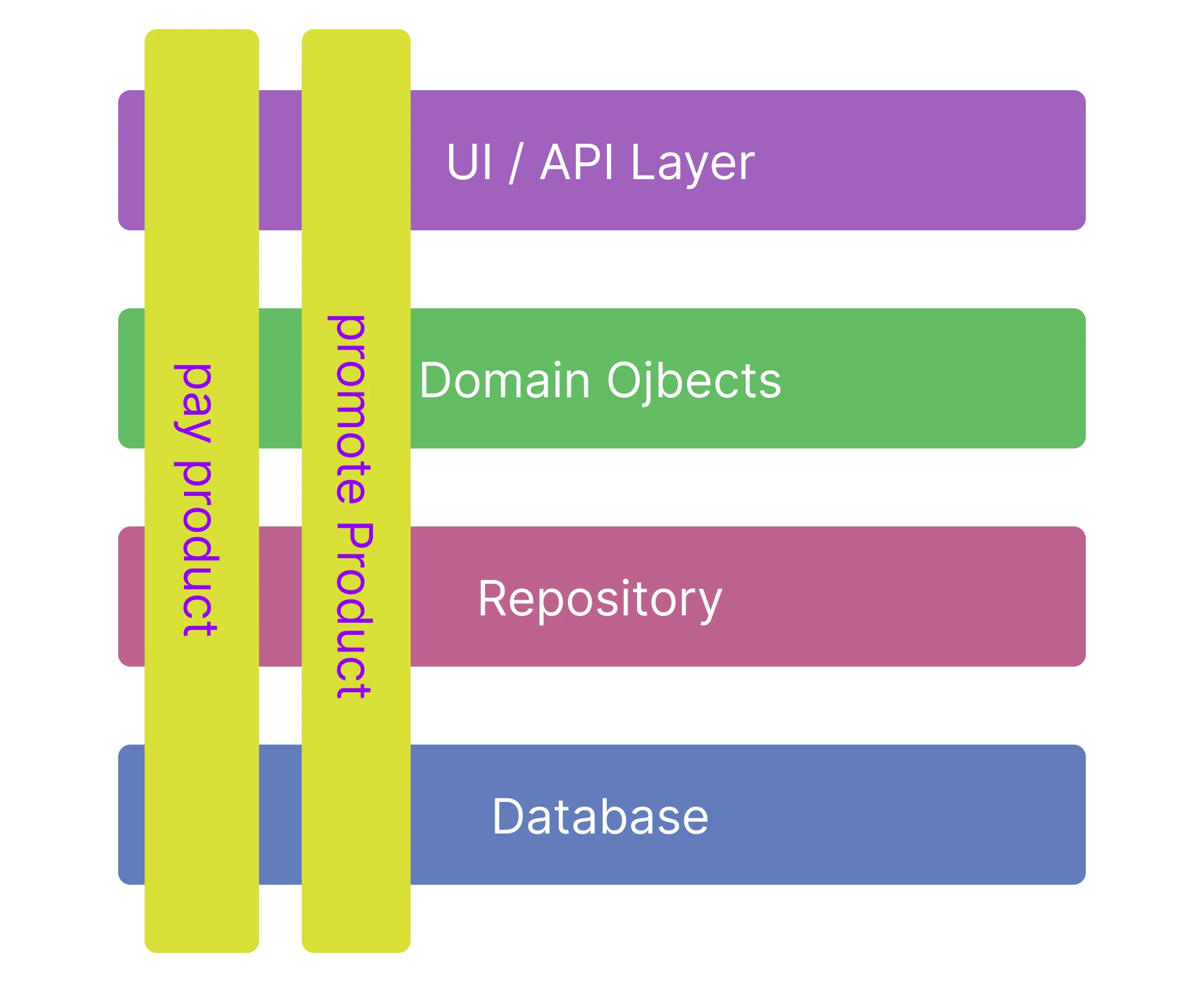
You can think of Vertical Slices as dividing cross-cutting concerns vertically. (Actually, I guess the reverse could also be considered true..?) For example, say you implemented features by separating out the cross-cutting concerns of logging, security, and transactions, but as the app grew too large, you split into teams so that each domain implements its own logging, security, and transactions. In that case, Vertical Slices let you divide things up with each domain's concerns as the core concern, and it'll also be easier for project managers to assign work to teams by domain and track it.
FSD Architecture
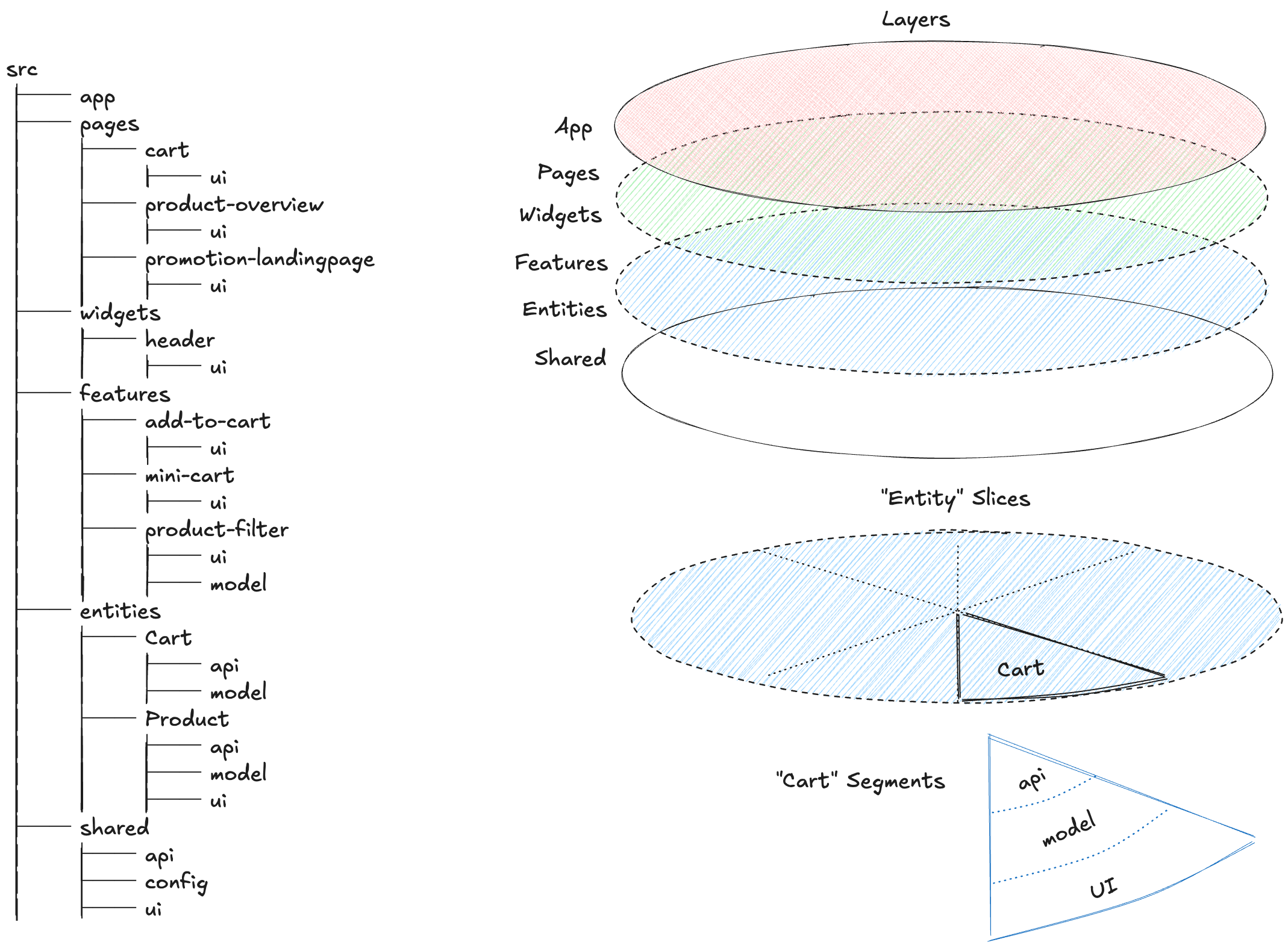
Among frontend architectures, there's one called the FSD architecture. It splits the app into multiple Layers, and within each Layer, it further separates things by concern, according to feature or domain. Since cross-cutting and vertical concerns get divided multiple times like this, reusability improves a lot, and so does maintainability. Of course, the architecture gets very complex, but if the person in charge of adopting the architecture can use diagrams to get it firmly into everyone's head so that everyone implements with the same architecture, I think it can help in building large systems.
Wrapping Up
I think it's best for architecture to be designed by a senior developer with as much experience as possible, who then shares with the team the intent behind the design.
The reason I think this is that junior developers are still building experience by creating structure at the code level, and the code they write doesn't affect the whole organization.(Of course, if there's no senior developer, you have to pull it off somehow!!) And since architecture affects the entire organization, I thought an experienced senior developer should keep proposing architectures suited to the software being built, based on their own experience.
I also think senior developers should make sure the model team members predict and picture in their heads matches the model that actually emerges during development. That's because, rather than simply memorizing an architecture, I believe it has to match what naturally forms in your head for overall understanding and usability to improve.
Am I pushing too much responsibility onto senior developers?? But I said this because I want to become that kind of senior developer. I think developers can lead from the front responsibly, and also gain the strength to move in a better direction together by sharing ideas with other developers. What's the point of building an architecture alone and being the only one who knows it? I believe that only by sharing your intentions and thoughts and growing with your team can both you and your team grow.
I think it'll be especially helpful for junior developers with little experience!! At my first job, there were only junior developers, so I had to figure out on my own what to study, and then study what I found. I always felt like I was wandering, so I want to grow together with junior developers so they can make better products and code without going through the same trial and error I did.