
Contents (7)
Processes and Threads
Before explaining processes and threads, we need to know about programs (Program). A program is "a file that can be executed to do some task," a bundle of instructions and static data that sits in secondary storage waiting to be executed.
1. Process
A process is an instance of a program that's running and has been loaded into memory (main memory, volatile memory, RAM). You can think of a process as the bundle of code and static data stored in secondary storage (hard disk, ROM) that has been allocated in memory (RAM) so it can run. Or, put another way, a process is a unit of work that gets system resources allocated by the operating system, and it means a program that has been executed.

A process can be divided into 4 parts: the Code, Data, Stack, and Heap areas.
Code: where the function code lives
Data: storage space for global variables and Static variables
Stack: the area holding the local variables, parameters, return addresses, and so on that are created when code runs (the area for running code)
Heap: the memory area that's dynamically allocated at runtime
2. Thread
As "a unit of flow executed within a process," it's the unit of execution that uses the resources allocated to the process. Each process is allocated at least 1 thread; the code, data, and heap areas are shared within the process, while each thread gets its own stack.

3. PCB and TCB
Processes and threads are controlled through the information in the PCB (Process Control Block) and the TCB (Thread Control Block). The PCB lives in the kernel area of memory, and the TCB is included in the PCB. Memory manages PCBs in the kernel area in the form of a table; a PCB holds the PC (Program Counter), which indicates the next code to run, the Process State, Pointer information, and so on, while a TCB holds information such as the parent PCB pointer, the Stack pointer, the thread state, and the PC.
Process PCB |
Thread TCB | ||||||||||||||||||||||||||||||
In the tables above, the important parts the CPU uses to save its execution state right up to the last moment are the Status, PC, and SP (pointer). You can think of the SP as the last address of the most recently executed code, the PC indicates which code to run next, and the Status is a value that tells you whether it's Blocked, running, and so on. So when an interrupt occurs during execution and the CPU has to handle another process, it stores the most recent execution information in the PCB and TCB, and uses it when it handles that process again.
3.1 PCB, TCB, and Context Switching
The PCB and TCB are used by the operating system to allocate processes to the CPU. And on the CPU side, the CPU uses the CPU and PCB information to bring back the info of the task it was working on and continue the work, and when an interrupt occurs, it saves it to the PCB or TCB again.
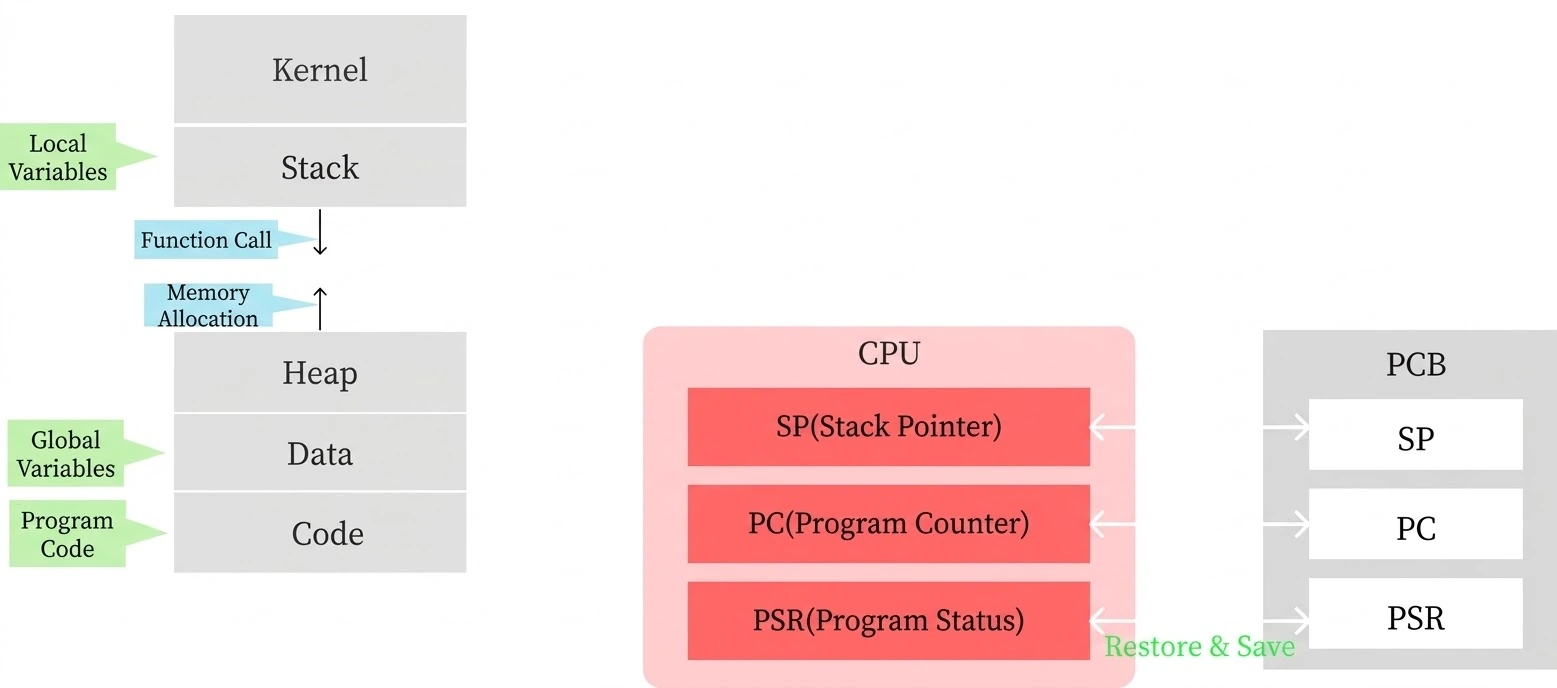
Context switching mainly happens because of the following interrupts.
Example | Description | |
|---|---|---|
Voluntary interrupts | System Call | When a user process requests an OS feature, e.g., read(), write() |
I/O requests | Yields the CPU to another process while waiting on disk or network I/O rather than the CPU | |
Wait calls like sleep(), wait() | When an explicit blocking call is made | |
Calling yield() | Explicitly yields the CPU to another thread (rarely used) | |
Involuntary interrupts | Timer interrupt (Time Slice Expiry) | A forced context switch when the time slice runs out |
Page Fault | The memory being accessed isn't currently in RAM, so the OS steps in | |
Exceptions (e.g., division by zero, illegal instructions) | An error occurs while the CPU is executing, and the OS steps in | |
External interrupts (hardware interrupts) | Devices like the disk, network, or keyboard notify the CPU | |
A higher-priority process shows up (Preemption) | A more important process appears, so the current process is suspended |
PCBs and TCBs are put into queues: the OS takes a PCB's information out of a queue, and the CPU does its processing based on that PCB's information. There are 2 of these queues: the Ready Queue and the Blocked Queue. A PCB only goes into the Blocked Queue when a voluntary context switch happens during execution; in the other cases, it goes into the Ready Queue or can end up in the terminated state.
Item | Ready Queue (ready list) | Blocked Queue (waiting list) |
|---|---|---|
State | Ready to run | Waiting for an event (I/O, etc.) |
CPU allocation | Can be allocated soon | Can't use the CPU |
Trigger | Runs when CPU time is allocated | Waits because of an I/O request, etc. |
Current state | Ready | Blocked |
Next state | Running | Ready (when the event completes) |
4. Multitasking, Multiprocessing, and Multithreading
We hear words like multiprocessing, multithreading, and multitasking a lot. So I'd like to sort out what each of them means.
Description | Characteristics | |
|---|---|---|
Multitasking | A technique that rapidly alternates between multiple tasks on a single CPU core so they look like they're running at the same time |
|
Multiprocessing | Multiple independent processes running at the same time |
|
Multithreading | Multiple threads working at the same time within a single process; the threads each have their own stack and share the other resources |
|
Wrapping Up
I might have brought in a few too many concepts at once...
For the CPU to do its work, it uses the information in the PCBs of processes and the TCBs of threads that live in memory, and then saves it again. These PCBs and TCBs are the information that lets work be paused and then picked back up, and with this mechanism, the OS allocates processes to the CPU in turn using time-sharing. That's what makes multitasking, multiprocessing, and multithreading possible.