
Contents (15)
HTTP(Hypertext Transfer Protocol)
I've been doing interviews lately, and I realized I'd forgotten a lot of the basics and never really had them organized properly. So I'm writing this with the mindset of learning everything again from scratch... T_T
HTTP is a protocol that lets you fetch resources. In particular, it's the foundation of data exchange on the web, and it's mainly a communication protocol between a server and a client. Usually a web browser (Chrome, Safari, etc.) is the client, and things like Tomcat and Nginx play the role of the server.
1. Resources
A web server manages and serves resources. It can deliver static files stored on the web server, but it can also deliver data dynamically depending on who made the request and when. For example, the nickname information you get back at login will be different for each user. And the web client receives this data through a web server suited to the purpose.
1.1 MIME (Media Type, Content-type)
MIME (Multipurpose Internet Mail Extensions) was designed to solve the problems that came up when messages were exchanged between different mail systems. More specifically, since each mail system encoded attachments in its own way, the goal was to make them compatible by specifying what kind of file it is and how it's encoded. HTTP communication also transfers many different types of files, so it needed a way to identify the data being sent through its MIME type.
So HTTP sends the format and compression method of the data through headers called Content-type (data format), Content-length (data size), and Content-Encoding (compression method), and the web client uses that information to handle the data appropriately.
When you receive an image over HTTP, the MIME information will come back in the following format.HTTP/1.1 200 OKContent-Type: image/jpegContent-Length: 245760Content-Encoding: gzipContent-Type: {main type}/{subtype}; charset={encoding, e.g. utf-8}Content-Length: file sizeContent-Encoding: {compression method, e.g. gzip1.2 URI (Uniform Resource Identifier)
Each web server resource has its own name, and the client needs to be able to point to that resource. The name of such a server resource is called a URI. A URI helps uniquely identify an information resource and specify its location.
For example, the URI of this blog's background video is https://api.yooncarrot.com/static/home/background2.mp4. (If you know the S3 server address and the resource location of the file in S3, you can also access it through the S3 server address.)
There are two kinds of URI: URL and URN.
URL(uniform resource locator)
It refers to the specific location of a single resource on a particular server. A URL consists of three parts.
Scheme: https:// (the protocol typically used)
Internet address of the server (domain): api.yooncarrot.com
Location of the resource on the server: /static/home/background2.mp4
URN(uniform resource name)
It acts as a unique name regardless of where the resource is located. Even if the resource is moved, the URN should keep working without any problems, and it can be accessed regardless of protocol. (It takes the form urn:namespace:name-within-namespace, e.g. urn:isbn:9780134092669) Book and paper information is usually stored this way. These days it's practically almost never used.
2. Transactions
An HTTP transaction consists of a request (client -> server) and a response (server -> client). This interaction is carried out through standardized HTTP messages.
Request
GET /static/home/background2.mp4 HTTP/1.1
Host: api.yooncarrot.comResponse
HTTP/1.1 200 OK
Content-type: video/mp4
Content-Length: 981314
A request includes the HTTP method, the address of the server to send it to, and the path, while a response includes the protocol version, the response status, MIME information, and so on. And displaying a web page usually takes several HTTP transactions. (Fetching the HTML document, fetching JS files, fetching images...)
2.1 HTTP Methods
When making a request, the client uses an HTTP method to tell the server what action it should take.
Method | Description |
GET | Send the specified resource to the client |
PUT | Store the data sent from the client to the server as a resource with the specified name |
DELETE | Delete the specified resource from the server |
POST | Send the client's data to a server gateway application |
HEAD | Send only the HTTP header part of the specified resource to the client |
OPTIONS | Tell the client which methods are available on the server |
2.2 Status Codes
Every HTTP response is sent with a status code and a reason phrase (a phrase like OK). The reason phrase is just for reference; the status itself is handled through the HTTP status code.
Status Code | Description |
200 | OK |
302 | The resource has been moved temporarily, so redirect |
404 | Resource doesn't exist |
3. Messages
HTTP messages are plain text rather than a binary format, so they're easy to read and write. HTTP requests and responses consist of a start line, headers, a blank line that separates them from the body, and the body.

Start line
For a request, it tells the server what to do; for a response, it tells the client what happened.
Headers
Headers are sent as key-value pairs separated by a colon (:). If you want to add a value, you just add one more line.
Body
The body comes after the blank line following the headers. HTTP messages can include binary data in the body.
4. TCP Connections
HTTP communication requires a TCP connection. In networking terms, HTTP is a layer above TCP.
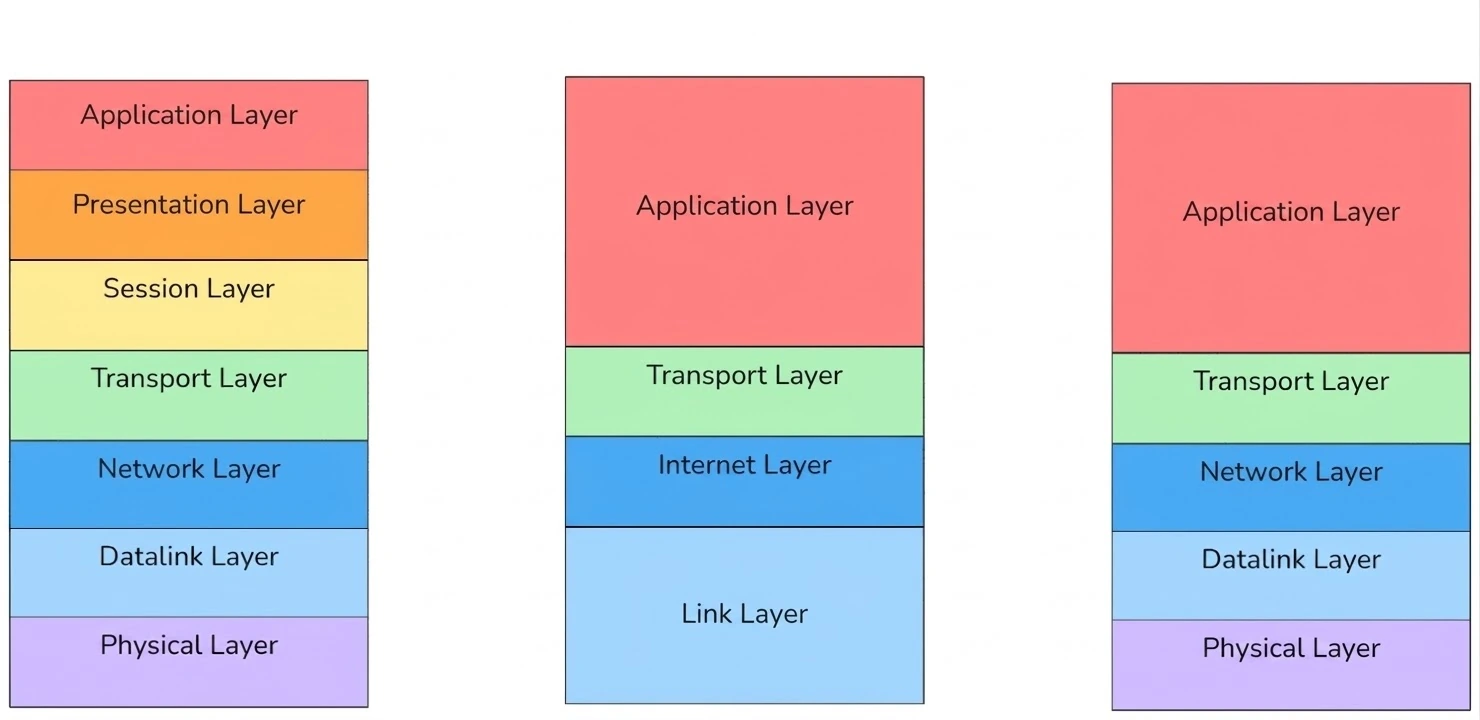
As you can see above, there are various network models. Among them, here's a table summarizing how HTTP gets transmitted, based on the recently updated 5-layer TCP/IP model.

And here's what that transmission process looks like as a diagram.

In more detail, if you send data through an application on your computer, it goes through the following steps in order.
The application data is created
The transport layer adds a TCP/UDP header (port) (a segment is created)
The network layer adds an IP header (a packet is created)
If it's an internal network, it checks the ARP table to see whether the MAC address for the destination IP exists, and if it doesn't, it updates the ARP table for the destination IP via ARP.
If it's an external network, it gets and uses the MAC address of the default gateway (next hop) from the ARP table
It adds an Ethernet header using the next hop's MAC address from the ARP table (a frame is created)
The frame is passed to the network card
The network card sends the data to the next hop's MAC address.
While the data is being forwarded, if there's a router whose ARP table contains the destination IP address, the data is finally delivered to that IP.
But in the process above, the client has to find the server's IP address, while what we usually type in is a domain name. So how do we figure out the IP from a domain name?? For example, to communicate over HTTPS on port 443 of yooncarrot.com, we need to know the IP address of yooncarrot.com to be able to reach that server. This works because the IP address corresponding to the domain name is fetched through DNS, and HTTPS communication then happens with that IP address.
5. HTTP Versions
HTTP has kept evolving through versions 0.9, 1.0, 1.1, 2.0, and 3.0. It's currently up to 3.0, and versions 1.1 and 2.0 are the most commonly used.
5.1 HTTP/0.9
HTTP/0.9 is the prototype of HTTP. It could only transfer HTML files, and GET was the only method.
5.2 HTTP/1.0
This was the first version to be widely used. Version numbers, headers, methods, and MIME were added, and it became possible to interact through web page forms.
Then, as the WWW expanded rapidly, many features were added, such as keep-alive connections, virtual hosting support, and proxy connection support.
Keep-alive made it possible to handle multiple requests and responses between the client and the server over a single TCP connection. This cut the cost of setting up a connection for every request, so things could be handled more efficiently. And to close the connection, you could include Connection: close in the header. (The phenomenon where one delayed response delays all the responses after it is called HOL blocking.)
5.3 HTTP/1.1
HTTP/1.1 focused on fixing structural flaws in HTTP's design, significant performance optimizations, and removing broken features, and it supports deploying more complex web applications.
It made keep-alive the default and added pipelining.
Pipelining is a feature that lets you send multiple requests sequentially over a single connection and receive the responses sequentially. Since the order of responses has to be guaranteed, one slow response can delay all the responses, and on top of that, pipelining is hard to implement and proxy servers didn't handle it properly, so it had a lot of problems and isn't used today.
5.4 HTTP/2.0
HTTP/2.0 turns the header and body of the data into data units called frames, converts them to binary instead of text, and sends them as streams. It also added features called multiplexing and Server Push.
For each request, HTTP/2.0 splits the header into one or two header frames and zero or more data frames, and sends them as a single stream.
Multiplexing is a feature that was created to solve HOL (Head of Line) blocking. Since data is sent in units of frames, when there are three requests, the headers don't have to be sent strictly in order, and the 2nd request's header frame can be sent ahead of the 3rd request's header, which improved the problem of responses being processed strictly in request order.
Of course, this was overcome at the application layer, but since frames were still exchanged over a TCP connection, it couldn't solve the HOL blocking that happens in TCP. For example, if a packet of some header is lost along the way, all the data that should come after it still has to wait until that lost packet arrives. It solved HOL blocking at the application layer, but not HOL blocking at the transport layer.
Server push is when the server sends resources to the client before the client makes an HTTP request. But since the client doesn't know about the resources the server sent and requests them again anyway, this feature was removed.
5.5 HTTP/3.0
HTTP/3.0 solved the HOL blocking problem at the transport layer. To do this, it doesn't rely on TCP and instead uses the QUIC protocol, which is based on UDP. So the streams that used to be based on TCP now use the UDP-based QUIC protocol, and each stream became independent. It now takes 0 seconds to establish a connection.
With the QUIC protocol, each request stream can now operate independently. To put it simply, if all requests used to have to go through a single pipe, with the QUIC protocol you can send requests using as many pipes as there are requests. In other words, packets can now be sent through multiple pipes instead of just one.
Because the QUIC protocol doesn't run on top of TCP and TLS but handles everything in an integrated way within QUIC, latency is very low. QUIC runs on UDP and has TLS 1.3 built in, so when reconnecting to a server it has connected to before, it can send data immediately with 0-RTT (0 Round Trip Time). In other words, it can send data right away without a handshake, which is why it can send data immediately with 0-RTT.