
Contents (14)
- [Blog Introduction] Frontend - Architecture
- 1. Micro Frontend Architecture and Setup
- 1.1 Apps and Packages
- 1.2 How to Share tsconfig
- 1.3 How to Share ESLint Config
- 2. Internal Package Compilation Strategies
- 2.1 Just-in-Time Packages
- 2.2 Compiled Packages
- 2.3 Publishable Packages
- 3. Folder Structure
- 3.1 Next.js (App Router)
- 3.2 design-system Package Folder Structure
- 3.3 editor Package Folder Structure
- References
[Blog Introduction] Frontend - Architecture
I tried setting up this blog many times, and I gave up more than a few times along the way. After a lot of trial and error, I concluded that a monorepo structure was the cleanest way to split up the project and also the most convenient to work with. When I tried to separate features with folder structure alone, the folders got way too fragmented, but splitting the packages into separate repos makes them a pain to manage and to apply to other apps. Especially since I wanted to include an editor, the amount of code grew and the domain and the code easily got tangled together. On the other hand, splitting things into modules within a single repo naturally separates the domain from the code, and I felt it had clear advantages in that it also gives you reusability and usability (developer experience).
1. Micro Frontend Architecture and Setup
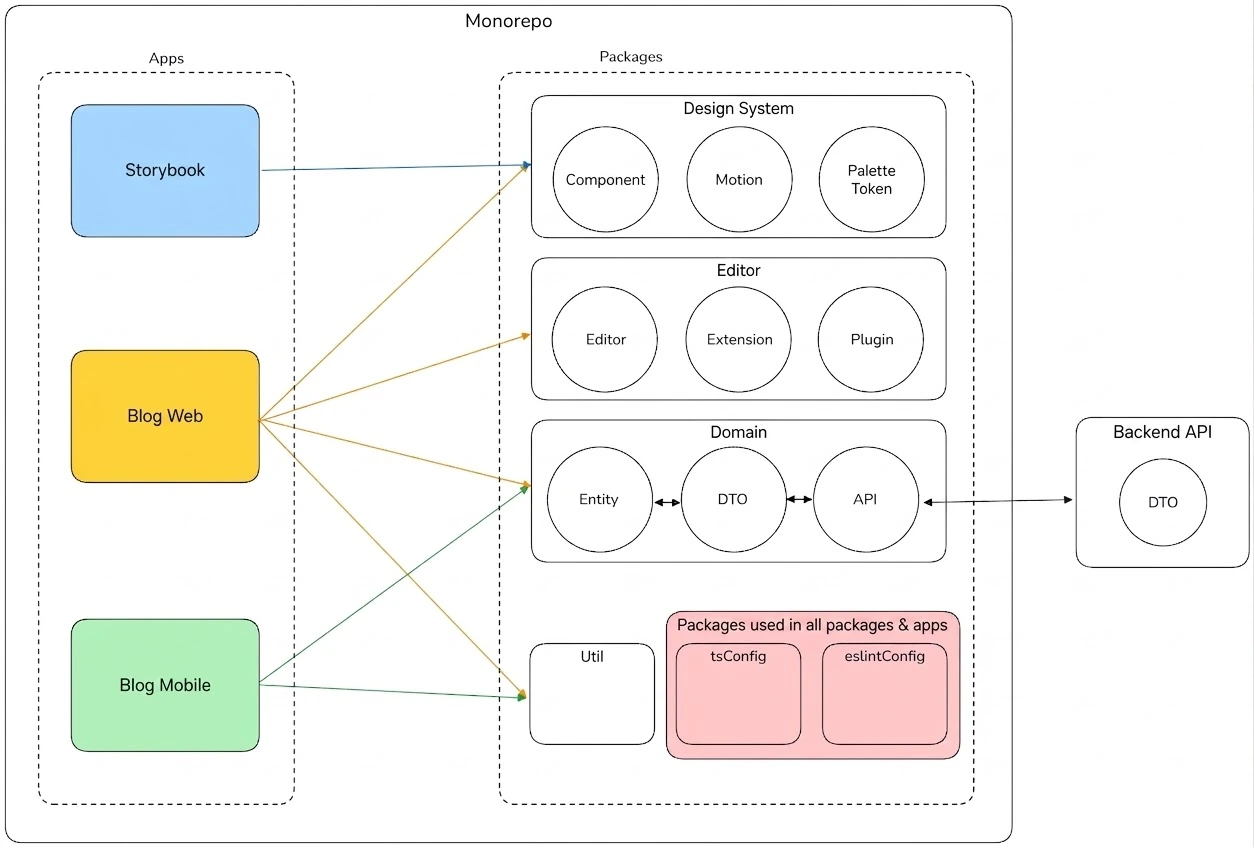
Here's the monorepo structure I used to build the blog.
Old folder structure (using tsconfig References)
The shared settings lived in eslint.base.js and tsconfig.base.json, and each app and package extended them. For optimization, I set up dependencies using the references property. But since I was configuring everything with the latest version (eslint v9.16), there wasn't much reference material out there, so parts of the setup ended up a bit of a mess.
├── apps/│ ├── storyBook/ # storybook│ ├── carrotBlogFront/ # Next.js app (main frontend)│ └── carrotMobileApp/ # React Native app ├── packages/│ ├── designSystem/ # Tailwind-based design system│ ├── editor/ # Editor│ ├── domain/ # Domain [Entity, FetchApi, Util]│ └── utils/ # Shared utils├── preinstall.js # preinstall script├── pnpm-workspace.yaml # pnpm defines workspaces in a separate file├── package.json ├── turbo.json # Build pipeline, task config├── eslint.config.js # root eslint├── tsconfig.json # root tsconfig├── eslint.config.base.js # Shared eslint└── tsconfig.base.json # Shared tsconfigCurrent folder structure (using Just-in-Time packages)
I moved the shared parts of the tsconfig and eslint settings into their own packages so they're more intuitive to find and manage.
On top of that, I had previously optimized tsconfig using the references field, but since I'm developing this on my own, the project is unlikely to become huge, so I switched to the just-in-time packages approach, which is better in terms of usability. (I removed references.)
When I first set up eslint, I was using the latest version and had to look up how to use it while applying it, so things got a bit messy. So I replaced a large part of it with the default config generated by turboRepo dlx.
├── apps/│ ├── storyBook/ # storybook│ ├── carrotBlogFront/ # Next.js app (main frontend)│ └── carrotMobileApp/ # React Native app ├── packages/│ ├── designSystem/ # Tailwind-based design system│ ├── editor/ # Editor│ ├── domain/ # Domain [Entity, FetchApi, Util]│ ├── utils/ # Shared utils│ ├── eslintConfig/ # eslint config│ └── tsConfig/ # TypeScript config├── preinstall.js # preinstall script├── pnpm-workspace.yaml # pnpm defines workspaces in a separate file├── package.json └── turbo.json # Build pipeline, task config// apps/*/package.json// pacckages/*/package.json{ "devDependencies": { "@yooncarrot/eslint-config": "workspace:*", "@yooncarrot/ts-config": "workspace:*", "eslint": "9.16.0" }}// packages/typescript-config/tsconfig.base.json{ "$schema": "https://json.schemastore.org/tsconfig", "compilerOptions": { "declaration": true, "declarationMap": true, "esModuleInterop": true, "isolatedModules": true, "composite": true, "lib": ["es2022", "DOM", "DOM.Iterable"], "module": "NodeNext", "moduleDetection": "force", "moduleResolution": "nodenext", "noUncheckedIndexedAccess": false, // So index access doesn't add undefined "resolveJsonModule": true, "skipLibCheck": true, "strict": true, "forceConsistentCasingInFileNames": true, "allowImportingTsExtensions": true, "emitDeclarationOnly": true, "target": "ES2022" }}// packages/exlint-config/base.jsimport js from "@eslint/js";import eslintConfigPrettier from "eslint-config-prettier";import turboPlugin from "eslint-plugin-turbo";import tseslint from "typescript-eslint";import onlyWarn from "eslint-plugin-only-warn";/** * A shared ESLint configuration for the repository. * * @type {import("eslint").Linter.Config[]} * */export const config = [ js.configs.recommended, eslintConfigPrettier, ...tseslint.configs.recommended, { plugins: { turbo: turboPlugin, }, rules: { "turbo/no-undeclared-env-vars": "off", "no-unused-vars": "off", "@typescript-eslint/no-unused-vars": [ // Don't error on unused variables prefixed with an underscore "error", { args: "all", argsIgnorePattern: "^_", caughtErrors: "all", caughtErrorsIgnorePattern: "^_", destructuredArrayIgnorePattern: "^_", varsIgnorePattern: "^_", ignoreRestSiblings: true, }, ], }, }, { plugins: { onlyWarn, }, }, { ignores: ["dist/**"], },];1.1 Apps and Packages
The blog project has three apps: Storybook, React Web, and React Native. The packages consist of four (Design System, Editor, Domain, and Utils) plus two for ts and ESLint configuration: tsConfig and eslintConfig.
App
React Web
React Native
Storybook
Package
DesignSystem
Editor
Domain
Utils
tsConfig
esLintConfig
The reason I split Domain out separately is to use APIs in a more systematic way. (I wasn't thinking of it as domain-driven design or anything like that.) The Domain package has three roles.
It defines the entities used on the frontend, such as Article and Category, and the DTOs received from the backend, then transforms the DTOs into entities so the app can use entities directly.
I also designed the API to be RESTful (around maturity level 2), and separated this from the app so that query parameters can be used more systematically when calling APIs like [Get, /articles]. That way, common query parameters can be managed consistently by creating objects like QueryStringFactory.
ex) [Get, /articles?q=blog&sort=+createdAt-likes&category=Typescript&page=0&size=9] This API searches for "blog", sorts the data by creation date ascending and likes descending, and only fetches items in the Typescript category. Since there are so many query strings like this, I thought it would be better if they could be managed in common across multiple APIs.Lastly, since I also need to build a mobile app with React Native, it makes the APIs reusable.
1.2 How to Share tsconfig
Let me walk you through the ways to share tsconfig between modules in a monorepo. The examples below are actually taken from examples using Nx. But since the setup is exactly the same with turboRepo, I just used the same examples. I've summarized the differences between each tsconfig sharing approach. I think it'll be a big help when you set up a monorepo.
Approach | Description | Type Inference Speed | Build Method | Type Files | Publishing |
|---|---|---|---|---|---|
Project Reference | TS tracks dependencies/build order between packages | 🟡 Medium (uses .tsbuildInfo) | tsc --build tsc --watch (real-time) | .d.ts .tsbuildinfo | ❌ |
Internal Package | Consumes .ts files as-is without building | 🟡 Medium | Uses the consumer's builder | .ts | ❌ |
Compiled Package | Builds the source code and outputs .js + .d.ts | 🟢 Fast | Uses a builder | .d.ts, .js | ✅ |
Publish Package | Package built for public distribution | 🟢 Fast | Uses a builder | .d.ts, .js | ✅ |
Relative Imports (the most intuitive approach)
└─ . ├─ apps │ └─ exampleApp │ ├─ src │ │ └─ index.ts │ └─ tsconfig.json ├─ packages │ └─ exampleLib │ ├─ src │ │ └─ index.ts │ └─ tsconfig.json └─ tsconfig.base.json// apps/exampleApp/src/index.tsimport { add } from '../../../packages/exampleLib/src/index.ts';console.log(add(1,3));// tsconfig.base.json{ "compilerOptions": { "target": "ES2020", "module": "NodeNext", "strict": true, "moduleResolution": "NodeNext", "baseUrl": ".", "rootDir": "." }}// apps/exampleApp/tsconfig.json{ "extends": "../../tsconfig.base.json", "compilerOptions": { "outDir": "../../dist", "declaration": true }, "include": ["src/**/*"]}// packages/exampleLib/tsconfig.json{ "extends": "../../tsconfig.base.json", "compilerOptions": { "outDir": "../../dist", "declaration": true }, "include": ["src/**/*"]}Dependency Resolution
This is the simplest way to connect packages, using relative paths.
However, if you change the codebase structure, you have to update every extends path one by one. This drawback can become more pronounced in a large workspace.
Modularity
It enables modularization by separating apps and libraries into their own folders. This improves maintainability and makes the workspace easy to navigate.
However, from TypeScript's perspective, the whole thing becomes one unified project, so there are no boundaries between packages during type checking.
Performance
From TypeScript's perspective, the whole thing becomes one unified project, which can cause problems if the workspace is large. Since type checking and compilation run across all modules, builds can slow down and editor responsiveness can degrade.
Converting Relative Imports to Path Aliases (improving readability)
Differences from Relative Imports
tsconfig.base.json
Add the paths field
Conclusion
Shorter import paths improve readability
└─ . ├─ apps │ └─ exampleApp │ ├─ src │ │ └─ index.ts │ └─ tsconfig.json ├─ packages │ └─ exampleLib │ ├─ src │ │ └─ index.ts │ └─ tsconfig.json └─ tsconfig.base.json// tsconfig.base.json{ "compilerOptions": { "target": "ES2020", "module": "NodeNext", "strict": true, "moduleResolution": "NodeNext", "baseUrl": ".", "rootDir": "." "paths": { "@text-package/exampleLib": ["packages/exampleLib/src/index.ts"] } }}// apps/exampleApp/src/index.tsimport { add } from '@test-package/exampleLib';console.log(add(1,3));Dependency Resolution
With path aliases, you no longer need relative paths, so even if the codebase structure changes, you only need to update paths in tsconfig.base.json.
Modularity and performance stay the same.
Using tsconfig References
Requirement: TypeScript v3.0 or later
Differences from Relative Import + Path Alias
root - package.json
Use tsc --build in scripts
tsconfig.base.json
Remove rootUrl
Set composite:true in compilerOptions => incremental becomes true and a .tsbuildinfo is generated on build
Add declaration-related settings
root - tsconfig.json
Add files
Add the references field
app - tsconfig.json
Remove the declaration and outDir fields
Add the references field
packages - tsconfig.json
Remove the declaration and outDir fields
Conclusion
TypeScript manages each module separately
Improved performance
Creates type dependencies (build dependencies are created, and TS works them out on its own)
└─ . ├─ apps │ └─ exampleApp │ ├─ src │ │ └─ index.ts │ └─ tsconfig.json ├─ packages │ └─ exampleLib │ ├─ src │ │ └─ index.ts │ └─ tsconfig.json ├─ tsconfig.json └─ tsconfig.base.json// apps/exampleApp/src/index.tsimport { add } from '@test-package/exampleLib';console.log(add(1,3));// tsconfig.base.json// The key is removing rootUrl.{ "compilerOptions": { "target": "ES2020", "module": "NodeNext", "strict": true, "moduleResolution": "NodeNext", "composite": true, "declaration": true, "declarationMap": true, "sourceMap": true, "baseUrl": ".", "paths": { "@text-package/exampleLib": ["packages/exampleLib/src/index.ts"] } }}// tsconfig.json{ "files": [], "references": [{ "path": "./packages/exampleLib" }, { "path": "./apps/exampleApp" }]}// apps/exampleApp/tsconfig.json{ "extends": "../../tsconfig.base.json", "compilerOptions": { "rootDir": "src", }, "references": [{ "path": "../../packages/exampleLib" }], "include": ["src/**/*"]}// packages/exampleLib/tsconfig.json{ "extends": "../../tsconfig.base.json", "compilerOptions": { "rootDir": "src", }, "include": ["src/**/*"]}// packages/exampleLib/package.json{ "name": "test-package", ... "scripts": { "dev": "tsx --tsconfig tsconfig.base.json apps/exampleApp/src/index.ts", "build": "tsc --build", "clean": "tsc --build --clean", "typecheck": "tsc --build --emitDeclarationOnly" }}Modularity
With project references, you can make each module independent. It enforces logical separation between components. This raises the level of isolation between packages, and type checking for dependencies is performed per package.
Performance
It uses incremental builds. Since only the changed packages are recompiled, there's no need to repeat a full build. TypeScript generates .tsbuildinfo files to track changes, which speeds up type checking and compilation. This is useful in large workspaces or CI pipelines. (For development convenience, use the --watch option for real-time updates.)
Reference + package manager
Requirement: Node.js v13.2.0 or later
In this approach, the app (consumer) directly references the package's ts files. So the responsibility for transpiling lies with the consumer. If the consumer can't compile TypeScript, it can't use the package.
Differences from Using tsconfig References
tsconfig.base.json
Remove baseUrl
Remove paths
app - package.json
Add the private field
Add the package to dependencies
app - tsconfig.json
Add the baseUrl field
package - package.json
Add the private field (can be used on its own)
Add the exports field
package - tsconfig.json
Add the composite field
Add the declaration field
Add main and type
Add the workspace
For pnpm, the pnpm-workspace.yaml file
For npm and yarn, add the workspaces field to root - package.json.
Conclusion
Apps and packages are connected through the package manager instead of TypeScript path aliases
Modules are packaged and managed separately
Stricter separation of environments
The app handles transpiling + bundling separately (building the app has to cover the packages too)
└─ . ├─ apps │ └─ exampleApp │ ├─ src │ │ └─ index.ts │ └─ tsconfig.json ├─ packages │ └─ exampleLib │ ├─ src │ │ └─ index.ts │ └─ tsconfig.json ├─ pnpm-workspace.yaml ├─ tsconfig.json └─ tsconfig.base.json// pnpm-workspace.yamlpackages: - 'apps/*' - 'packages/*'// apps/exampleApp/tsconfig.json{ "compilerOptions": { "target": "ES2020", "module": "NodeNext", "strict": true, "moduleResolution": "NodeNext", "composite": true, "declaration": true, "declarationMap": true, "sourceMap": true, }}// apps/exampleApp/tsconfig.json{ "extends": "../../tsconfig.base.json", "compilerOptions": { "outDir": "dist", "rootDir": "src", "baseUrl": ".", "tsBuildInfoFile": "dist/tsconfig.tsbuildinfo" }, "references": [{ "path": "../../packages/exampleLib" }], "include": ["src/**/*"]}// packages/exampleLib/tsconfig.json{ "extends": "../../tsconfig.base.json", "compilerOptions": { "baseUrl": ".", "rootDir": "src", "outDir": "dist", "tsBuildInfoFile": "dist/tsconfig.tsbuildinfo" }, "include": ["src/**/*"]}// packages/exampleLib/package.json{ "name": "@text-package/exampleLib", ... "type": "module", "exports": { ".": { "types": "./src/index.ts", "import": "./src/index.ts", "default": "./src/index.ts" }, "./package.json": "./package.json" }, "main": "./src/index.ts", "types": "./src/index.ts", "module": "./src/index.ts"}// apps/exampleApp/package.json{ "name": "@yooncarrot/exampleApp", ... "dependencies": { "@test-package/exampleLib": "workspace:*" // Optional with NPM, but required with pnpm. }}Dependency Resolution
By using the package manager's workspace, package resolution is delegated to the package manager, so it works independently of TypeScript.
Modularity
Each package's dependencies are clearly defined in package.json, which makes them intuitive and easy to understand. And because the files to export are specified explicitly, the package that imports those files takes on the responsibility of transpiling and bundling them, which makes the modularization much more definite.
Performance is the same as the previous References approach.
Using Reference + package manager + Pre-building (Compiled Packages)
Differences from the Reference + Package Manager approach
package - package.json
Change the exports paths to the build paths (src/index.ts => dist/index.d.js..)
Adjust the build scripts in package.json or exampleLib's package.json accordingly.
If you use nx or turboRepo, adjust the pipeline to fit that monorepo library.
Conclusion
Each module can own its bundling responsibility. (Because packages are built in advance and then provided)
Compiled Packages can be tedious, since types only update after you build. (May hurt development convenience)
In large projects, the pre-compile approach can actually be more convenient for development (less IDE type inference delay)
└─ . ├─ apps │ └─ exampleApp │ ├─ ... │ ├─ package.json │ └─ tsconfig.json ├─ package.json ├─ packages │ └─ exampleLib │ ├─ dist │ │ ├─ index.d.ts │ │ ├─ index.d.ts.map │ │ ├─ index.js │ │ ├─ index.js.map │ │ └─ tsconfig.tsbuildinfo │ ├─ package.json │ ├─ src │ │ └─ index.ts │ └─ tsconfig.json ├─ pnpm-workspace.yaml ├─ tsconfig.base.json └─ tsconfig.json// packages/exampleApp/package.json{ "name": "@test-package/exampleLib", "version": "0.0.0", // Added field "private": true, // Added field "type": "module", "exports": { ".": { "types": "./dist/index.d.ts", // Change all ./src/* => ./dist/* (built files) "import": "./dist/index.js", "default": "./dist/index.js" }, "./package.json": "./package.json" }, "main": "./dist/index.js", "types": "./dist/index.d.ts", "module": "./dist/index.js"}Dependency Resolution
By precompiling the dependency packages, the app bundler can use the prebuilt output. It also removes the need to compile package dependencies while bundling the application. When writing task pipelines, you can ensure the packages are precompiled, which makes the workflow more efficient.
Modularity
Modularity improves compared to the previous approach of directly referencing TypeScript source files. Once packages are precompiled and packaged, they can even be published outside the monorepo.
Performance
It can improve type-checking performance. Since type information is generated in advance through precompiled .d.ts files, these type information files can be used directly instead of processing TypeScript source files through project references.
Reference + package manager + package use path alias + (Just-in-TIme Packages)
Requirement: TypeScript 5.4 or later, Node.js 14.6 or later
Among a package's tsconfig options, compilerOptions.paths isn't applied to the consumer. That's because it works on the assumption that the code will be transpiled by the app's TypeScript.
So using path aliases in a package causes problems, but starting with TypeScript 5.0, you can solve this with the subPath feature added in Node.js 14.6.
In a monorepo, a Just-in-Time package is one where the app directly references the package's ts files. In other words, it doesn't reference type definition files (.d.ts) or .tsbuildInfo files. The advantage is that changes are reflected in real time without having to keep building.
└─ . ├─ apps │ └─ exampleApp │ ├─ ... │ ├─ package.json │ └─ tsconfig.json ├─ package.json ├─ packages │ └─ exampleLib │ ├─ package.json │ ├─ src │ │ ├─ add.ts │ │ ├─ sub.ts │ │ └─ index.ts │ └─ tsconfig.json ├─ pnpm-workspace.yaml ├─ tsconfig.base.json └─ tsconfig.json// packages/exampleLib/package.json{ "name": "@test-package/exampleLib", "version": "0.0.0", // Added field "type": "module", "imports": { // Added field "#*": "./src/*" // For using path aliases inside a package. (@ not allowed in the node setup) }, "exports": { // Added field ".": "./src/index.ts", "./add": "./src/add.ts", "./sub": "./src/sub.ts", }, ...}// packages/exampleLib/tsconfig.json{ "extends": ["../../tsconfig.base.json"], "compilerOptions": { "baseUrl": ".", "paths": { "#*": ["./src/*"] // For path aliases inside a package, @ is not allowed in Just-in-Time packages. } }, "include": ["src/**/*"] ...}Dependency Resolution
Even package modules can use path aliases and still have their types referenced. (The dependency problem caused by path aliases is solved.)
Performance
Performance isn't as good as using the packages in the app as compiled packages. But unless it's a large-scale project where showing types in the IDE takes a lot of resources, the developer experience can actually be better.
1.3 How to Share ESLint Config
ESLint configuration is much easier to manage than tsConfig configuration, because it doesn't have much to do with compiling or bundling. I simply created the shared eslint config in the eslintConfig package and imported it in the apps and packages.
// eslint.config.js of the Next.js appimport {nextJsConfig} from "@yooncarrot/eslintConfig/next";/** @type {import("eslint").Linter.Config} */export default nextJsConfig;// base.js of the esLintPackage packageexport const config = [ js.configs.recommended, eslintConfigPrettier, ...tseslint.configs.recommended, { plugins: { turbo: turboPlugin, }, rules: { "turbo/no-undeclared-env-vars": "off", "no-unused-vars": "off", "@typescript-eslint/no-unused-vars": [ "error", { args: "all", argsIgnorePattern: "^_", caughtErrors: "all", caughtErrorsIgnorePattern: "^_", destructuredArrayIgnorePattern: "^_", varsIgnorePattern: "^_", ignoreRestSiblings: true, }, ], }, }, { plugins: { onlyWarn, }, }, { ignores: ["dist/**"], },];// nextjs.eslint.js of the esLintConfig packageexport const nextJsConfig = [ ...baseConfig, js.configs.recommended, eslintConfigPrettier, ...tseslint.configs.recommended, { ...pluginReact.configs.flat.recommended, languageOptions: { ...pluginReact.configs.flat.recommended.languageOptions, globals: { ...globals.serviceworker, }, }, }, { plugins: { "@next/next": pluginNext, }, rules: { ...pluginNext.configs.recommended.rules, ...pluginNext.configs["core-web-vitals"].rules, // Allow custom fonts "@next/next/no-page-custom-font": "off", }, }, { plugins: { "react-hooks": pluginReactHooks, }, settings: {react: {version: "detect"}}, rules: { ...pluginReactHooks.configs.recommended.rules, // React scope no longer necessary with new JSX transform. "react/react-in-jsx-scope": "off", }, },];2. Internal Package Compilation Strategies
Turborepo broadly divides the compilation strategies for internal packages into three: Just-in-Time Packages, which aren't compiled; Compiled Packages, which are compiled with ts; and Publishable Packages, which are published to NPM.
2.1 Just-in-Time Packages
Just-in-Time packages need only minimal configuration. That's because the package isn't built separately; it's built together by the app's compiler and bundler. In other words, the compile and bundling settings are affected by the app's configuration. And even without compiling separately, types are inferred right away by reading the ts files.
Pros
Since TypeScript is exported and used as-is, the app references the package's ts files directly. So when you modify a package file, the changes are reflected immediately and types are inferred.
Since the app references the package directly, no separate build script or configuration is needed.
Cons/Limitations
Because it references ts files directly, the consumer (usually the app) must be able to understand ts and build it. If the app can only use js, you need to switch to the compiled packages approach.
Packages can't use path aliases in tsconfig. That's because TypeScript assumes the code will be transpiled within the package where it was written, so it can't recognize path aliases separately. So if you want to use path aliases, you need to use Node.js's subPath feature.
The downside is that Turborepo can't cache the package's build output, because the package isn't built separately. So whenever a package changes, the app has to be rebuilt too.
Since packages are used as raw ts, if they have type errors, the app may end up having to deal with type errors it shouldn't need to know about.
2.2 Compiled Packages
A compiled package is a package whose ts files are compiled into js and d.ts files. Usually the compiled output goes into the /dist folder, which is then set as the entry point. Because it's compiled, you can take advantage of Turborepo's build caching. As a result, both apps and packages can build faster.
Pros
You can take advantage of Turborepo's build caching.
Cons/Limitations
Usually you only compile with tsc, because the app's bundler is used. But if a package occasionally uses static files, a separate bundling step may be needed.
It needs more configuration than Just-in-Time packages. For example, if a package needs polyfills, you have to add the sideEffects property to package.json.
2.3 Publishable Packages
A publishable package is one that's published to the NPM registry and used from there. So it needs to be buildable with its own builder, which means the responsibility for compiling and bundling lies with the package. It's the most robust way to build a package. The app downloads the package from the npm registry and uses it.
3. Folder Structure
For the folder structure, I went with the commonly used structure (Layered Architecture). I considered FSD architecture since it seemed like it would suit a Next.js app too, but I was already taking on too many new things, so I neatly shelved it. I've laid out the folder structures of some of the apps and packages.
3.1 Next.js (App Router)
└─ blog ├─ src │ ├─ app │ │ ... │ │ ├─ layout.ts │ │ ├─ page.ts │ │ ├─ action.ts │ │ ├─ error.ts │ │ ├─ loading.ts │ │ ├─ robots.ts │ │ └─ sitemap.ts │ ├─ components │ │ ├─ client │ │ └─ server │ └─ provider ├─ after_build.js ├─ eslint.config.js ├─ tsconfig.json ├─ postcss.config.js ├─ next.config.ts └─ package.json3.2 design-system Package Folder Structure
└─ design-system ├─ src │ ├─ globals.css │ ├─ palette.css │ ├─ components │ │ ... │ │ ├─ Backdrop │ │ └─ BentoCard │ └─ motion ├─ eslint.config.js ├─ tsconfig.json ├─ postcss.config.js ├─ vite.config.ts └─ package.json3.3 editor Package Folder Structure
└─ editor ├─ src │ ├─ extensions │ ├─ hooks │ ├─ plugins │ └─ utils ├─ eslint.config.js ├─ tsconfig.json ├─ vite.config.ts └─ package.jsonReferences
https://turbo.build/blog/you-might-not-need-typescript-project-references